Nimbalyst 0.81.7: review agent CSV edits before handing off the file
Keep CSV data in the project, give an agent a bounded change, then review the diff and delivery format. An official-source guide to 0.81.7, metadata and costs, not a hands-on test.
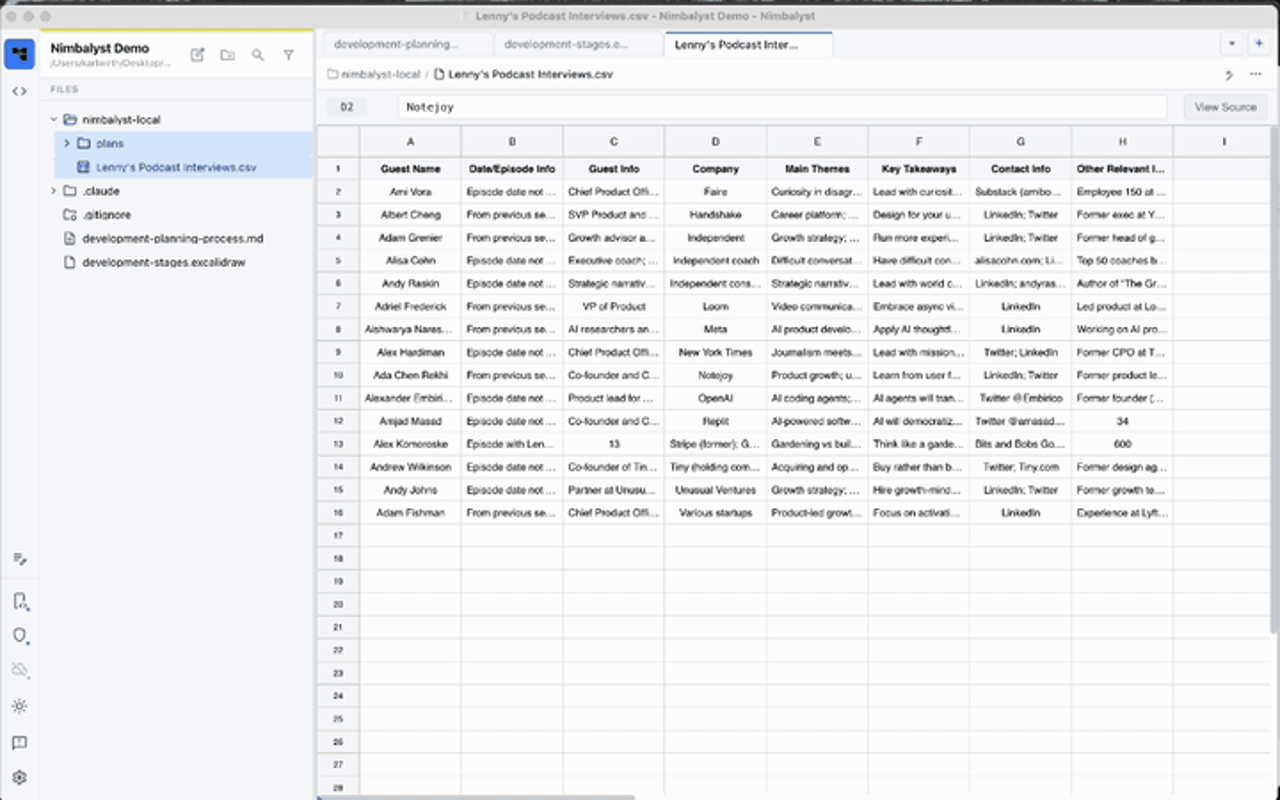
A rewritten CSV is not yet a deliverable
You have a project export and want to trim a name column or standardize dates. An agent can rewrite the file in bulk, but “done” is not verification. Nimbalyst brings project files, a spreadsheet view and agent review into one workspace, particularly for people already using Claude Code or Codex.[1][2]
This guide draws on official releases, documentation, README and licensing checked on 2026-10-19. We did not install or test the app. The steps below are a proposed workflow, not a completed data-cleaning experiment.
Static frame from the official CSV.gif, illustrating the opening inspection step. Some long cells are clipped. It shows neither a red/green diff nor a successful save or identifiable version; it is not a screenshot of new 0.81.7 controls.
Keep the original and change one rule at a time
Start with a CSV/TSV you own, an understanding of its columns and suitable model access. Preserve the original. Local project files do not automatically make requests to your chosen agent offline; check organizational policy before involving sensitive data.
- Open the CSV or TSV from the file tree. Inspect headers, key records, blanks and original date notation; use View Source when you need the underlying text.[2]
- Give a checkable instruction: “Trim leading and trailing whitespace only in customer_name; preserve blanks and leave other columns unchanged.” That is easier to review than “clean this up.”
- Wait for the agent changes to reach review. The CSV documentation says edits appear as a red/green diff and the grid stays read-only until you accept or reject, preventing manual edits from mixing into that review.[2]
- Check the intended column and unintended changes before accepting or rejecting. Ambiguous dates, leading zeros in postal codes and identifier case still need business rules. A visible diff does not establish semantic correctness.
- Try the result in its real downstream application and compare record counts, column counts and key values with the original. This is editorial advice, not a test we ran or a reported success rate.
The output should be a reviewed copy ready for downstream validation, not a completion message. One clean review is not a reason to stop reviewing later batches.
What 0.81.7 adds
The stable 0.81.7 release dated 2026-10-16 lists conditional formatting, data validation, wrapping, freezing, a status bar, formula autocomplete with click-to-insert references, named ranges, spreadsheet shortcuts, paste from other spreadsheet apps and undo for every edit. Agents gain A1-range tools, including for files that are not open.[1]
This extends an existing product; it is not the first CSV editor release. A1 tools do not guarantee an agent will touch only the intended range. Current docs also cover cell/row/column editing, sorting, filtering, reference formulas and source view. A calculation-first Calc Sheet is a separate document type, not an inherent property of CSV.[2]
Metadata is part of the handoff
CSV cannot fully represent formatting, column types, filters or frozen panes. Depending on project settings, Nimbalyst puts that metadata in an inline CSV comment or a separate . sidecar; values and formulas remain in the CSV/TSV.[2]
Before delivery, ask whether the receiver accepts comments, whether a sidecar must accompany the CSV, and whether formulas become formulas or text. Validate with the actual importer. A correct-looking grid is not evidence of universal lossless compatibility. Keep the original and distinguish an editing file from its delivery copy.
Choose it against the task, not a feature count
A tested script with stable inputs may remain the simpler option. Nimbalyst fits when data sits alongside code and you want to inspect agent file changes visually. Its own positioning describes a complement to Excel or Google Sheets, not a full replacement.[3]
We did not benchmark those tools, maximum row counts or formula compatibility. The reason to explore this is project-level inspection and review, not a claim of greater capacity, speed or automatic correctness.
Costs, platform and limits
The individual app is free and the repository uses MIT. Model access still needs your subscription, API key or another supported access method; free software does not mean free AI. Team Wiki is a separate offering.[4][5]
The README lists Apple silicon and Intel downloads for macOS 12+. The desktop uses TypeScript/Electron, not native Swift. It says anonymous usage analytics can be disabled under Settings > Advanced > Analytics. The repository's MIT license does not establish the license of the separate collaboration sync service.[5][6]
This suits developers or data organizers already using coding agents and willing to review changes. It does not suit treating AI output as final data or working before a sensitive-data policy has been settled.
Sources and next step
Checked on 2026-10-19. Current docs may move ahead of versioned release notes; the image illustrates only its visible step.
- 0.81.7 release
- CSV documentation
- Spreadsheet features and positioning
- Current pricing
- Official README
- MIT license
Discover Nimbalyst on OpenNavo, then use the official website to choose your Mac download. Validate one small change on a non-sensitive copy before adopting the workflow.