MacPacker 1.1: recover one file from a nested archive before editing
Separate inspection, extraction and editing: browse a nested archive, take only the files you need, and preserve the original before trying ZIP or newly supported 7z edits.
A downloaded build contains another archive, and you need one configuration file or report. Unpacking every layer leaves you with files you did not need. MacPacker lets you inspect the contents first, choose what to extract, and decide separately whether the archive needs editing.[2][3]
This guide is based on official sources checked on 2026-10-19; we have not installed or tested the app. Stable 1.1.0, released that day, explicitly adds 7z editing and a progress window for compression from Finder. This is an existing app, not a new launch or a promise that every format is writable.[1]
Recover one file without starting by changing the original
Suppose a colleague sends an archive containing older versions and an internal ZIP. You need one file. These are illustrative circumstances, not a test we performed. Start with an archive from a trusted source and an untouched original; the output is a separately extracted, checked file ready for its intended use.
- Find the official entry point on the OpenNavo MacPacker page and check the installed version. Browsing and extraction do not require you to modify an archive to try the new feature.
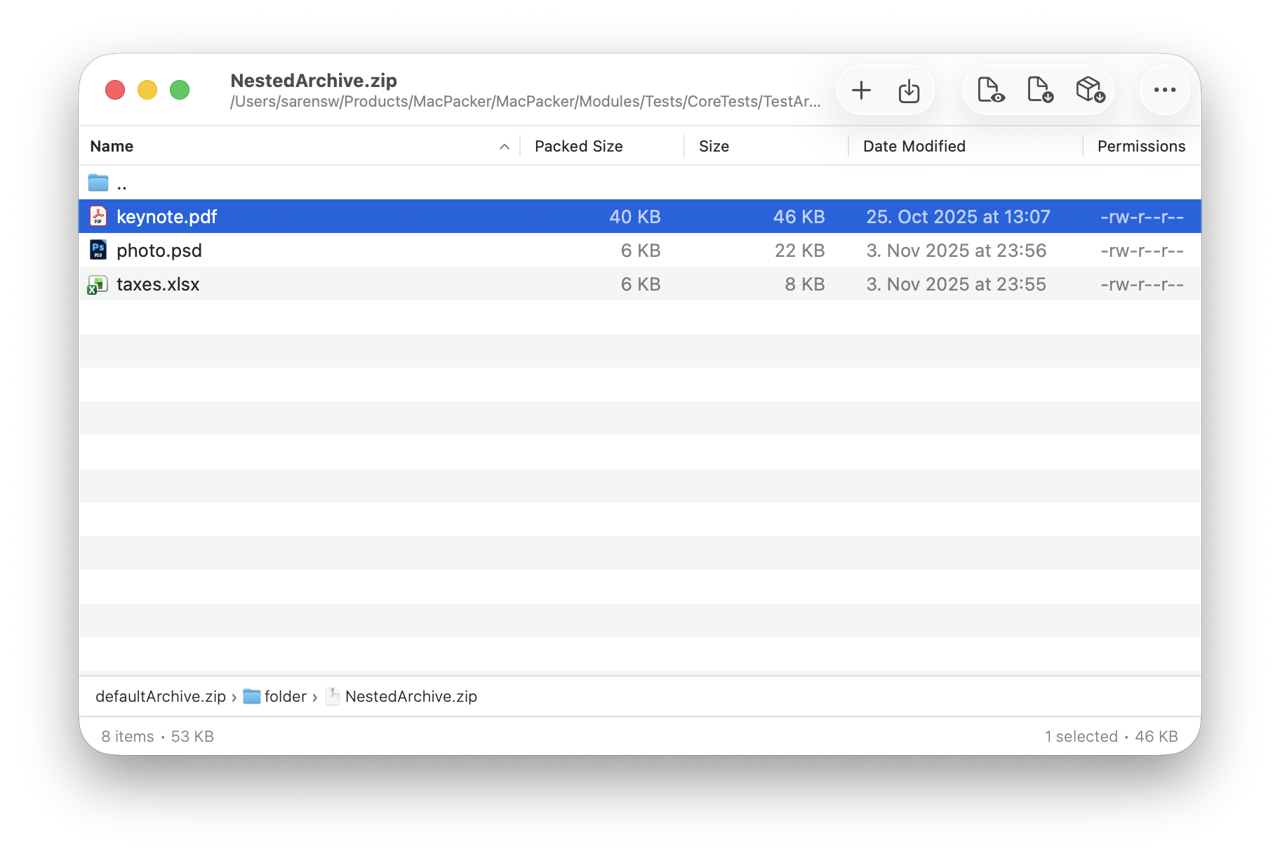
- Open the archive in MacPacker and follow its folders into the inner archive. Check names, sizes and breadcrumbs. The official documentation describes nested browsing without manually unpacking every layer in full.[2]
- Inspect the target with Quick Look, then drag the selected item into a new destination folder. If macOS cannot preview that file type, inspect the extracted file with an appropriate app; a thumbnail is not proof that the content is correct.[2]
- Check the recovered file's name, contents and purpose before handing it over. Keep the original archive until it is no longer needed. Cleaning a temporary folder and rewriting the source are different tasks.
This official product illustration reuses a visually reviewed OpenNavo asset. The breadcrumbs and selected row explain nested browsing; the visible path includes test material. It does not show completed extraction, establish an app version or prove a successful 7z edit.
Make editing a separate, bounded job
Official material already describes adding, deleting and saving ZIP contents. The 1.1.0 notes separately list “Edit 7z archives.” The README still says ZIP editing with more formats coming, so the version-specific notes establish the added scope; we have not silently rewritten the older README.[1][2][3]
Copy the entire archive first. On that copy, check which editing actions are supported, save to a known location, then reopen the result and inspect its listing and deliverable files. If you only need one file, stop after extraction rather than tidying or rewriting the source. We make no claim about zero temporary extraction, speed or lossless rewriting, and have not verified every combination of damaged, split or encrypted archives.
The release also fixes reported empty ZIPs from Finder compression, freezes with large folders, and corruption when saving a ZIP containing a 7z. These are recorded fixes, not proof that all files have been validated. A replaceable copy remains the right place to try the workflow.[1]
Choose against Archive Utility and BetterZip
For occasionally unpacking a whole ordinary ZIP, macOS Archive Utility may be enough. MacPacker's documented difference is browsing, previewing, nested navigation and selective extraction, not a measured compression-ratio advantage.[3]
For established presets, filtering and automation, compare BetterZip's own documentation. It lists in-place changes, external-editor round trips, presets, AppleScript and command-line tools. MacPacker should not be presented as a complete replacement for those workflows. There is no need to migrate from a tool that already fits; this is an open-source option with a specific new capability.[5]
Who should use it, and who should wait
It suits Mac users inspecting build artifacts, downloads or backups for a few files, and people willing to check release notes and try ZIP/7z changes on copies. It is not a backup system, a guarantee of damaged-archive recovery or a way to write every readable format. Being able to preview an unfamiliar file does not make it safe to execute.
Requirements, cost and version boundaries
The official README requires macOS 14.6 or later. The website's shorter macOS 14+ wording and Homebrew's coarse minimum do not establish support for 14.0–14.5. We downloaded the Homebrew-linked 1.1.0 ZIP and checked its SHA-256, Info.plist minimum of 14.6 and x86_64/arm64 architectures in the Universal main executable. That is package inspection, not an installation or runtime test.[2]
The app is free under GPL-3.0; the site says there are no paid tiers, subscriptions or MacPacker account requirements. App Store delivery still follows Apple's account and review rules and may lag direct downloads. The README continues to call the project early development with possible breaking changes ahead. A stable tag is not a backup or zero-risk guarantee.[2][3][4]
Sources and download
Checked on 2026-10-19. Read the MacPacker app details, then download from the official website. This is a source-based guide, not a hands-on review. Preserve the original before editing and check the output after extraction or saving.
[1] Official 1.1.0 release notes. [2] Version-tagged README and requirements. [3] Official MacPacker features and cost. [4] Version-tagged GPL-3.0 license. [5] BetterZip official features.