Skip to content

Nimbalyst

Nimbalyst · A visual desktop workspace for working with Claude Code, Codex, and project files in one place.

CaskDeveloper Tools 2.1K
Install command
brew install --cask nimbalyst
30-day installs
88
#1089 in App
1-year installs
1K
Last 365 days
Latest version
0.84.5
Download size
580MB
dmg
Release cadence
Daily
11 releases in 30 days

About

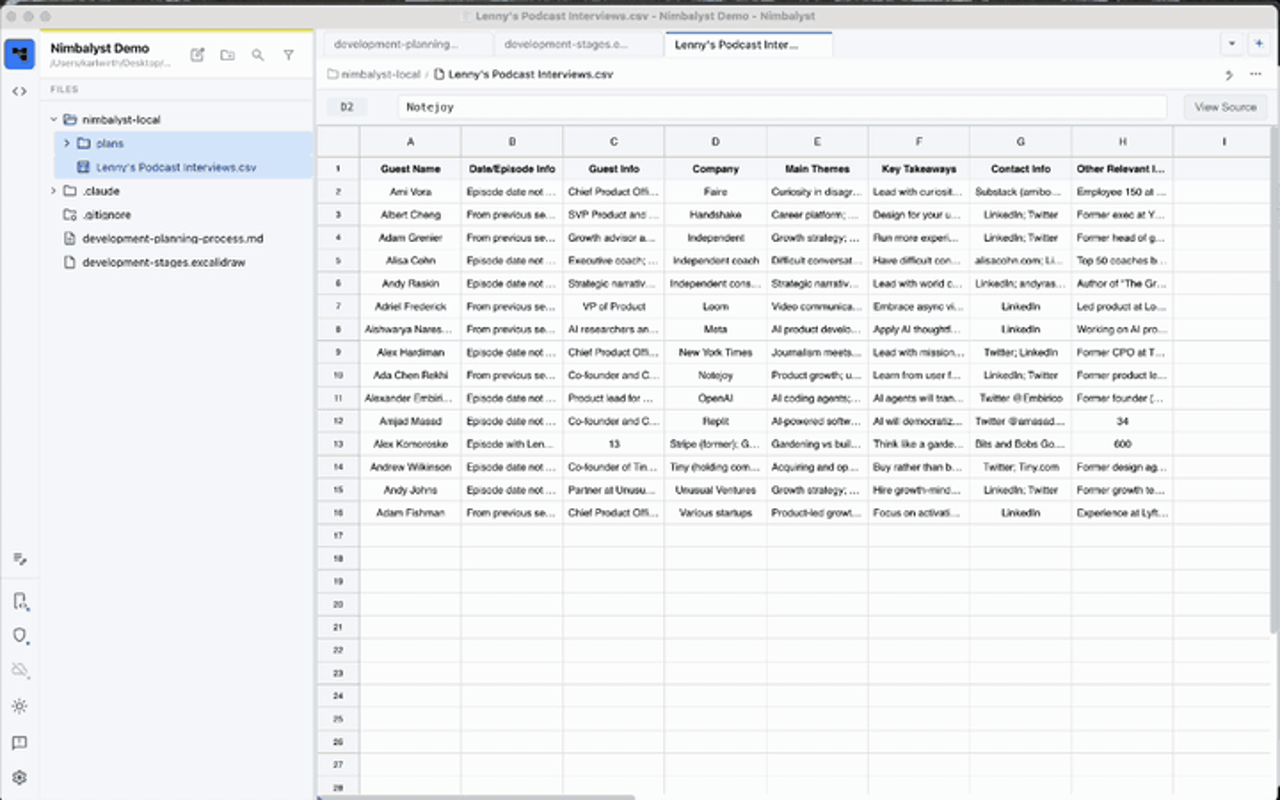
Nimbalyst is a visual workspace for building with Claude Code and Codex. It brings agent sessions and project materials together so you can work on tasks, documents, diagrams, mockups, spreadsheets, and code within one desktop app.

  • Run multiple agent sessions and organize work on a session kanban board.
  • Edit Markdown, CSV, code, mockups, diagrams, and data models in visual editors.
  • Inspect agent file changes as diffs and review them before applying.
  • Link project artifacts and tasks in a shared workspace; the product also describes real-time collaboration features.
  • Extend the workspace through its extension system.

Install the Homebrew cask with brew install --cask nimbalyst, then open Nimbalyst from Applications. This cask requires macOS 12 or later and installs Nimbalyst.app. The official site says it works with an existing Claude Code or Codex subscription or API key; those services are not included by the cask.

The supplied cask is for the macOS desktop app, not the iOS app or the Windows and Linux downloads mentioned on the website. The official site describes the desktop and iOS apps as open source under the MIT license.

Sources: Nimbalyst · Homebrew cask

At a glance

Price
Free with in-app purchases
System
macOS 13 or later
Chip
Apple silicon · Intel
Auto-updates
No
Repository
Open source · MIT · Updated 1 day ago★2.1K
Developer
Nimbalyst
Homebrew
Available; updated by Homebrew
Also known as
stravu-crystal, nimbalyst
Homepage
nimbalyst.com
Token
nimbalyst

Checked

What’s new in 0.84.5

New OpenNavo editorial

  • SessionsWorkstreams group peer sessions in a named folder
  • GitSwitch or create branches from the Git panel
  • AgentsNew Codex sessions default to GPT-6.2 Sol

How to install Nimbalyst on Mac

Homebrew installs the app in your Applications folder.

Install without Homebrew

Download the file Homebrew uses for your chip: Install Details

Uninstall Nimbalyst and optional data cleanup

Uninstall command
brew uninstall --cask nimbalyst

A regular uninstall removes the app and keeps its settings and caches.

Deep clean (optional)
Uninstall command
brew uninstall --zap --cask nimbalyst

--zap also deletes the settings, caches and other files listed in the Homebrew definition. They can include data shared with other apps and cannot be restored, and it does not guarantee that nothing is left. Back up any data you need first. To keep settings and caches, leave out --zap.

Questions about Nimbalyst

Is Nimbalyst safe?

Nimbalyst is in Homebrew’s official catalog and has not been disabled. Since September 2026, Homebrew disables apps that fail macOS Gatekeeper checks. When installing, Homebrew checks the download from github.com against its SHA-256 checksum. It was installed 88 times through Homebrew in the last 30 days.

Is Nimbalyst free?

Nimbalyst is free to download and offers in-app purchases. Source: nimbalyst.com, checked Oct 17, 2026.

Is Nimbalyst open source?

Nimbalyst’s source code is public on GitHub (nimbalyst/nimbalyst) under the MIT license.

How do I completely uninstall Nimbalyst on a Mac?

Run brew uninstall --cask nimbalyst. To delete its settings and caches as well, run brew uninstall --zap --cask nimbalyst. --zap also deletes the settings, caches and other files listed in the Homebrew definition. They can include data shared with other apps and cannot be restored, and it does not guarantee that nothing is left. Back up any data you need first. To keep settings and caches, leave out --zap. That also deletes 11 files and folders, including ~/Library/Application Support/@nimbalyst.

Does Nimbalyst run on Apple silicon (M1 and later) Macs?

Yes. Homebrew downloads separate builds for Apple silicon and Intel Macs. It needs macOS 13 or later.

Where does Nimbalyst store its settings and data?

Its settings are in ~/Library/Preferences/com.nimbalyst.electron.plist. Its data is in ~/Library/Application Support/@nimbalyst and ~/Library/Application Support/Crystal. These locations come from Homebrew’s clean-up list.

What is the latest version of Nimbalyst?

The latest version is 0.84.5, added to Homebrew on Nov 27, 2026. Run brew upgrade --cask nimbalyst to update it.

Related articles

Similar Apps

  • 010 EditorA macOS text and hex editor for examining and editing text and binary data, with Binary Templates, analysis tools, and scripting.
  • Open IslandA native macOS companion that brings AI coding-agent session status, permission requests, and terminal or IDE jump-back controls to the notch or top bar.
  • JetBrains AirA macOS agentic development environment for working with coding agents and reviewing their changes.
  • JetBrains GatewayA remote-development gateway for JetBrains IDEs, available as a macOS application and `gateway` command.
Browse all apps