HotkeyClash: check who owns a Mac shortcut before assigning it
Follow one proposed key combination through lookup, source checks, observation and a reversible change. A clean scan is not a guarantee of availability.
You want to assign a shortcut to a capture or text utility without stealing an action from Finder. Start with one combination. The useful output is a checkable list of bindings and a reversible decision, rather than a red conflict count.
This source-based guide was checked on October 20, 2026; it is not an installed hands-on test. HotkeyClash 0.9.2 arrived on September 27. Its first public release was June 16; its October 20 OpenNavo listing is not a product launch.
1. Look up the proposed combination
Open the relevant apps, then scan. Reading running apps' menus needs Accessibility permission; config files and system shortcuts do not. Enter opt cmd t or cmd+shift+4. Version 0.9.2 can report a matching app, system binding or free result even without a conflict. App-name and action-name queries still return conflicts only, so they are not interchangeable inventories.
A free result needs a coverage check. Raycast's encrypted store has no parser. Hammerspoon coverage is limited to statically readable bindings in init.lua; variables and separately loaded files can hide bindings. Do not expose private configs or run an unfamiliar script just to fill those gaps.
2. Read the sources before trusting a winner
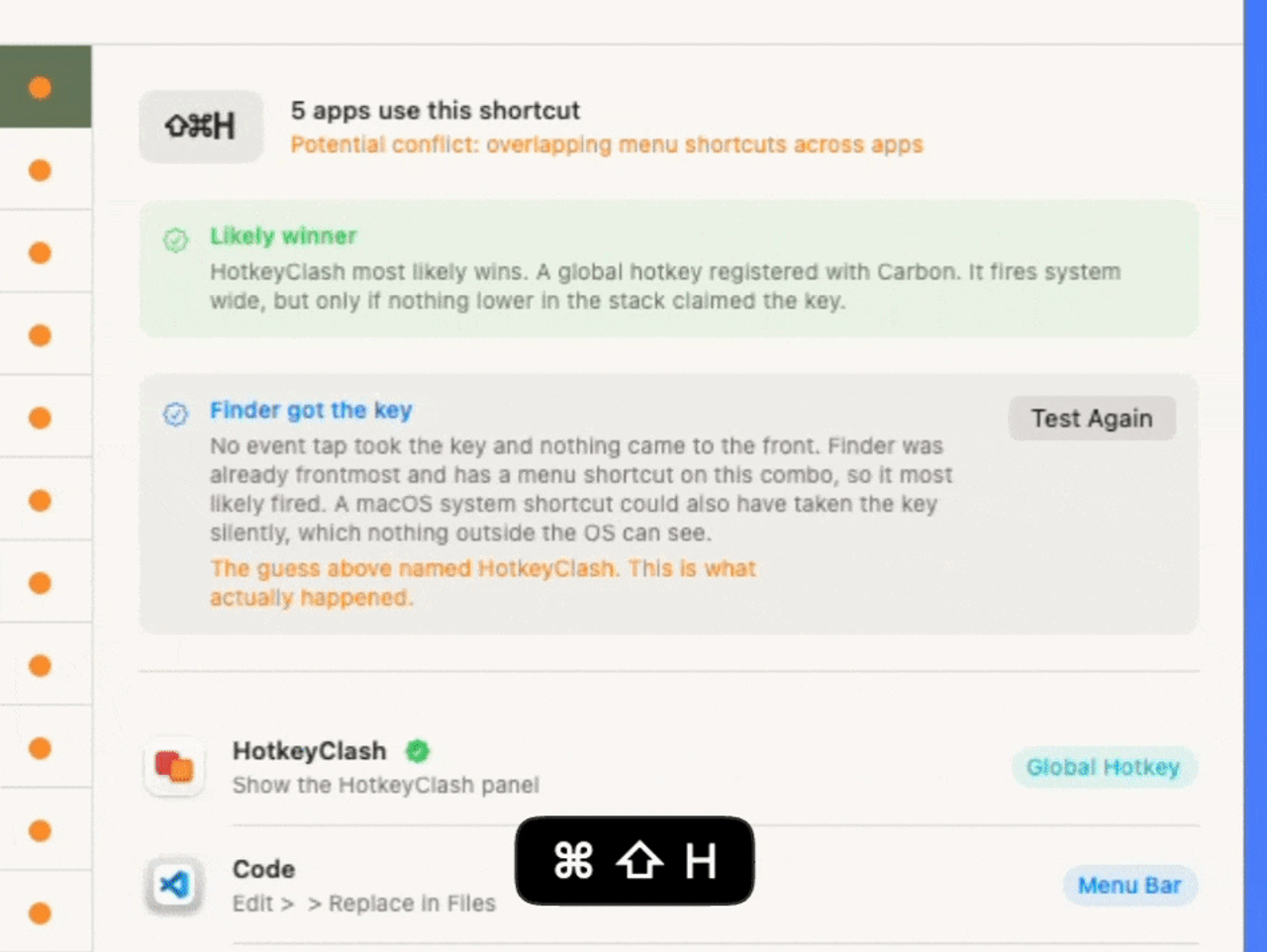
Select a combination and inspect its app, action and source labels, such as System, Global Hotkey or Menu Bar. The report brings running-app menus, system settings and supported automation configs together. They are not all active in the same circumstances: menu bindings depend on the foreground app, while drivers, event taps, system shortcuts and global hotkeys sit at different interception layers. Registration order within a layer can be unknown. A likely winner is an explained prediction.
Official demo: the static prediction names HotkeyClash for ⌘⇧H; a test below reports Finder. This illustrates prediction versus observation, not our own test. No version is visible, and the picture does not establish the 0.9.2 search interface. The test text also admits system handling it cannot observe.
3. Change one binding, then verify and roll back
Record the original binding and action. Change one shortcut in its owning app instead of deleting configuration wholesale. If you use Test, press the combination and read the qualifications: the official notes say only some verdicts identify one definite recipient. The 0.9.0 notes flag a Globe live-test limitation, and the next two releases do not explicitly resolve it; do not use that case as a definitive test here.
Rescan after the change, then check both intended actions in the appropriate foreground apps. Restore the recorded setting if the result is wrong. This is an editorial operating procedure, not an automatic repair feature or a guaranteed fix. Markdown export helps with a support request; review app names and action text before sharing a report.
Which approach fits the task?
For learning an app's shortcuts, KeyCue's own feature page describes shortcut tables, system hotkeys and customization. That is a different task from investigating a proposed combination; there is no need to claim HotkeyClash replaces it. For one known menu binding, the owning app's settings may be the right first stop. A cross-source report becomes useful when several automation tools compete and ownership is unclear.
Audience, cost and boundaries
This suits people combining tools such as Alfred, Karabiner or Keyboard Maestro who will inspect individual results. It does not suit treating an empty result as a system-wide clearance certificate or expecting automatic repairs. HotkeyClash remains a 0.x utility, free under GPL-2.0. Its site lists macOS 14+, Apple silicon and Intel. Coverage and dynamic-config limits matter more than an exhaustive-scan slogan.
Find HotkeyClash on OpenNavo, then use the official site to check downloads and versions. Do not disable system security protections to diagnose a shortcut.
Sources and verification date
Checked October 20, 2026. Version-tagged documentation and release notes support the features. The screenshot is an official demonstration, not a result from the author's Mac. Sources below cover live-test boundaries, licensing and the alternative's scope.
0.9.2 release · Tagged README · Live-test release · License · KeyCue features