Skip to content

Clipappboard

GRUPO EMPRESARIAL INNURE SL · Clipboard history manager for the Mac that keeps text, links, images and files locally, with search, filters, a floating shelf and a one-time Pro upgrade.

Website downloadProductivityUtilitiesFree with paid features
Downloads come from apps.apple.com · OpenNavo hosts no installers

About

Clipappboard is a Productivity app for Mac. It is made by GRUPO EMPRESARIAL INNURE SL. You download it from apps.apple.com.

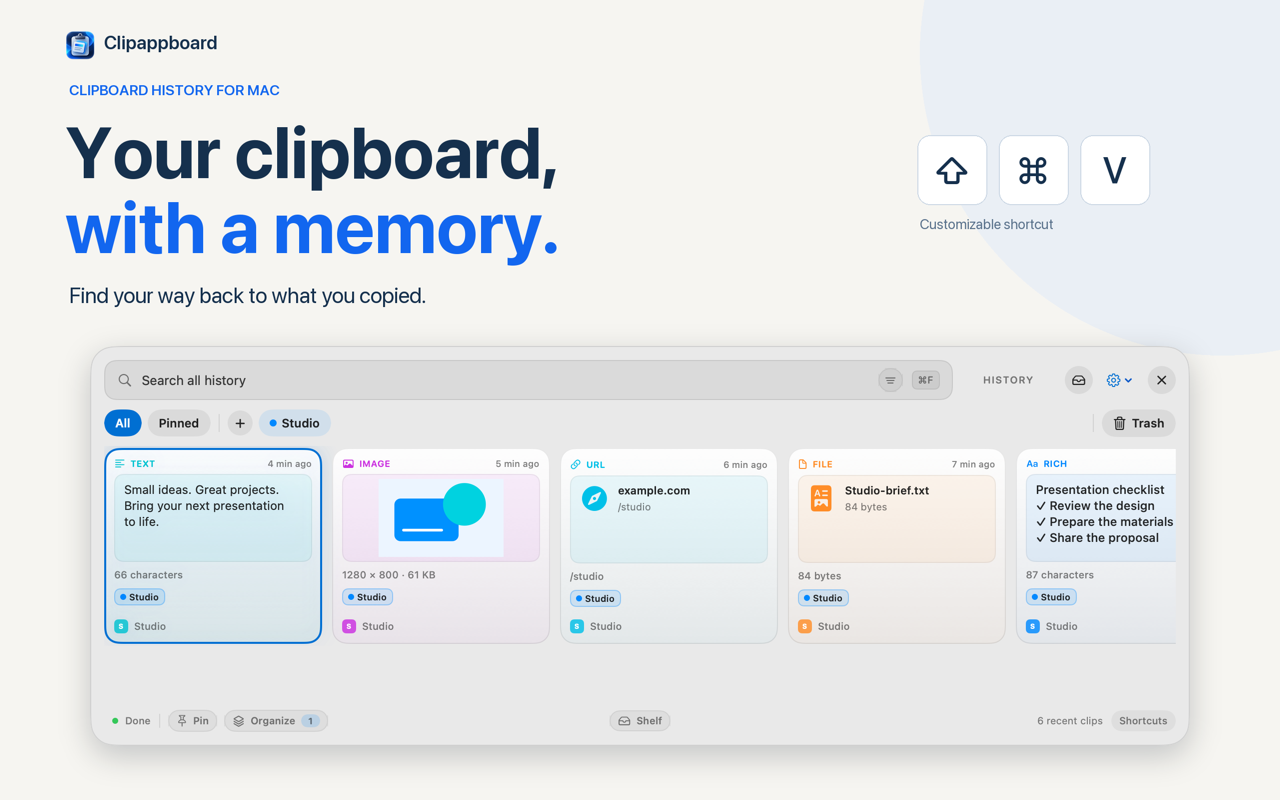
Clipappboard is a clipboard history manager for the Mac. Everything you copy stays in a searchable history on your Mac, so you can find a link, an image or a file reference again without going back to the app it came from. Open it from the menu bar or with a keyboard shortcut.

What it keeps

  • Text, rich text, links, images and file references in one history.
  • Search by text and filter the history by content type.
  • Preview a clip before pasting it again.
  • Copy a clip, then paste it with ⌘V in the destination app.

Gathering and organizing

  • The floating shelf holds several clips you plan to reuse. Drag items there from the history and copy or drag them one at a time or all together.
  • The free version includes one collection and up to five pinned clips. Pro adds more collections and pins, aliases for clips and combined filters.

Editing

  • Pro saves an edited text as a new copy.
  • Annotate an image with arrows, shapes and text, or crop it before reusing it.

Window and themes

  • Automatic, light and dark themes, a choice of accent color and Quick Look previews.
  • Pro adds a compact window mode that stays visible while you work, plus optional Halloween themes.

Privacy and account Clipappboard needs no account. The history is stored locally on your Mac and is not sent to the developer's own servers. The app contains no advertising and no developer analytics. File clips may be references to the original file rather than copies of it.

Free and Pro The free version does not expire and includes the history, search, previews, the shelf, one collection and five pinned clips. Pro is an optional one-time purchase with a 15-day trial and no subscription or automatic renewal. Apple manages purchases and updates for the App Store version.

Requirements Clipappboard runs on Apple Silicon and Intel Macs with macOS 12 or later. The interface is available in English and Spanish. The optional AI suggestions in Pro require macOS 26 or later, an Apple Intelligence-compatible Mac and screen recording permission, and are processed on your Mac.

Download from Website

Verified 2026-10-30 from the vendor site and the Mac App Store listing. Mac App Store only; no Homebrew cask exists. Developer: GRUPO EMPRESARIAL INNURE SL.

OpenNavo hosts no installers; downloads come straight from the developer.

At a glance

Download source
apps.apple.com
Price
Free with in-app purchases · $8.99
Developer
GRUPO EMPRESARIAL INNURE SL
Homepage
clipappboard.app
Token
clipappboard

Checked

Clipappboard security facts

Only facts that can be checked, each with its source and date. This is not a safety certification. To check the files you downloaded, scan them on your Mac with OpenNavo.

Distribution
Official website
Scan with OpenNavoOpens a scan preview in the OpenNavo app; you decide whether to start it. ClamAV on Mac

Clipappboard price and purchase options

Prices OpenNavo has checked, by region, edition and billing period, with sources and dates. OpenNavo keeps no price history and never calls a price the lowest.

EditionPriceRegionWhere to buyChecked
ProFree with in-app purchases · $8.99 United StatesOfficial websiteapps.apple.com/us/app/clipappboard/id6809466230?mt=12

Questions about Clipappboard

Is Clipappboard free?

Clipappboard is free to download and offers in-app purchases. Pro · United States · $8.99 Source: apps.apple.com/us/app/clipappboard/id6809466230?mt=12, checked Oct 30, 2026.

Sources

Every fact on this page names its source and check date. Facts past their validity read “as of” their date and are no longer stated as current.

Checked

Related articles

Similar Apps

  • TrellisWMArrange Mac windows in nested, zoomable spaces, with keyboard navigation and optional Pro tab groups.
  • SnapDockLaunch, switch to, or hide Mac apps with shortcuts that follow your Dock, plus custom app shortcuts.
  • SpaceMount cloud files as a Mac drive, stream data on demand, and share versioned workspaces with people and agents.
  • KeyboopCorrect Russian–English keyboard layouts, expand snippets and dictate locally, without using the clipboard for corrections.
Browse all apps