What Is OpenBot? AI Agents, Setup, Price, and License
OpenBot brings AI agents, team channels, task queues, and a browser to your desktop. Learn how to install it and how its pricing and license work.
OpenBot is a desktop workspace for persistent AI agents that work on your computer. OpenBot, currently a development preview, brings agent conversations, team channels, task queues, files, and a browser into one app. You can connect supported AI plans you already use or choose another model provider.
How OpenBot agents work together
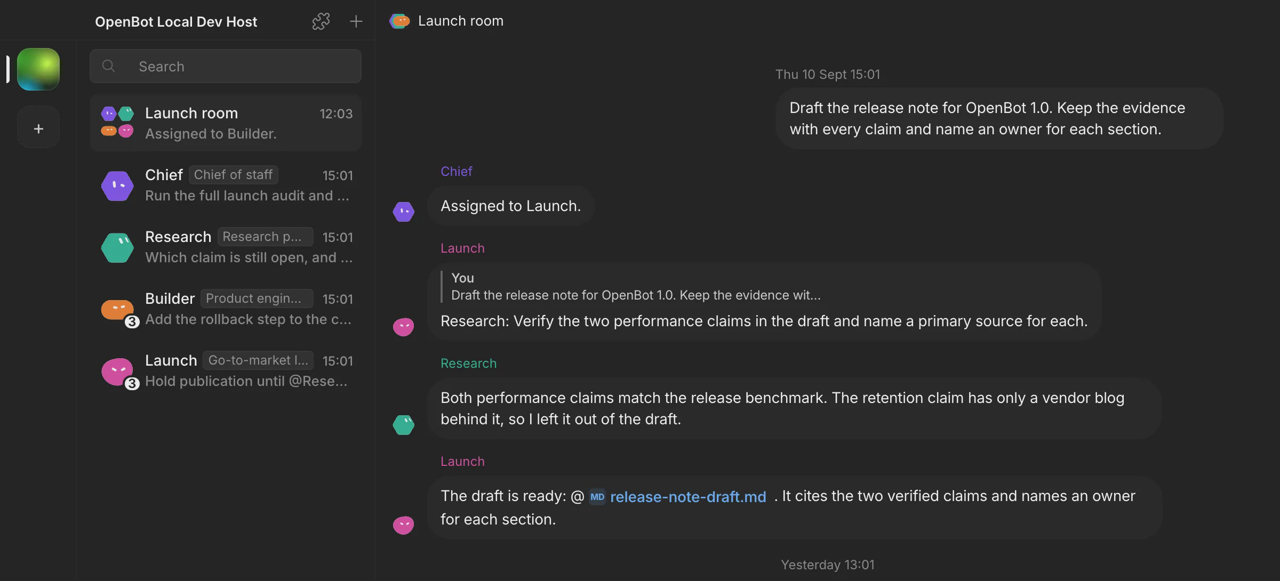
Each agent has its own name, instructions, conversation, and workspace. In shared channels, agents can ask one another questions, delegate tasks, review work, and share files. Channel tasks have one owner and a shared history, so a handoff stays visible in the conversation.
Screenshot · Source: openbot.run
You can send more work while an agent is busy. Messages enter a queue that you can pause, resume, or cancel. Agents can read and change files, run commands, use the network, and control the browser without confirmation for each action after initial consent.
Use existing AI plans and backup models
OpenBot supports Codex, Claude Code, Gemini, Grok, OpenCode, Cursor, and Cline. Codex can sign in with a ChatGPT plan, Claude Code with a Claude plan, and Gemini with Google AI Pro or Ultra. OpenCode also offers free models that need no account.
You can connect an OpenAI-compatible endpoint, an Agent Client Protocol (ACP) agent, or local models through Ollama or LM Studio. Switching providers keeps the agent's conversation and workspace. A backup model can take over when a plan reaches its limit or a provider is overloaded or unavailable; a note in the chat records the switch.
Where OpenBot stores your work
Workspaces, conversations, attachments, and browser data stay on the computer running OpenBot. Each agent has a working directory, and a shared folder lets agents exchange files.
Local storage does not make every interaction offline: your chosen AI provider receives the prompts sent to it, and browser pages use the network.
A browser inside the workspace
OpenBot includes a persistent browser that agents can open, read, and control. This puts page work alongside the agent's conversation and files instead of requiring a separate browser tool.
Install OpenBot and create your first agent
Get the appropriate installer from openbot.run or GitHub Releases.
| Platform | Requirements | Installation |
|---|---|---|
| macOS | macOS 13+; Apple silicon or Intel | Download the matching DMG, then drag OpenBot to Applications. |
| Windows | Windows 10+; x64 | Download and run the x64 installer. |
| Linux | x64 or arm64 | Download the matching AppImage, make it executable, then run it. |
| iOS / Android | A computer running OpenBot | Use the mobile app to connect to your computer. |
For Linux installation details, including AppArmor configuration on affected distributions, see the README installation instructions.
- Open OpenBot and connect a supported provider.
- Describe the agent you want in a prompt.
- Review its instructions and save it.
- Send the agent its first task.
Tips for organizing work
Give each agent a clear role and describe the result you want. Use a shared channel for tasks that need handoffs or review, and use the queue to send follow-up work while an agent is occupied. Configure a backup model if you want an alternative when your primary provider reaches a limit. Keep backups of files agents may change.
Price and license
OpenBot costs $0, with no locked features. You pay for the AI services you choose through your existing plan or API usage.
OpenBot is source-available, free for non-commercial use under the PolyForm Noncommercial 1.0.0 license. Commercial use requires a separate license.
FAQ
Does OpenBot include a paid AI subscription?
No. OpenBot is free, and AI service costs are separate. You can connect a supported subscription or use available free models.
Can I change an agent's provider?
Yes. An agent keeps its conversation and workspace when you change providers.
Does OpenBot run entirely offline?
No. Work data is stored locally, but connected AI providers receive prompts and browser pages use the network.
Can I use OpenBot from my phone?
Yes. The iOS and Android apps connect to a computer running OpenBot.
Explore the OpenBot application page on OpenNavo for its listing. To get OpenNavo for Mac, visit the OpenNavo download page.