RepoBar workflow: triage GitHub, then check your local branch
A practical first pass for Mac users maintaining several GitHub repositories: pin the relevant repos, inspect CI and PRs, match local checkouts, and understand cache and sync limits.
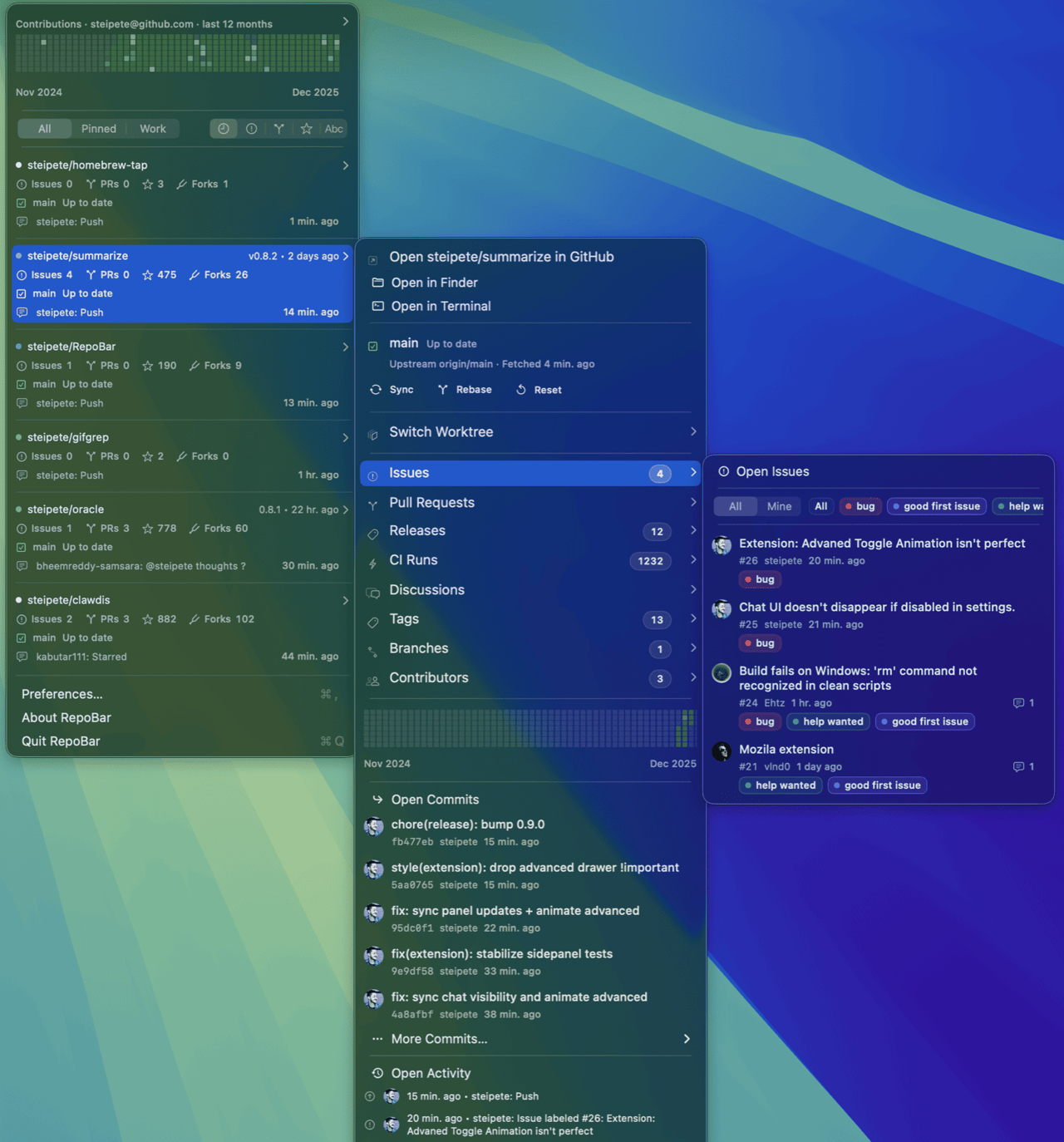
Opening Issues, PRs and Actions for several repositories, then checking local branches in a terminal, can turn a morning status check into repeated window switching. RepoBar puts remote queues and local checkout state in one menu so you can decide which repository needs attention first. It does not review code for you.
This guide is based on official documentation and release records checked on 2026-10-19. It is not an installed, hands-on test, and no time savings were measured. The version checked is 0.10.2: a maintained niche discovery, not a new launch.
Start with one repository pass
The starting point is several GitHub repositories you maintain and an existing projects folder on your Mac. The output is a short action order, not a claim that everything is resolved: identify failing CI, PRs to inspect and local workspaces with unfinished changes.
- Check installation requirements on the OpenNavo app page, or download from official releases. Open the app, select Sign in to GitHub and complete browser authentication.
- In Preferences → Repositories, mark today's repositories Visible or Pinned and unrelated ones Hidden. Keep the first pass focused.
- Inspect Issues, PRs, CI and Releases, then open a repository submenu. Counts are entry points, not severity scores: read the issue and CI logs before setting priorities.
- Choose a projects root in Preferences → Advanced → Local Projects. After matching, inspect branch, upstream, ahead/behind, dirty files and worktrees. Use Open in Finder or Open in Terminal when ready.
- If local changes, divergence or uncertain state remain, stop at inspection. The presence of Sync, Rebase and Reset buttons is not a reason to use them casually.
This historical example comes from the official repository and expands steipete/summarize. Its repository release label is not the RepoBar app version; relative timestamps are not current observations. The application build pictured is unknown.
Two local-matching traps
The Local Projects documentation says scans default to four levels and skip hidden directories and symlinks. Matching first considers the folder and repository names, then origin as a hint. If different organizations have same-named repositories, verify the remote and path yourself. A zero-repository result also warrants checking scan depth and folder access; an expired bookmark may require choosing the folder again.
Ahead/behind depends on fetched upstream refs, not continuous network truth. Local discovery and status have caches too. Before editing or syncing, check fetch age and confirm important operations against Git, CI logs and the actual diff.
Treat automatic syncing as a second step
Start with the status display before enabling Auto-sync clean repos. Official rules require a clean workspace, a non-detached HEAD, a branch behind its remote and a fast-forward-only update. Git's documentation explains that fast-forward-only fails on divergent history rather than merging it for you.
These conditions reduce the risk of discarding work, but syncing is not read-only: it fetches and updates eligible local branches. Leave auto-sync disabled if background changes to project folders are unacceptable. Manual Sync, Rebase and Reset are documented to stop when fetching fails; that is not a recommendation to experiment with Reset.
Cache continuity is not live truth
RepoBar reads persistent SQLite data first and refreshes in the background. Compatible archives can supply issue and PR lists when offline or rate-limited. A cached PR may already have merged. The cache documentation acknowledges further work on per-row stale-source labels, so do not assume every row clearly states its age.
REST requests remaining and GraphQL points remaining use different units and are last-observed values. Unknown quota or a cooldown is not solved by repeatedly refreshing. The official 0.10.2 entry is dated 2026-10-18 and coalesces repository-detail writes into a 30-second window; it is maintenance, not a new triage capability or a measured speed claim.
Divide the work with existing tools
- GitHub's notifications inbox offers Save, Done, Unsubscribe and filters for subscribed events. If notification overload is the only problem, cleaning up that inbox may suffice. Choose RepoBar for the combined multi-repository and local-checkout menu, not because the inbox is inherently inadequate.
- Git in the terminal checks the working tree and diffs. The official status documentation distinguishes staged, unstaged and untracked files. RepoBar helps pick the project; verify actual state before editing.
- Code review and CI pages remain the place for deeper investigation. RepoBar is not presented here as a replacement for review, conflict resolution or guaranteed live data.
It fits maintainers and on-call developers doing a first pass across repositories. It is less compelling for occasional work in a single repo, macOS 14 or older, or organizations that prohibit third-party repository access.
Price, permissions and download
The official site currently lists the app as free and MIT-licensed for Apple silicon and Intel Macs running macOS 15+. The 0.x application continues to change; this guide is not a stability guarantee. GitHub.com access is bounded by both user permissions and the RepoBar GitHub App installation. Private organization access may require approval. Release builds store credentials in macOS Keychain; debug storage differs. Keep credentials out of screenshots and issue reports.
The website, README and historical changes differ in their description of permissions for the optional reference monitor, so this guide gives no setup advice for that feature. The core repository check does not require enabling it. Optional AI summaries, account and Enterprise configuration are outside this workflow; a free app does not imply free external services.
Find RepoBar on OpenNavo or download from official releases. Confirm system support, repository authorization and local state before choosing to enable syncing.
Sources and verification
Checked 2026-10-19. Steps and capabilities: official README, Local Projects, cache design. Maintenance: 0.10.2 release. Price/platform: official site. License: LICENSE. Comparison sources: GitHub notifications, git status, git pull.