TablePro 0.82: prepare UUID test rows, then review the SQL
Use TablePro's new UUID actions for a small batch of test rows. Separate primary keys from foreign keys, loaded rows from the whole table, and staged edits from saved changes.
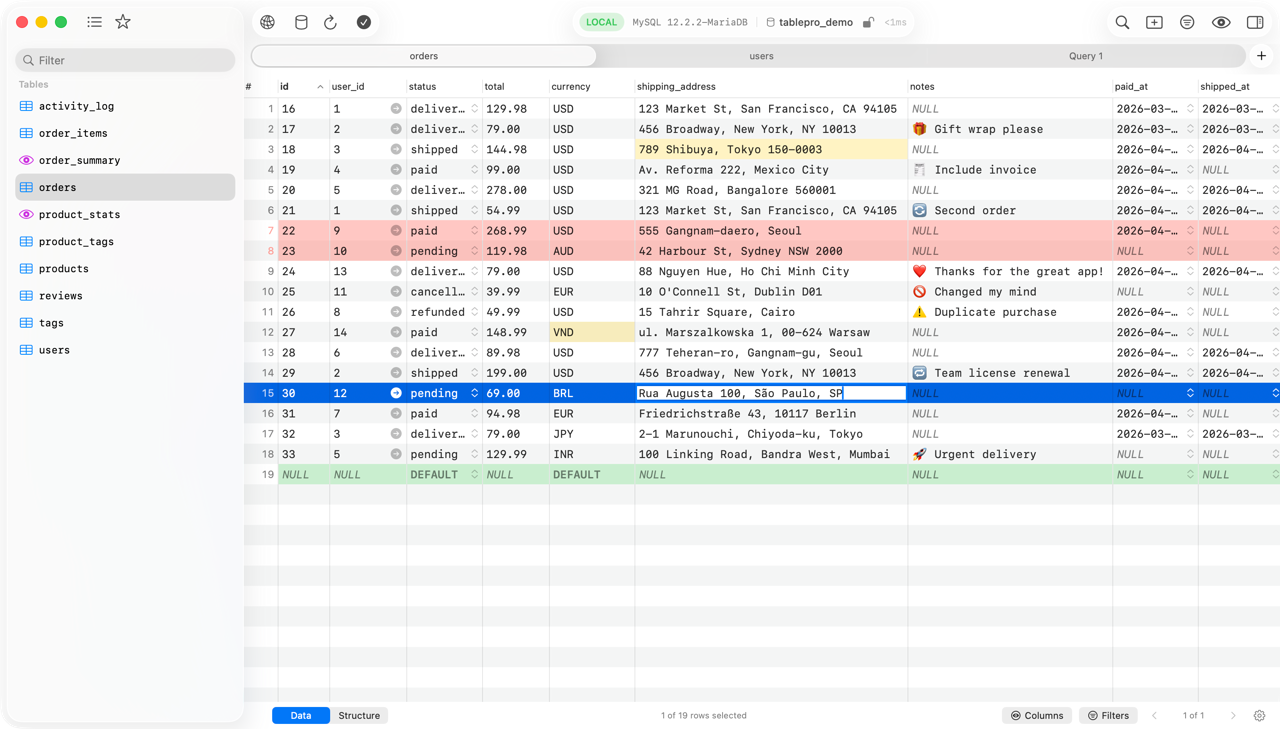
When copying a development test row, identifier fields are easy to overlook: a primary key must not simply carry over, while a foreign key must not become an arbitrary value that references nothing. The UUID actions added in TablePro 0.82.0 suit small, visually checked edits, rather than replacing a project's fixture scripts.[1]
This guide is based on official sources checked on 2026-10-19. We did not install or test the app. The official stable 0.82.0 release arrived that day; OpenNavo and Homebrew still showed 0.81.0 during verification. New features below follow the official 0.82.0 release notes. Check the installed version rather than treating a catalog listing as proof of availability.[1][2]
Start with a disposable development database
You need a rebuildable development database, a table with a supported UUID column and an account restricted to that database. The intended output is a few test rows with distinct identifiers and correct business fields, plus SQL reviewed before saving. Do not start on production or read these steps as a record of an executed test.
- Find the official entry point through the TablePro app page and confirm the Mac build and version. Check the connection, database and table. Browse in Read-Only first; when editing is necessary, deliberately switch to Alert or a stricter Safe Mode. Alert confirms writes; Safe Mode adds Touch ID or password approval. Silent is the default, so do not assume the first write will ask.[3]
- Open the table from the sidebar. Filter for the sample you want to copy, then identify primary keys, foreign keys and server-generated columns. Duplicate Row returns ordinary identity columns to DEFAULT. For a UUID primary key without a server default, 0.82 generates a new UUID; Add Row and Paste support that case too.[1][4]
- For other suitable identifier columns, select a few cells and choose Generate UUID or Generate UUIDv7 under Set Value. The former creates v4 values, the latter values ordered by creation time; each selected cell gets its own value. Native uuid/uniqueidentifier columns and text or binary columns displayed as UUID are supported. Foreign keys and Cassandra timeuuid columns offer neither action; do not break references.[4]
- Check business fields such as names and status, then open Preview SQL (Cmd+Shift+P). Changes are queued in this tab: pressing Enter to finish editing a cell does not write to the database. Inspect INSERT/UPDATE targets, conditions and expected row counts. Undo mistakes before saving.[4]
- Save with Cmd+S only after review, then query these test rows again to check keys and counts. Transactions depend on the engine: with transactions, a failure rolls the whole save back; without them, statements executed before the failure may remain. A confirmation dialog is neither a backup nor proof of business correctness.[4]
This official README interface example reuses an existing OpenNavo asset. It illustrates grid editing, not the UUID generator, a successful save or a particular app version. Colors alone are not evidence of a specific error type.
Two boundaries that matter
Fill Column operates on every loaded row, not automatically on the entire database table. It is absent on primary keys and server-owned columns. Check the loaded scope before choosing cells or a whole-column operation.[4]
Results containing JOIN, CTE or UNION cannot be edited directly in the grid; open the underlying table instead. Even single-table results have conditions: omitting or renaming the primary key blocks saving. An enabled editing control is not a substitute for understanding how a result maps back to its table.[4]
Choose between a GUI, scripts and another client
If CI must rebuild the same data under the same rules every time, versioned SQL or project fixture scripts are easier to review and rerun. That is our workflow recommendation, not a claim that TablePro lacks scripting. TablePro fits a handful of rows that require human judgment. Generating UUIDs removes manual identifier entry, not data modeling.
Existing TablePlus users need not migrate merely for inline editing: TablePlus also lists inline edit, code review and safe mode. The reasons to consider TablePro here are its specific new UUID operations, open-source license and free core editor, not an untested speed advantage or exclusive ownership of SQL review.[5]
Who should use this workflow
It suits Mac developers maintaining development samples or correcting small batches while reviewing the SQL. It does not suit randomly filling a complex foreign-key graph, treating manual edits as repeatable team seed data, or expecting a client to decide whether production writes are safe. AI and MCP are not prerequisites; UUID generation does not require sending data to an external model.
Compatibility, cost and recovery limits
The Mac app supports macOS 13+ with Apple silicon and Intel builds. The core SQL editor, data grid and Safe Mode are free without a trial limit; the source uses AGPLv3. Compare & Sync, Data Rewind and iCloud Sync on the Mac require paid plans. Open source does not mean every feature is free.[2][3][6]
Saving clears the current undo history. Paid Data Rewind is not a backup either: it does not undo triggers, cascades or changes outside the app, and recovery has limits such as missing primary keys. Keep rebuildable samples or backups before writing.[3][4]
Sources and download
Sources checked: 2026-10-19. Start with TablePro on OpenNavo, then download from the official website and confirm the version includes the required features. This is not a hands-on review or a promise of speed or stability.
[1] Official 0.82.0 release. [2] Version-tagged README. [3] Data editing and Safe Mode. [4] Change Tracking: edit, preview, save and restore. [5] TablePlus official features. [6] TablePro pricing and license boundaries.