Skip to content

MacPacker

sarensw and contributors · Free native Mac archive manager for browsing nested archives, previewing contents and extracting selected files, with archive editing and Finder integration.

CaskFiles and StorageAuto-updates 1.6K
Install command
brew install --cask macpacker
30-day installs
1,801
#171 in App
1-year installs
8.2K
Last 365 days
Latest version
1.3.0
Download size
15MB
zip
Release cadence
Daily
25 releases in 30 days

About

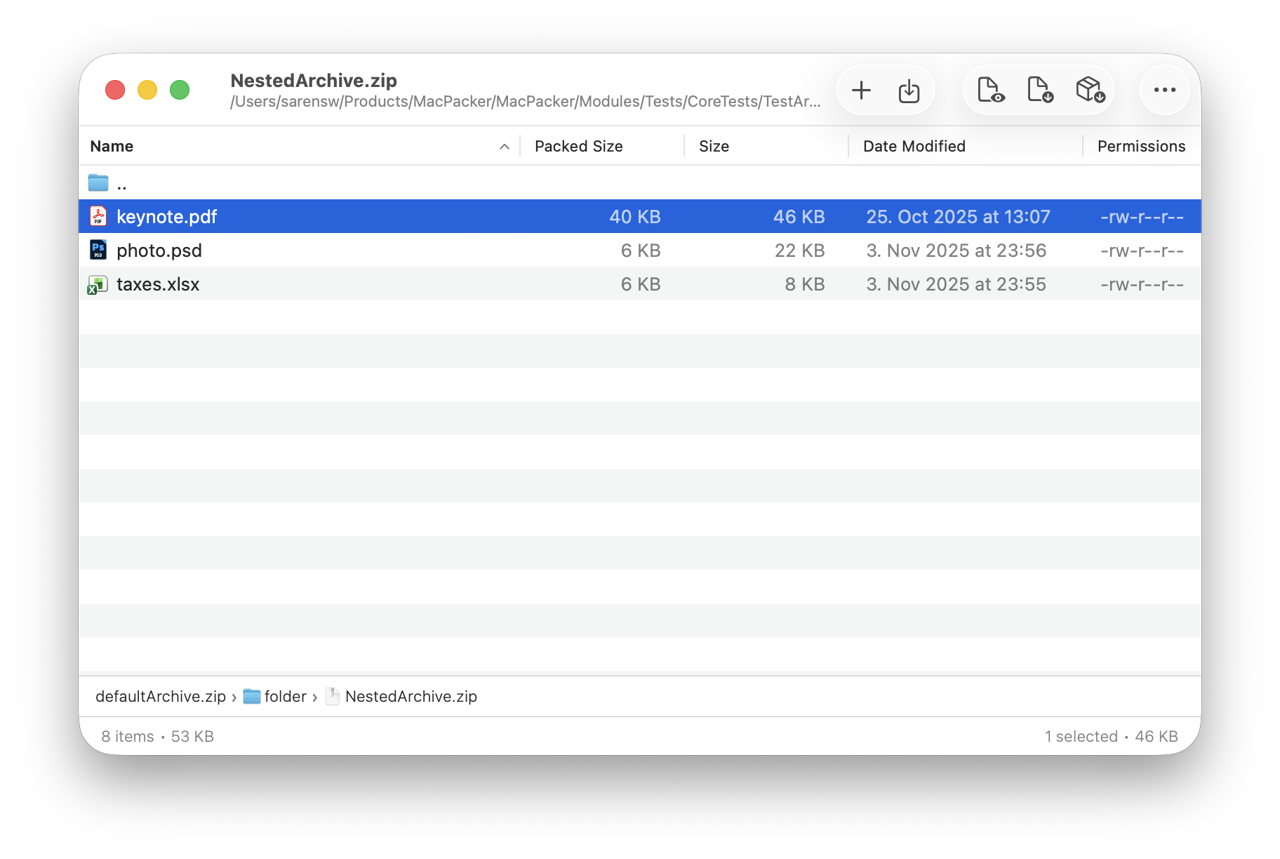
MacPacker is a free, open-source archive manager for macOS, designed for people who need to inspect archives before extracting everything. Browse folders and nested archives, preview files, and drag out only selected items. It is useful for developers, administrators and everyday Mac users handling compressed downloads or backups.

Features

  • Browse archives like folders, including nested archives, and extract selected files by drag and drop.
  • Read many archive, disk-image and compression formats, including ZIP,7z,RAR,TAR,DMG and ISO; support varies by format and operation.
  • Edit and save supported archives; ZIP editing is documented, without promising every readable format can be written.
  • Preview archive contents with Quick Look and use Finder extraction actions.
  • Work with encrypted archives and, in1.0.0, password encryption, split volumes and additional compression options.
  • Navigate with keyboard shortcuts, sortable columns and breadcrumbs; detect formats by file signatures.

Installation and requirements

Install brew install --cask macpacker, or download the signed/notarized app from the official site or GitHub and move it into Applications. The vendor requires macOS14.6 or later; Homebrew's coarser macOS14 minimum should not be taken as confirmation that14.0–14.5 are supported. Earlier macOS13 support ended with0.14.1. Mac App Store releases may follow direct releases after review. Enable Finder/Quick Look extensions if needed and grant access to files or folders through the app's prompts; the sandbox can limit access until permission is granted.

Dependencies, conflicts and platforms

Homebrew declares no additional formula dependency or explicit cask conflict. Archive engines are part of the app distribution; you do not need to install a separate7-Zip command just to use MacPacker. Runtime toolchain/build dependencies concern building source, not ordinary installation. Other archive apps can coexist, while file associations and enabled Finder extensions determine which handles an archive. Preserve original archives before editing them and keep all parts of split archives together. Available disk space must accommodate extraction and temporary work; no universal RAM/storage minimum was established in the official README.

MacPacker is a native macOS application. No Windows, Linux, Android or iOS edition is established in its official installation documentation; the presence of portable archive engines does not make the app itself cross-platform. The official1.0.0 ZIP contains a Universal binary with both x86_64 and arm64, supporting Intel and Apple Silicon Macs. Its Info.plist confirms the14.6 minimum.

Accounts, cost and licensing

Normal local archive work requires no MacPacker account or cloud subscription. The app is free, with optional donations/sponsorship. App Store delivery uses Apple's account requirements. The project identifies its license as GPL3; bundled archive engines retain their own license notices. Archive handling is local rather than an AI upload workflow.

References: Official site, README and installation, Releases.

At a glance

Price
Free / Free to download · $0.00
System
macOS 14 or later
Chip
Apple silicon · Intel
Auto-updates
Yes
Repository
Open source · GPL-3.0 · Updated 3 days ago★1.6K
Developer
sarensw and contributors
Homebrew
Available; the app updates itself
Also known as
macpacker
Homepage
macpacker.app
Token
macpacker

Checked

What’s new in 1.3.0

New · OpenNavo editorial

  • ArchivesTest whether an archive is intact.
  • FixesA missing recent archive no longer crashes the app.

How to install MacPacker on Mac

Homebrew installs the app in your Applications folder.

Install without Homebrew

Download the same file Homebrew uses: Install Details

Uninstall MacPacker and optional data cleanup

Uninstall command
brew uninstall --cask macpacker

A regular uninstall removes the app and keeps its settings and caches.

Deep clean (optional)
Uninstall command
brew uninstall --zap --cask macpacker

--zap also deletes the settings, caches and other files listed in the Homebrew definition. They can include data shared with other apps and cannot be restored, and it does not guarantee that nothing is left. Back up any data you need first. To keep settings and caches, leave out --zap.

Questions about MacPacker

Is MacPacker safe?

MacPacker is in Homebrew’s official catalog and has not been disabled. Since September 2026, Homebrew disables apps that fail macOS Gatekeeper checks. When installing, Homebrew checks the download from github.com against its SHA-256 checksum. It was installed 1,801 times through Homebrew in the last 30 days.

Is MacPacker free?

Yes, MacPacker is free to use. Source: macpacker.app, checked Oct 19, 2026.

Is MacPacker open source?

MacPacker’s source code is public on GitHub (sarensw/MacPacker) under the GPL-3.0 license.

How do I completely uninstall MacPacker on a Mac?

Run brew uninstall --cask macpacker. It quits the app. To delete its settings and caches as well, run brew uninstall --zap --cask macpacker. --zap also deletes the settings, caches and other files listed in the Homebrew definition. They can include data shared with other apps and cannot be restored, and it does not guarantee that nothing is left. Back up any data you need first. To keep settings and caches, leave out --zap. That also deletes 4 files and folders, including ~/Library/Group Containers/group.app.macpacker.

Does MacPacker run on Apple silicon (M1 and later) Macs?

Homebrew installs it on both Apple silicon and Intel Macs, from the same download. It needs macOS 14 or later.

Where does MacPacker store its settings and data?

Its data is in ~/Library/Group Containers/group.app.macpacker. These locations come from Homebrew’s clean-up list.

What is the latest version of MacPacker?

The latest version is 1.3.0, added to Homebrew on Nov 18, 2026. MacPacker updates itself; to update it with Homebrew, run brew upgrade --cask --greedy macpacker.

Related articles

Similar Apps

  • GrandPerspectiveA macOS disk-usage visualizer that maps files and folders as proportional rectangles, helping you inspect storage before deciding what to remove.
  • SyncthingNative Mac menu-bar wrapper with a bundled Syncthing process for encrypted file synchronization between authorized devices.
  • DropboxSynchronize and share cloud files through Finder, with selective sync and online-only or offline file controls.
  • OneDriveMicrosoft cloud-file sync client for Mac Finder, with Files On-Demand and personal, work or school account support.
Browse all apps