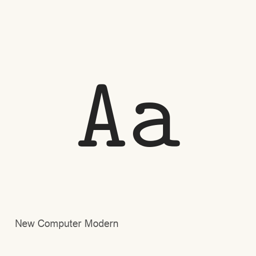
New Computer Modern
Antonis Tsolomitis · An OpenType font collection with serif, sans-serif, monospaced, mathematical, Devanagari, and uncial files.
- Installazioni in 30 giorni
- 32
- Installazioni in un anno
- 429
- Ultimi 365 giorni
- Ultima versione
- 8.1.1
- 22 giu · 22 giu
- Dimensione del download
- 25MB
- arm64 / x86_64 · txz
- Frequenza di rilascio
- Ogni mese
- 0 versioni in 30 giorni
New Computer Modern è un font che puoi installare su un Mac. Lo sviluppatore è Antonis Tsolomitis.
Informazioni di base
- File dei font
- 41 · OTF
- Percorso di installazione
~/Library/Fonts- Sviluppatore
- Antonis Tsolomitis
- Comando di installazione
brew install --cask font-new-computer-modern- Homebrew
- Installabile; aggiornato da Homebrew
- Altri nomi
- font-new-computer-modern
Descrizione
New Computer Modern is a font collection distributed as OpenType files. The Homebrew cask installs a specific set of font files into the user’s ~/ directory; it does not install an application.
The installed collection includes serif styles in regular, italic, bold, and book variants; sans-serif and monospaced styles; mathematical fonts; Devanagari styles; and uncial styles. The exact installed files are NewCMUncial10-Regular., NewCM08-BookItalic., NewCM08-Italic., NewCM08-Regular., NewCM08Devanagari-Book., NewCM08Devanagari-Regular., NewCM10-Bold., NewCM10-BoldItalic., NewCM10-Book., NewCM10-BookItalic., NewCM10-Italic., NewCM10-Regular., NewCM10Devanagari-Bold., NewCM10Devanagari-Book., NewCM10Devanagari-Regular., NewCMMath-Bold., NewCMMath-Book., NewCMMath-Regular., NewCMMono10-Bold., NewCMMono10-BoldOblique., NewCMMono10-Book., NewCMMono10-BookItalic., NewCMMono10-Italic., NewCMMono10-Regular., NewCMSans08-Book., NewCMSans08-BookOblique., NewCMSans08-Oblique., NewCMSans08-Regular., NewCMSans10-Bold., NewCMSans10-BoldOblique., NewCMSans10-Book., NewCMSans10-BookOblique., NewCMSans10-Oblique., NewCMSans10-Regular., NewCMSansMath-Regular., NewCMUncial08-Bold., NewCMUncial08-Book., NewCMUncial08-Regular., NewCMUncial10-Bold., NewCMUncial10-Book., and NewCM08-Book..
Install it with brew install --cask font-new-computer-modern. After installation, select the desired installed font by name in an application that supports custom fonts. The monospaced files can be selected in a compatible editor or terminal. The included file list identifies the installed styles, but does not establish complete Unicode coverage or ligature support.
Sources: Project page, font archive
Requisiti di sistema
| macOS | Versione dell’app | Chip | Download | Fonte |
|---|---|---|---|---|
| Versione per macOS 27, 26, 15, 14, 13, 12, 11 | 8.1.1 | Intel | download.gnu.org.ua/release/newcm/newcm-8.1.1.txzSHA-256 1c10a9e2be6b0978a5d6e851094de72727237c1794ac200bc63604eb49adcba0 | HomebrewVerificato il |
| Versione per macOS 27, 26, 15, 14, 13, 12, 11 | 8.1.1 | Apple silicon | download.gnu.org.ua/release/newcm/newcm-8.1.1.txzSHA-256 1c10a9e2be6b0978a5d6e851094de72727237c1794ac200bc63604eb49adcba0 | HomebrewVerificato il |
Come installare New Computer Modern sul Mac
- Esegui in “Terminale”:
brew install --cask font-new-computer-modern - Homebrew installa il font in ~/Library/Fonts, dove Libro Font può usarlo.
Installa senza Homebrew
Scarica lo stesso file usato da Homebrew: download.gnu.org.ua/release/newcm/newcm-8.1.1.txz
Lo SHA-256 serve solo a verificare che il download sia completo: non è una certificazione di sicurezza. Mostra lo SHA-256 e l’indirizzo di download
Disinstallazione di New Computer Modern e pulizia facoltativa dei dati
brew uninstall --cask font-new-computer-modernUna disinstallazione normale rimuove l’app e ne conserva impostazioni e cache.
Novità della versione 8.1.1
Nuova versione Redazione OpenNavo
Questa versione non ha note di rilascio specifiche.
Dettagli di installazione
- Tap
- homebrew/cask
- URL di download
- https://download.gnu.org.ua/release/newcm/newcm-8.1.1.txz
- SHA-256
- 1c10a9e2be6b0978a5d6e851094de72727237c1794ac200bc63604eb49adcba0
- Definizione Homebrew
- github.com/homebrew/homebrew-cask/blob/HEAD/Casks/font/font-n/font-new-computer-modern.rb
- formulae.brew.sh
- formulae.brew.sh/cask/font-new-computer-modern
Contenuti di installazione e rimozione
Installazione
fontFile di origine: newcm-8.
1. 1/ otf/ NewCMUncial10-Regular. otf Destinazione dichiarata: /
$HOME/ Library/ Fonts/ NewCMUncial10-Regular. otf Mostra la dichiarazione completa
{ "font": [ "newcm-8.
1. ], "target": "/1/ otf/ NewCMUncial10-Regular. otf" $HOME/ }Library/ Fonts/ NewCMUncial10-Regular. otf" Installazione
fontFile di origine: newcm-8.
1. 1/ otf/ NewCM08-BookItalic. otf Destinazione dichiarata: /
$HOME/ Library/ Fonts/ NewCM08-BookItalic. otf Mostra la dichiarazione completa
{ "font": [ "newcm-8.
1. ], "target": "/1/ otf/ NewCM08-BookItalic. otf" $HOME/ }Library/ Fonts/ NewCM08-BookItalic. otf" Installazione
fontFile di origine: newcm-8.
1. 1/ otf/ NewCM08-Italic. otf Destinazione dichiarata: /
$HOME/ Library/ Fonts/ NewCM08-Italic. otf Mostra la dichiarazione completa
{ "font": [ "newcm-8.
1. ], "target": "/1/ otf/ NewCM08-Italic. otf" $HOME/ }Library/ Fonts/ NewCM08-Italic. otf" Installazione
fontFile di origine: newcm-8.
1. 1/ otf/ NewCM08-Regular. otf Destinazione dichiarata: /
$HOME/ Library/ Fonts/ NewCM08-Regular. otf Mostra la dichiarazione completa
{ "font": [ "newcm-8.
1. ], "target": "/1/ otf/ NewCM08-Regular. otf" $HOME/ }Library/ Fonts/ NewCM08-Regular. otf" Installazione
fontFile di origine: newcm-8.
1. 1/ otf/ NewCM08Devanagari-Book. otf Destinazione dichiarata: /
$HOME/ Library/ Fonts/ NewCM08Devanagari-Book. otf Mostra la dichiarazione completa
{ "font": [ "newcm-8.
1. ], "target": "/1/ otf/ NewCM08Devanagari-Book. otf" $HOME/ }Library/ Fonts/ NewCM08Devanagari-Book. otf" Installazione
fontFile di origine: newcm-8.
1. 1/ otf/ NewCM08Devanagari-Regular. otf Destinazione dichiarata: /
$HOME/ Library/ Fonts/ NewCM08Devanagari-Regular. otf Mostra la dichiarazione completa
{ "font": [ "newcm-8.
1. ], "target": "/1/ otf/ NewCM08Devanagari-Regular. otf" $HOME/ }Library/ Fonts/ NewCM08Devanagari-Regular. otf" Installazione
fontFile di origine: newcm-8.
1. 1/ otf/ NewCM10-Bold. otf Destinazione dichiarata: /
$HOME/ Library/ Fonts/ NewCM10-Bold. otf Mostra la dichiarazione completa
{ "font": [ "newcm-8.
1. ], "target": "/1/ otf/ NewCM10-Bold. otf" $HOME/ }Library/ Fonts/ NewCM10-Bold. otf" Installazione
fontFile di origine: newcm-8.
1. 1/ otf/ NewCM10-BoldItalic. otf Destinazione dichiarata: /
$HOME/ Library/ Fonts/ NewCM10-BoldItalic. otf Mostra la dichiarazione completa
{ "font": [ "newcm-8.
1. ], "target": "/1/ otf/ NewCM10-BoldItalic. otf" $HOME/ }Library/ Fonts/ NewCM10-BoldItalic. otf" Installazione
fontFile di origine: newcm-8.
1. 1/ otf/ NewCM10-Book. otf Destinazione dichiarata: /
$HOME/ Library/ Fonts/ NewCM10-Book. otf Mostra la dichiarazione completa
{ "font": [ "newcm-8.
1. ], "target": "/1/ otf/ NewCM10-Book. otf" $HOME/ }Library/ Fonts/ NewCM10-Book. otf" Installazione
fontFile di origine: newcm-8.
1. 1/ otf/ NewCM10-BookItalic. otf Destinazione dichiarata: /
$HOME/ Library/ Fonts/ NewCM10-BookItalic. otf Mostra la dichiarazione completa
{ "font": [ "newcm-8.
1. ], "target": "/1/ otf/ NewCM10-BookItalic. otf" $HOME/ }Library/ Fonts/ NewCM10-BookItalic. otf" Installazione
fontFile di origine: newcm-8.
1. 1/ otf/ NewCM10-Italic. otf Destinazione dichiarata: /
$HOME/ Library/ Fonts/ NewCM10-Italic. otf Mostra la dichiarazione completa
{ "font": [ "newcm-8.
1. ], "target": "/1/ otf/ NewCM10-Italic. otf" $HOME/ }Library/ Fonts/ NewCM10-Italic. otf" Installazione
fontFile di origine: newcm-8.
1. 1/ otf/ NewCM10-Regular. otf Destinazione dichiarata: /
$HOME/ Library/ Fonts/ NewCM10-Regular. otf Mostra la dichiarazione completa
{ "font": [ "newcm-8.
1. ], "target": "/1/ otf/ NewCM10-Regular. otf" $HOME/ }Library/ Fonts/ NewCM10-Regular. otf" Installazione
fontFile di origine: newcm-8.
1. 1/ otf/ NewCM10Devanagari-Bold. otf Destinazione dichiarata: /
$HOME/ Library/ Fonts/ NewCM10Devanagari-Bold. otf Mostra la dichiarazione completa
{ "font": [ "newcm-8.
1. ], "target": "/1/ otf/ NewCM10Devanagari-Bold. otf" $HOME/ }Library/ Fonts/ NewCM10Devanagari-Bold. otf" Installazione
fontFile di origine: newcm-8.
1. 1/ otf/ NewCM10Devanagari-Book. otf Destinazione dichiarata: /
$HOME/ Library/ Fonts/ NewCM10Devanagari-Book. otf Mostra la dichiarazione completa
{ "font": [ "newcm-8.
1. ], "target": "/1/ otf/ NewCM10Devanagari-Book. otf" $HOME/ }Library/ Fonts/ NewCM10Devanagari-Book. otf" Installazione
fontFile di origine: newcm-8.
1. 1/ otf/ NewCM10Devanagari-Regular. otf Destinazione dichiarata: /
$HOME/ Library/ Fonts/ NewCM10Devanagari-Regular. otf Mostra la dichiarazione completa
{ "font": [ "newcm-8.
1. ], "target": "/1/ otf/ NewCM10Devanagari-Regular. otf" $HOME/ }Library/ Fonts/ NewCM10Devanagari-Regular. otf" Installazione
fontFile di origine: newcm-8.
1. 1/ otf/ NewCMMath-Bold. otf Destinazione dichiarata: /
$HOME/ Library/ Fonts/ NewCMMath-Bold. otf Mostra la dichiarazione completa
{ "font": [ "newcm-8.
1. ], "target": "/1/ otf/ NewCMMath-Bold. otf" $HOME/ }Library/ Fonts/ NewCMMath-Bold. otf" Installazione
fontFile di origine: newcm-8.
1. 1/ otf/ NewCMMath-Book. otf Destinazione dichiarata: /
$HOME/ Library/ Fonts/ NewCMMath-Book. otf Mostra la dichiarazione completa
{ "font": [ "newcm-8.
1. ], "target": "/1/ otf/ NewCMMath-Book. otf" $HOME/ }Library/ Fonts/ NewCMMath-Book. otf" Installazione
fontFile di origine: newcm-8.
1. 1/ otf/ NewCMMath-Regular. otf Destinazione dichiarata: /
$HOME/ Library/ Fonts/ NewCMMath-Regular. otf Mostra la dichiarazione completa
{ "font": [ "newcm-8.
1. ], "target": "/1/ otf/ NewCMMath-Regular. otf" $HOME/ }Library/ Fonts/ NewCMMath-Regular. otf" Installazione
fontFile di origine: newcm-8.
1. 1/ otf/ NewCMMono10-Bold. otf Destinazione dichiarata: /
$HOME/ Library/ Fonts/ NewCMMono10-Bold. otf Mostra la dichiarazione completa
{ "font": [ "newcm-8.
1. ], "target": "/1/ otf/ NewCMMono10-Bold. otf" $HOME/ }Library/ Fonts/ NewCMMono10-Bold. otf" Installazione
fontFile di origine: newcm-8.
1. 1/ otf/ NewCMMono10-BoldOblique. otf Destinazione dichiarata: /
$HOME/ Library/ Fonts/ NewCMMono10-BoldOblique. otf Mostra la dichiarazione completa
{ "font": [ "newcm-8.
1. ], "target": "/1/ otf/ NewCMMono10-BoldOblique. otf" $HOME/ }Library/ Fonts/ NewCMMono10-BoldOblique. otf"
Domande frequenti su New Computer Modern
Come disinstallare completamente New Computer Modern dal Mac?
Esegui brew uninstall --cask font-new-computer-modern.
Qual è l’ultima versione di New Computer Modern?
L’ultima versione è la 8.1.1, aggiunta a Homebrew il 22 giu. Per aggiornarlo, esegui brew upgrade --cask font-new-computer-modern.
Fonti
Ogni dato di questa pagina indica fonte e data di verifica. I dati scaduti riportano solo “Dati al” seguito dalla data e non vengono più presentati come attuali.
- Definizione Homebrew: github.com/homebrew/homebrew-cask/blob/HEAD/Casks/font/font-n/font-new-computer-modern.rb · Verificato il
- formulae.brew.sh: formulae.brew.sh/cask/font-new-computer-modern