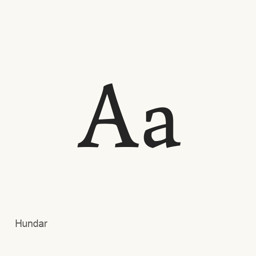
Hundar
Emily de Oliveira Santos · An open-source typeface project focused on book and article writing, particularly academic and scientific work.
- Installazioni in 30 giorni
- 0
- Installazioni in un anno
- 14
- Ultimi 365 giorni
- Ultima versione
- latest
- Dimensione del download
- 25kB
- arm64 / x86_64 · otf
- Frequenza di rilascio
- Irregolare
- 0 versioni in 30 giorni
Hundar è un font che puoi installare su un Mac. Lo sviluppatore è Emily de Oliveira Santos.
Informazioni di base
- File dei font
- 1 · OTF
- Percorso di installazione
~/Library/Fonts- Sviluppatore
- Emily de Oliveira Santos
- Comando di installazione
brew install --cask font-hundar- Homebrew
- Installabile; aggiornato da Homebrew
- Altri nomi
- font-darwin, font-hundar
Descrizione
Hundar is an open-source typeface project intended for book and article writing, with a particular focus on academic and scientific use. This Homebrew cask installs one font file, Hundar.; it does not install a writing application.
- The project describes the typeface as intended for book and article writing.
- Its stated focus is academic and scientific usage.
- The cask installs the single file
Hundar.in the user’s Fonts folder.otf
Install with brew install --cask font-hundar. After installation, select Hundar as the font in a compatible application. For example, choose it in a word processor or publishing tool when formatting text. The installed font file alone does not establish which styles or character sets are included, or whether it supports features such as ligatures.
Version changes: Unknown.
Requisiti di sistema
| macOS | Versione dell’app | Chip | Download | Fonte |
|---|---|---|---|---|
| Versione per macOS 27, 26, 15, 14, 13, 12, 11 | latest | Intel | raw.githubusercontent.com/The-EPL-Type-Foundry/Hundar/refs/heads/main/fonts/otf/Hundar.otf | HomebrewVerificato il |
| Versione per macOS 27, 26, 15, 14, 13, 12, 11 | latest | Apple silicon | raw.githubusercontent.com/The-EPL-Type-Foundry/Hundar/refs/heads/main/fonts/otf/Hundar.otf | HomebrewVerificato il |
Come installare Hundar sul Mac
- Esegui in “Terminale”:
brew install --cask font-hundar - Homebrew installa il font in ~/Library/Fonts, dove Libro Font può usarlo.
Installa senza Homebrew
Scarica lo stesso file usato da Homebrew: raw.githubusercontent.com/The-EPL-Type-Foundry/Hundar/refs/heads/main/fonts/otf/Hundar.otf
Disinstallazione di Hundar e pulizia facoltativa dei dati
brew uninstall --cask font-hundarUna disinstallazione normale rimuove l’app e ne conserva impostazioni e cache.
Novità della versione latest
Nuova versione Dai commit di Homebrew
Questa versione non ha note di rilascio specifiche.
Dettagli di installazione
- Tap
- homebrew/cask
- Token precedenti
- font-darwin
- URL di download
- https://raw.githubusercontent.com/The-EPL-Type-Foundry/Hundar/refs/heads/main/fonts/otf/Hundar.otf
- Definizione Homebrew
- github.com/homebrew/homebrew-cask/blob/HEAD/Casks/font/font-h/font-hundar.rb
- formulae.brew.sh
- formulae.brew.sh/cask/font-hundar
- Codice sorgente
- github.com/The-EPL-Type-Foundry/Hundar
Contenuti di installazione e rimozione
Installazione
fontFile di origine: Hundar.
otf Destinazione dichiarata: /
$HOME/ Library/ Fonts/ Hundar. otf Mostra la dichiarazione completa
{ "font": [ "Hundar.
otf" ], "target": "/$HOME/ }Library/ Fonts/ Hundar. otf"
Domande frequenti su Hundar
Come disinstallare completamente Hundar dal Mac?
Esegui brew uninstall --cask font-hundar.
Fonti
Ogni dato di questa pagina indica fonte e data di verifica. I dati scaduti riportano solo “Dati al” seguito dalla data e non vengono più presentati come attuali.
- Definizione Homebrew: github.com/homebrew/homebrew-cask/blob/HEAD/Casks/font/font-h/font-hundar.rb · Verificato il
- formulae.brew.sh: formulae.brew.sh/cask/font-hundar