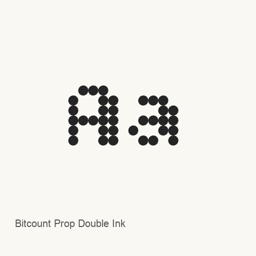
Bitcount Prop Double Ink
TYPETR · A Google Fonts typeface distributed as one variable TrueType font file.
- Installazioni in 30 giorni
- 2
- Installazioni in un anno
- 24
- Ultimi 365 giorni
- Ultima versione
- latest
- 5 set 2025 · 5 set 2025
- Dimensione del download
- 339kB
- arm64 / x86_64 · ttf
- Frequenza di rilascio
- Irregolare
- 0 versioni in 30 giorni
Bitcount Prop Double Ink è un font che puoi installare su un Mac. Lo sviluppatore è TYPETR.
Informazioni di base
- File dei font
- 1 · TTF
- Percorso di installazione
~/Library/Fonts- Sviluppatore
- TYPETR
- Comando di installazione
brew install --cask font-bitcount-prop-double-ink- Homebrew
- Installabile; aggiornato da Homebrew
- Altri nomi
- font-bitcount-prop-double-ink
Descrizione
Bitcount Prop Double Ink is a font available through Google Fonts. The Homebrew cask installs one TrueType font file, named BitcountPropDoubleInk[CRSV,ELSH,ELXP,SZP1,SZP2,XPN1,XPN2,YPN1,YPN2,slnt,wght].. The filename identifies it as a variable font; the cask provides this file rather than a collection of separate font files.
To install it, run brew install --cask font-bitcount-prop-double-ink. After installation, select Bitcount Prop Double Ink from the font menu in an application that supports installed fonts. Installing this cask adds a font file; it does not install a separate application. The supplied package information does not establish particular glyph coverage, stylistic options, or application compatibility, so consult the font picker in your chosen application to see whether it can use the installed font.
- The listed artifact is a TrueType (
.) font file.ttf - The cask installs one font file under the user’s
Library/directory.Fonts - The font’s official Google Fonts page is linked below.
Requisiti di sistema
| macOS | Versione dell’app | Chip | Download | Fonte |
|---|---|---|---|---|
| Versione per macOS 27, 26, 15, 14, 13, 12, 11 | latest | Intel | github.com/google/fonts/raw/main/ofl/bitcountpropdoubleink/BitcountPropDoubleInk%5BCRSV%2CELSH%2CELXP%2CSZP1%2CSZP2%2CXPN1%2CXPN2%2CYPN1%2CYPN2%2Cslnt%2Cwght%5D.ttf | HomebrewVerificato il |
| Versione per macOS 27, 26, 15, 14, 13, 12, 11 | latest | Apple silicon | github.com/google/fonts/raw/main/ofl/bitcountpropdoubleink/BitcountPropDoubleInk%5BCRSV%2CELSH%2CELXP%2CSZP1%2CSZP2%2CXPN1%2CXPN2%2CYPN1%2CYPN2%2Cslnt%2Cwght%5D.ttf | HomebrewVerificato il |
Come installare Bitcount Prop Double Ink sul Mac
- Esegui in “Terminale”:
brew install --cask font-bitcount-prop-double-ink - Homebrew installa il font in ~/Library/Fonts, dove Libro Font può usarlo.
Installa senza Homebrew
Scarica lo stesso file usato da Homebrew: github.com/google/fonts/raw/main/ofl/bitcountpropdoubleink/BitcountPropDoubleInk%5BCRSV%2CELSH%2CELXP%2CSZP1%2CSZP2%2CXPN1%2CXPN2%2CYPN1%2CYPN2%2Cslnt%2Cwght%5D.ttf
Disinstallazione di Bitcount Prop Double Ink e pulizia facoltativa dei dati
brew uninstall --cask font-bitcount-prop-double-inkUna disinstallazione normale rimuove l’app e ne conserva impostazioni e cache.
Novità della versione latest
Nuova versione · Redazione OpenNavo
Questa versione non ha note di rilascio specifiche.
Dettagli di installazione
- Tap
- homebrew/cask
- URL di download
- https://github.com/google/fonts/raw/main/ofl/bitcountpropdoubleink/BitcountPropDoubleInk%5BCRSV%2CELSH%2CELXP%2CSZP1%2CSZP2%2CXPN1%2CXPN2%2CYPN1%2CYPN2%2Cslnt%2Cwght%5D.ttf
- Definizione Homebrew
- github.com/homebrew/homebrew-cask/blob/HEAD/Casks/font/font-b/font-bitcount-prop-double-ink.rb
- formulae.brew.sh
- formulae.brew.sh/cask/font-bitcount-prop-double-ink
- Codice sorgente
- github.com/google/fonts
Contenuti di installazione e rimozione
Installazione
fontFile di origine: BitcountPropDoubleInk[CRSV,ELSH,ELXP,SZP1,SZP2,XPN1,XPN2,YPN1,YPN2,slnt,wght].
ttf Destinazione dichiarata: /
$HOME/ Library/ Fonts/ BitcountPropDoubleInk[CRSV,ELSH,ELXP,SZP1,SZP2,XPN1,XPN2,YPN1,YPN2,slnt,wght]. ttf Mostra la dichiarazione completa
{ "font": [ "BitcountPropDoubleInk[CRSV,ELSH,ELXP,SZP1,SZP2,XPN1,XPN2,YPN1,YPN2,slnt,wght].
ttf" ], "target": "/$HOME/ }Library/ Fonts/ BitcountPropDoubleInk[CRSV,ELSH,ELXP,SZP1,SZP2,XPN1,XPN2,YPN1,YPN2,slnt,wght]. ttf"
Domande frequenti su Bitcount Prop Double Ink
Come disinstallare completamente Bitcount Prop Double Ink dal Mac?
Esegui brew uninstall --cask font-bitcount-prop-double-ink.
Fonti
Ogni dato di questa pagina indica fonte e data di verifica. I dati scaduti riportano solo “Dati al” seguito dalla data e non vengono più presentati come attuali.
- Definizione Homebrew: github.com/homebrew/homebrew-cask/blob/HEAD/Casks/font/font-b/font-bitcount-prop-double-ink.rb · Verificato il
- formulae.brew.sh: formulae.brew.sh/cask/font-bitcount-prop-double-ink