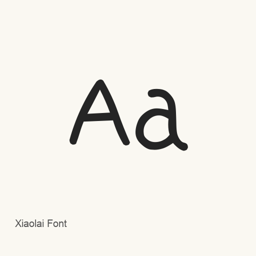
Xiaolai Font
LXGW / Nozomi Seto · A Chinese handwriting font derived from SetoFont; this Homebrew cask installs its Xiaolai-Regular.ttf file.
- Installations sur 30 jours
- 5
- Installations sur 1 an
- 35
- 365 derniers jours
- Dernière version
- 3.126
- 10 sept. 2025 · 10 sept. 2025
- Taille du téléchargement
- 22Mo
- arm64 / x86_64 · ttf
- Rythme des versions
- Irrégulier
- 0 version en 30 jours
Xiaolai Font est une police que vous pouvez installer sur un Mac. Développée par LXGW / Nozomi Seto.
Informations clés
- Fichiers de police
- 1 · TTF
- Emplacement d’installation
~/Library/Fonts- Développeur
- LXGW / Nozomi Seto
- Commande d’installation
brew install --cask font-xiaolai- Homebrew
- Disponible ; mises à jour par Homebrew
- Autres noms
- 小赖字体, 小瀨字體, Kose Font, font-xiaolai
Présentation
Xiaolai Font is a Chinese typeface derived from SetoFont. The project describes it as a simplified-Chinese adaptation that supplements characters, particularly those in GB2312 and the General Standard Chinese Characters table.
The project says the font displays the Chinese characters covered by GB 18030-2022 implementation level 2 and all 8,105 characters in the General Standard Chinese Characters table. It also describes support for Japanese kana, Korean Hangul syllables, and special symbols displayable in Source Han Sans. These are project-level descriptions; the supplied evidence does not identify the exact variant or coverage of the cask’s Xiaolai-Regular. file.
The project notes that some glyph forms may not follow mainland China standards and that added characters may differ in appearance from the source font.
Install with brew install --cask font-xiaolai. After installation, select Xiaolai Font in a compatible application that lets you choose installed fonts. This cask installs Xiaolai-Regular.; it does not install an app. Font rendering and character display depend on the application and its text support.
Configuration requise
| macOS | Version | Puce | Téléchargement | Source |
|---|---|---|---|---|
| Version pour macOS 27, 26, 15, 14, 13, 12, 11 | 3.126 | Intel | github.com/lxgw/kose-font/releases/download/v3.126/Xiaolai-Regular.ttfSHA-256 e2f68daf0e72777a8cf58bc83de1b98634b251e537ddbfca24b0ae50d1802da2 | HomebrewVérifié le |
| Version pour macOS 27, 26, 15, 14, 13, 12, 11 | 3.126 | Apple silicon | github.com/lxgw/kose-font/releases/download/v3.126/Xiaolai-Regular.ttfSHA-256 e2f68daf0e72777a8cf58bc83de1b98634b251e537ddbfca24b0ae50d1802da2 | HomebrewVérifié le |
Comment installer Xiaolai Font sur Mac
- Dans « Terminal », exécutez :
brew install --cask font-xiaolai - Homebrew installe la police dans ~/Library/Fonts, où Livre des polices peut l’utiliser.
Installer sans Homebrew
Téléchargez le même fichier que Homebrew : github.com/lxgw/kose-font/releases/download/v3.126/Xiaolai-Regular.ttf
Le SHA-256 vérifie seulement que le téléchargement est complet ; ce n’est pas une certification de sécurité. Voir le SHA-256 et l’adresse de téléchargement
Désinstaller Xiaolai Font et nettoyer éventuellement ses données
brew uninstall --cask font-xiaolaiUne désinstallation standard supprime l’app mais conserve ses réglages et ses caches.
Nouveautés de la version 3.126
Nouveau · Rédaction OpenNavo
Cette version n’a pas de notes dédiées.
Détails d’installation
- Tap
- homebrew/cask
- URL de téléchargement
- https://github.com/lxgw/kose-font/releases/download/v3.126/Xiaolai-Regular.ttf
- SHA-256
- e2f68daf0e72777a8cf58bc83de1b98634b251e537ddbfca24b0ae50d1802da2
- Définition Homebrew
- github.com/homebrew/homebrew-cask/blob/HEAD/Casks/font/font-x/font-xiaolai.rb
- formulae.brew.sh
- formulae.brew.sh/cask/font-xiaolai
- Code source
- github.com/lxgw/kose-font
Contenu de l’installation et de la désinstallation
Installation
fontFichier source: Xiaolai-Regular.
ttf Destination déclarée: /
$HOME/ Library/ Fonts/ Xiaolai-Regular. ttf Voir la déclaration complète
{ "font": [ "Xiaolai-Regular.
ttf" ], "target": "/$HOME/ }Library/ Fonts/ Xiaolai-Regular. ttf"
Questions fréquentes sur Xiaolai Font
Comment désinstaller complètement Xiaolai Font sur Mac ?
Exécutez brew uninstall --cask font-xiaolai.
Xiaolai Font : quelle est la dernière version ?
La dernière version est 3.126, ajoutée à Homebrew le 1 juin. Exécutez brew upgrade --cask font-xiaolai pour le mettre à jour.
Sources
Chaque information de cette page indique sa source et sa date de vérification. Les informations dont la validité a expiré sont présentées comme valables « au » jour indiqué et ne sont plus données comme actuelles.
- Définition Homebrew : github.com/homebrew/homebrew-cask/blob/HEAD/Casks/font/font-x/font-xiaolai.rb · Vérifié le
- formulae.brew.sh : formulae.brew.sh/cask/font-xiaolai