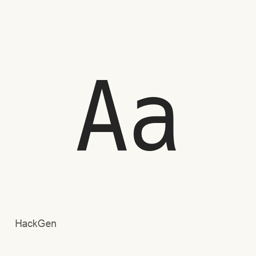
HackGen
yuru7 · A programming font combining Hack and GenJyuu-Gothic, with standard and 3:5-width families and console-focused variants.
- Installations sur 30 jours
- 131
- Installations sur 1 an
- 2,4 k
- 365 derniers jours
- Dernière version
- 2.10.0
- 29 déc. 2024 · 29 déc. 2024
- Taille du téléchargement
- 40Mo
- arm64 / x86_64 · zip
- Rythme des versions
- Mensuel
- 0 version en 30 jours
HackGen est une police que vous pouvez installer sur un Mac. Développée par yuru7.
Informations clés
- Fichiers de police
- 8 · TTF
- Emplacement d’installation
~/Library/Fonts- Développeur
- yuru7
- Commande d’installation
brew install --cask font-hackgen- Homebrew
- Disponible ; mises à jour par Homebrew
- Autres noms
- font-hackgen
Présentation
HackGen is a programming font that combines Latin characters from Hack with kana and kanji based on GenJyuu-Gothic. This Homebrew cask installs eight regular and bold TTF files across the HackGen, HackGen Console, HackGen35, and HackGen35 Console families; it does not install an application.
- HackGen uses a half-width-to-full-width ratio of 1:2, while HackGen35 uses 3:5 and displays Latin letters and numbers larger than the standard family.
- The Console families apply Hack-based letterforms throughout; many symbols, including arrows, are displayed at half width.
- All four families include Powerline symbols. The font also makes full-width spaces visible and modifies the pipe glyph to improve code legibility.
- Kana and kanji draw on GenJyuu-Gothic, and the project describes support through the fourth level of Japanese kanji. Latin characters include hinting for clearer display.
Install with brew install --cask font-hackgen. After installation, select the installed HackGen family and style in your editor or terminal’s font settings. The cask’s files cover regular and bold styles for these four families. It installs the standard font files, not the separately offered Nerd Font variants.
Configuration requise
| macOS | Version | Puce | Téléchargement | Source |
|---|---|---|---|---|
| Version pour macOS 27, 26, 15, 14, 13, 12, 11 | 2.10.0 | Intel | github.com/yuru7/HackGen/releases/download/v2.10.0/HackGen_v2.10.0.zipSHA-256 ed182e2a4b95792d94dea7932f6b45280b5ae353651be249d5f6b7867b788db7 | HomebrewVérifié le |
| Version pour macOS 27, 26, 15, 14, 13, 12, 11 | 2.10.0 | Apple silicon | github.com/yuru7/HackGen/releases/download/v2.10.0/HackGen_v2.10.0.zipSHA-256 ed182e2a4b95792d94dea7932f6b45280b5ae353651be249d5f6b7867b788db7 | HomebrewVérifié le |
Comment installer HackGen sur Mac
- Dans « Terminal », exécutez :
brew install --cask font-hackgen - Homebrew installe la police dans ~/Library/Fonts, où Livre des polices peut l’utiliser.
Installer sans Homebrew
Téléchargez le même fichier que Homebrew : github.com/yuru7/HackGen/releases/download/v2.10.0/HackGen_v2.10.0.zip
Le SHA-256 vérifie seulement que le téléchargement est complet ; ce n’est pas une certification de sécurité. Voir le SHA-256 et l’adresse de téléchargement
Désinstaller HackGen et nettoyer éventuellement ses données
brew uninstall --cask font-hackgenUne désinstallation standard supprime l’app mais conserve ses réglages et ses caches.
Nouveautés de la version 2.10.0
Nouveau · Rédaction OpenNavo
Cette version n’a pas de notes dédiées.
Détails d’installation
- Tap
- homebrew/cask
- URL de téléchargement
- https://github.com/yuru7/HackGen/releases/download/v2.10.0/HackGen_v2.10.0.zip
- SHA-256
- ed182e2a4b95792d94dea7932f6b45280b5ae353651be249d5f6b7867b788db7
- Définition Homebrew
- github.com/homebrew/homebrew-cask/blob/HEAD/Casks/font/font-h/font-hackgen.rb
- formulae.brew.sh
- formulae.brew.sh/cask/font-hackgen
- Code source
- github.com/yuru7/HackGen
Contenu de l’installation et de la désinstallation
Installation
fontFichier source: HackGen_v2.
10. 0/ HackGenConsole-Regular. ttf Destination déclarée: /
$HOME/ Library/ Fonts/ HackGenConsole-Regular. ttf Voir la déclaration complète
{ "font": [ "HackGen_v2.
10. ], "target": "/0/ HackGenConsole-Regular. ttf" $HOME/ }Library/ Fonts/ HackGenConsole-Regular. ttf" Installation
fontFichier source: HackGen_v2.
10. 0/ HackGen-Regular. ttf Destination déclarée: /
$HOME/ Library/ Fonts/ HackGen-Regular. ttf Voir la déclaration complète
{ "font": [ "HackGen_v2.
10. ], "target": "/0/ HackGen-Regular. ttf" $HOME/ }Library/ Fonts/ HackGen-Regular. ttf" Installation
fontFichier source: HackGen_v2.
10. 0/ HackGen35-Bold. ttf Destination déclarée: /
$HOME/ Library/ Fonts/ HackGen35-Bold. ttf Voir la déclaration complète
{ "font": [ "HackGen_v2.
10. ], "target": "/0/ HackGen35-Bold. ttf" $HOME/ }Library/ Fonts/ HackGen35-Bold. ttf" Installation
fontFichier source: HackGen_v2.
10. 0/ HackGen35-Regular. ttf Destination déclarée: /
$HOME/ Library/ Fonts/ HackGen35-Regular. ttf Voir la déclaration complète
{ "font": [ "HackGen_v2.
10. ], "target": "/0/ HackGen35-Regular. ttf" $HOME/ }Library/ Fonts/ HackGen35-Regular. ttf" Installation
fontFichier source: HackGen_v2.
10. 0/ HackGen35Console-Bold. ttf Destination déclarée: /
$HOME/ Library/ Fonts/ HackGen35Console-Bold. ttf Voir la déclaration complète
{ "font": [ "HackGen_v2.
10. ], "target": "/0/ HackGen35Console-Bold. ttf" $HOME/ }Library/ Fonts/ HackGen35Console-Bold. ttf" Installation
fontFichier source: HackGen_v2.
10. 0/ HackGen35Console-Regular. ttf Destination déclarée: /
$HOME/ Library/ Fonts/ HackGen35Console-Regular. ttf Voir la déclaration complète
{ "font": [ "HackGen_v2.
10. ], "target": "/0/ HackGen35Console-Regular. ttf" $HOME/ }Library/ Fonts/ HackGen35Console-Regular. ttf" Installation
fontFichier source: HackGen_v2.
10. 0/ HackGenConsole-Bold. ttf Destination déclarée: /
$HOME/ Library/ Fonts/ HackGenConsole-Bold. ttf Voir la déclaration complète
{ "font": [ "HackGen_v2.
10. ], "target": "/0/ HackGenConsole-Bold. ttf" $HOME/ }Library/ Fonts/ HackGenConsole-Bold. ttf" Installation
fontFichier source: HackGen_v2.
10. 0/ HackGen-Bold. ttf Destination déclarée: /
$HOME/ Library/ Fonts/ HackGen-Bold. ttf Voir la déclaration complète
{ "font": [ "HackGen_v2.
10. ], "target": "/0/ HackGen-Bold. ttf" $HOME/ }Library/ Fonts/ HackGen-Bold. ttf"
Questions fréquentes sur HackGen
Comment désinstaller complètement HackGen sur Mac ?
Exécutez brew uninstall --cask font-hackgen.
HackGen : quelle est la dernière version ?
La dernière version est 2.10.0, ajoutée à Homebrew le 30 déc. 2024. Exécutez brew upgrade --cask font-hackgen pour le mettre à jour.
Sources
Chaque information de cette page indique sa source et sa date de vérification. Les informations dont la validité a expiré sont présentées comme valables « au » jour indiqué et ne sont plus données comme actuelles.
- Définition Homebrew : github.com/homebrew/homebrew-cask/blob/HEAD/Casks/font/font-h/font-hackgen.rb · Vérifié le
- formulae.brew.sh : formulae.brew.sh/cask/font-hackgen