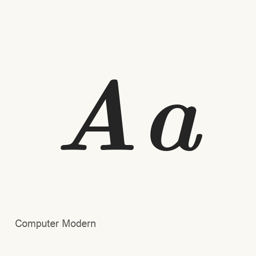
Computer Modern
Andrey Panov and Nikola Lečić · A 33-font Unicode family based on Computer Modern, with glyphs for Latin, Cyrillic, Greek, and IPA.
- Installations sur 30 jours
- 120
- Installations sur 1 an
- 1 k
- 365 derniers jours
- Dernière version
- 0.7.0
- Taille du téléchargement
- 4,9Mo
- arm64 / x86_64 · xz
- Rythme des versions
- Irrégulier
- 0 version en 30 jours
Computer Modern est une police que vous pouvez installer sur un Mac. Développée par Andrey Panov and Nikola Lečić.
Informations clés
- Fichiers de police
- 33 · TTF
- Emplacement d’installation
~/Library/Fonts- Développeur
- Andrey Panov and Nikola Lečić
- Commande d’installation
brew install --cask font-computer-modern- Homebrew
- Disponible ; mises à jour par Homebrew
- Autres noms
- font-computer-modern
Présentation
Computer Modern is a Unicode font family converted from Metafont sources. Its stated purpose is to provide quality fonts for use in applications that support multiple languages. The project describes glyphs from Latin, Cyrillic, and Greek code sets, as well as IPA extensions; the exact glyph coverage varies by font and should not be inferred from this description alone.
The Homebrew cask installs 33 font files. The installed files include a range of named styles, such as Roman, italic, bold, and typewriter variants; the cask installs specific files rather than every possible variant of the family. The project recommends using the fonts with antialiasing enabled.
Install with brew install --cask font-computer-modern. After installation, select the desired Computer Modern font in an application that supports user-installed fonts. This installs fonts, not a standalone application. For glyph coverage details, consult the project’s coverage information.
Configuration requise
| macOS | Version | Puce | Téléchargement | Source |
|---|---|---|---|---|
| Version pour macOS 27, 26, 15, 14, 13, 12, 11 | 0.7.0 | Intel | downloads.sourceforge.net/cm-unicode/cm-unicode-0.7.0-ttf.tar.xzSHA-256 2609c14450f42d0bcd40203900afcb1d693521a9b24a18c65e14b6b0585ff150 | HomebrewVérifié le |
| Version pour macOS 27, 26, 15, 14, 13, 12, 11 | 0.7.0 | Apple silicon | downloads.sourceforge.net/cm-unicode/cm-unicode-0.7.0-ttf.tar.xzSHA-256 2609c14450f42d0bcd40203900afcb1d693521a9b24a18c65e14b6b0585ff150 | HomebrewVérifié le |
Comment installer Computer Modern sur Mac
- Dans « Terminal », exécutez :
brew install --cask font-computer-modern - Homebrew installe la police dans ~/Library/Fonts, où Livre des polices peut l’utiliser.
Installer sans Homebrew
Téléchargez le même fichier que Homebrew : downloads.sourceforge.net/cm-unicode/cm-unicode-0.7.0-ttf.tar.xz
Le SHA-256 vérifie seulement que le téléchargement est complet ; ce n’est pas une certification de sécurité. Voir le SHA-256 et l’adresse de téléchargement
Désinstaller Computer Modern et nettoyer éventuellement ses données
brew uninstall --cask font-computer-modernUne désinstallation standard supprime l’app mais conserve ses réglages et ses caches.
Nouveautés de la version 0.7.0
Nouveau Rédaction OpenNavo
Cette version n’a pas de notes dédiées.
Détails d’installation
- Tap
- homebrew/cask
- URL de téléchargement
- https://downloads.sourceforge.net/cm-unicode/cm-unicode-0.7.0-ttf.tar.xz
- SHA-256
- 2609c14450f42d0bcd40203900afcb1d693521a9b24a18c65e14b6b0585ff150
- Définition Homebrew
- github.com/homebrew/homebrew-cask/blob/HEAD/Casks/font/font-c/font-computer-modern.rb
- formulae.brew.sh
- formulae.brew.sh/cask/font-computer-modern
Contenu de l’installation et de la désinstallation
Installation
fontFichier source: cm-unicode-0.
7. 0/ cmunvt. ttf Destination déclarée: /
$HOME/ Library/ Fonts/ cmunvt. ttf Voir la déclaration complète
{ "font": [ "cm-unicode-0.
7. ], "target": "/0/ cmunvt. ttf" $HOME/ }Library/ Fonts/ cmunvt. ttf" Installation
fontFichier source: cm-unicode-0.
7. 0/ cmunbi. ttf Destination déclarée: /
$HOME/ Library/ Fonts/ cmunbi. ttf Voir la déclaration complète
{ "font": [ "cm-unicode-0.
7. ], "target": "/0/ cmunbi. ttf" $HOME/ }Library/ Fonts/ cmunbi. ttf" Installation
fontFichier source: cm-unicode-0.
7. 0/ cmunbl. ttf Destination déclarée: /
$HOME/ Library/ Fonts/ cmunbl. ttf Voir la déclaration complète
{ "font": [ "cm-unicode-0.
7. ], "target": "/0/ cmunbl. ttf" $HOME/ }Library/ Fonts/ cmunbl. ttf" Installation
fontFichier source: cm-unicode-0.
7. 0/ cmunbmo. ttf Destination déclarée: /
$HOME/ Library/ Fonts/ cmunbmo. ttf Voir la déclaration complète
{ "font": [ "cm-unicode-0.
7. ], "target": "/0/ cmunbmo. ttf" $HOME/ }Library/ Fonts/ cmunbmo. ttf" Installation
fontFichier source: cm-unicode-0.
7. 0/ cmunbmr. ttf Destination déclarée: /
$HOME/ Library/ Fonts/ cmunbmr. ttf Voir la déclaration complète
{ "font": [ "cm-unicode-0.
7. ], "target": "/0/ cmunbmr. ttf" $HOME/ }Library/ Fonts/ cmunbmr. ttf" Installation
fontFichier source: cm-unicode-0.
7. 0/ cmunbso. ttf Destination déclarée: /
$HOME/ Library/ Fonts/ cmunbso. ttf Voir la déclaration complète
{ "font": [ "cm-unicode-0.
7. ], "target": "/0/ cmunbso. ttf" $HOME/ }Library/ Fonts/ cmunbso. ttf" Installation
fontFichier source: cm-unicode-0.
7. 0/ cmunbsr. ttf Destination déclarée: /
$HOME/ Library/ Fonts/ cmunbsr. ttf Voir la déclaration complète
{ "font": [ "cm-unicode-0.
7. ], "target": "/0/ cmunbsr. ttf" $HOME/ }Library/ Fonts/ cmunbsr. ttf" Installation
fontFichier source: cm-unicode-0.
7. 0/ cmunbtl. ttf Destination déclarée: /
$HOME/ Library/ Fonts/ cmunbtl. ttf Voir la déclaration complète
{ "font": [ "cm-unicode-0.
7. ], "target": "/0/ cmunbtl. ttf" $HOME/ }Library/ Fonts/ cmunbtl. ttf" Installation
fontFichier source: cm-unicode-0.
7. 0/ cmunbto. ttf Destination déclarée: /
$HOME/ Library/ Fonts/ cmunbto. ttf Voir la déclaration complète
{ "font": [ "cm-unicode-0.
7. ], "target": "/0/ cmunbto. ttf" $HOME/ }Library/ Fonts/ cmunbto. ttf" Installation
fontFichier source: cm-unicode-0.
7. 0/ cmunbx. ttf Destination déclarée: /
$HOME/ Library/ Fonts/ cmunbx. ttf Voir la déclaration complète
{ "font": [ "cm-unicode-0.
7. ], "target": "/0/ cmunbx. ttf" $HOME/ }Library/ Fonts/ cmunbx. ttf" Installation
fontFichier source: cm-unicode-0.
7. 0/ cmunbxo. ttf Destination déclarée: /
$HOME/ Library/ Fonts/ cmunbxo. ttf Voir la déclaration complète
{ "font": [ "cm-unicode-0.
7. ], "target": "/0/ cmunbxo. ttf" $HOME/ }Library/ Fonts/ cmunbxo. ttf" Installation
fontFichier source: cm-unicode-0.
7. 0/ cmunci. ttf Destination déclarée: /
$HOME/ Library/ Fonts/ cmunci. ttf Voir la déclaration complète
{ "font": [ "cm-unicode-0.
7. ], "target": "/0/ cmunci. ttf" $HOME/ }Library/ Fonts/ cmunci. ttf" Installation
fontFichier source: cm-unicode-0.
7. 0/ cmunit. ttf Destination déclarée: /
$HOME/ Library/ Fonts/ cmunit. ttf Voir la déclaration complète
{ "font": [ "cm-unicode-0.
7. ], "target": "/0/ cmunit. ttf" $HOME/ }Library/ Fonts/ cmunit. ttf" Installation
fontFichier source: cm-unicode-0.
7. 0/ cmunobi. ttf Destination déclarée: /
$HOME/ Library/ Fonts/ cmunobi. ttf Voir la déclaration complète
{ "font": [ "cm-unicode-0.
7. ], "target": "/0/ cmunobi. ttf" $HOME/ }Library/ Fonts/ cmunobi. ttf" Installation
fontFichier source: cm-unicode-0.
7. 0/ cmunobx. ttf Destination déclarée: /
$HOME/ Library/ Fonts/ cmunobx. ttf Voir la déclaration complète
{ "font": [ "cm-unicode-0.
7. ], "target": "/0/ cmunobx. ttf" $HOME/ }Library/ Fonts/ cmunobx. ttf" Installation
fontFichier source: cm-unicode-0.
7. 0/ cmunorm. ttf Destination déclarée: /
$HOME/ Library/ Fonts/ cmunorm. ttf Voir la déclaration complète
{ "font": [ "cm-unicode-0.
7. ], "target": "/0/ cmunorm. ttf" $HOME/ }Library/ Fonts/ cmunorm. ttf" Installation
fontFichier source: cm-unicode-0.
7. 0/ cmunoti. ttf Destination déclarée: /
$HOME/ Library/ Fonts/ cmunoti. ttf Voir la déclaration complète
{ "font": [ "cm-unicode-0.
7. ], "target": "/0/ cmunoti. ttf" $HOME/ }Library/ Fonts/ cmunoti. ttf" Installation
fontFichier source: cm-unicode-0.
7. 0/ cmunrb. ttf Destination déclarée: /
$HOME/ Library/ Fonts/ cmunrb. ttf Voir la déclaration complète
{ "font": [ "cm-unicode-0.
7. ], "target": "/0/ cmunrb. ttf" $HOME/ }Library/ Fonts/ cmunrb. ttf" Installation
fontFichier source: cm-unicode-0.
7. 0/ cmunrm. ttf Destination déclarée: /
$HOME/ Library/ Fonts/ cmunrm. ttf Voir la déclaration complète
{ "font": [ "cm-unicode-0.
7. ], "target": "/0/ cmunrm. ttf" $HOME/ }Library/ Fonts/ cmunrm. ttf" Installation
fontFichier source: cm-unicode-0.
7. 0/ cmunsi. ttf Destination déclarée: /
$HOME/ Library/ Fonts/ cmunsi. ttf Voir la déclaration complète
{ "font": [ "cm-unicode-0.
7. ], "target": "/0/ cmunsi. ttf" $HOME/ }Library/ Fonts/ cmunsi. ttf" Installation
fontFichier source: cm-unicode-0.
7. 0/ cmunsl. ttf Destination déclarée: /
$HOME/ Library/ Fonts/ cmunsl. ttf Voir la déclaration complète
{ "font": [ "cm-unicode-0.
7. ], "target": "/0/ cmunsl. ttf" $HOME/ }Library/ Fonts/ cmunsl. ttf" Installation
fontFichier source: cm-unicode-0.
7. 0/ cmunso. ttf Destination déclarée: /
$HOME/ Library/ Fonts/ cmunso. ttf Voir la déclaration complète
{ "font": [ "cm-unicode-0.
7. ], "target": "/0/ cmunso. ttf" $HOME/ }Library/ Fonts/ cmunso. ttf" Installation
fontFichier source: cm-unicode-0.
7. 0/ cmunss. ttf Destination déclarée: /
$HOME/ Library/ Fonts/ cmunss. ttf Voir la déclaration complète
{ "font": [ "cm-unicode-0.
7. ], "target": "/0/ cmunss. ttf" $HOME/ }Library/ Fonts/ cmunss. ttf" Installation
fontFichier source: cm-unicode-0.
7. 0/ cmunssdc. ttf Destination déclarée: /
$HOME/ Library/ Fonts/ cmunssdc. ttf Voir la déclaration complète
{ "font": [ "cm-unicode-0.
7. ], "target": "/0/ cmunssdc. ttf" $HOME/ }Library/ Fonts/ cmunssdc. ttf" Installation
fontFichier source: cm-unicode-0.
7. 0/ cmunst. ttf Destination déclarée: /
$HOME/ Library/ Fonts/ cmunst. ttf Voir la déclaration complète
{ "font": [ "cm-unicode-0.
7. ], "target": "/0/ cmunst. ttf" $HOME/ }Library/ Fonts/ cmunst. ttf" Installation
fontFichier source: cm-unicode-0.
7. 0/ cmunsx. ttf Destination déclarée: /
$HOME/ Library/ Fonts/ cmunsx. ttf Voir la déclaration complète
{ "font": [ "cm-unicode-0.
7. ], "target": "/0/ cmunsx. ttf" $HOME/ }Library/ Fonts/ cmunsx. ttf" Installation
fontFichier source: cm-unicode-0.
7. 0/ cmuntb. ttf Destination déclarée: /
$HOME/ Library/ Fonts/ cmuntb. ttf Voir la déclaration complète
{ "font": [ "cm-unicode-0.
7. ], "target": "/0/ cmuntb. ttf" $HOME/ }Library/ Fonts/ cmuntb. ttf" Installation
fontFichier source: cm-unicode-0.
7. 0/ cmunti. ttf Destination déclarée: /
$HOME/ Library/ Fonts/ cmunti. ttf Voir la déclaration complète
{ "font": [ "cm-unicode-0.
7. ], "target": "/0/ cmunti. ttf" $HOME/ }Library/ Fonts/ cmunti. ttf" Installation
fontFichier source: cm-unicode-0.
7. 0/ cmuntt. ttf Destination déclarée: /
$HOME/ Library/ Fonts/ cmuntt. ttf Voir la déclaration complète
{ "font": [ "cm-unicode-0.
7. ], "target": "/0/ cmuntt. ttf" $HOME/ }Library/ Fonts/ cmuntt. ttf" Installation
fontFichier source: cm-unicode-0.
7. 0/ cmuntx. ttf Destination déclarée: /
$HOME/ Library/ Fonts/ cmuntx. ttf Voir la déclaration complète
{ "font": [ "cm-unicode-0.
7. ], "target": "/0/ cmuntx. ttf" $HOME/ }Library/ Fonts/ cmuntx. ttf" Installation
fontFichier source: cm-unicode-0.
7. 0/ cmunui. ttf Destination déclarée: /
$HOME/ Library/ Fonts/ cmunui. ttf Voir la déclaration complète
{ "font": [ "cm-unicode-0.
7. ], "target": "/0/ cmunui. ttf" $HOME/ }Library/ Fonts/ cmunui. ttf" Installation
fontFichier source: cm-unicode-0.
7. 0/ cmunvi. ttf Destination déclarée: /
$HOME/ Library/ Fonts/ cmunvi. ttf Voir la déclaration complète
{ "font": [ "cm-unicode-0.
7. ], "target": "/0/ cmunvi. ttf" $HOME/ }Library/ Fonts/ cmunvi. ttf" Installation
fontFichier source: cm-unicode-0.
7. 0/ cmunbbx. ttf Destination déclarée: /
$HOME/ Library/ Fonts/ cmunbbx. ttf Voir la déclaration complète
{ "font": [ "cm-unicode-0.
7. ], "target": "/0/ cmunbbx. ttf" $HOME/ }Library/ Fonts/ cmunbbx. ttf"
Questions fréquentes sur Computer Modern
Comment désinstaller complètement Computer Modern sur Mac ?
Exécutez brew uninstall --cask font-computer-modern.
Computer Modern : quelle est la dernière version ?
La dernière version est 0.7.0. Exécutez brew upgrade --cask font-computer-modern pour le mettre à jour.
Sources
Chaque information de cette page indique sa source et sa date de vérification. Les informations dont la validité a expiré sont présentées comme valables « au » jour indiqué et ne sont plus données comme actuelles.
- Définition Homebrew : github.com/homebrew/homebrew-cask/blob/HEAD/Casks/font/font-c/font-computer-modern.rb · Vérifié le
- formulae.brew.sh : formulae.brew.sh/cask/font-computer-modern