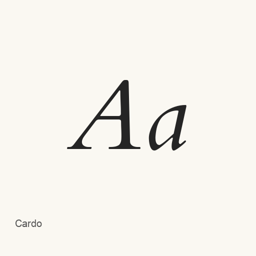
Cardo
David J. Perry · A Unicode typeface for classical and biblical scholarship, medieval studies, and linguistics, installed as TrueType font files.
- Installations sur 30 jours
- 8
- Installations sur 1 an
- 115
- 365 derniers jours
- Dernière version
- 1.04
- Taille du téléchargement
- 2,9Mo
- arm64 / x86_64 · zip
- Rythme des versions
- Irrégulier
- 0 version en 30 jours
Cardo est une police que vous pouvez installer sur un Mac. Développée par David J. Perry.
Informations clés
- Fichiers de police
- 3 · TTF
- Emplacement d’installation
~/Library/Fonts- Développeur
- David J. Perry
- Commande d’installation
brew install --cask font-cardo- Homebrew
- Disponible ; mises à jour par Homebrew
- Autres noms
- font-cardo
Présentation
Cardo is a Unicode typeface designed for classical and biblical scholars, medievalists, and linguists. The Homebrew cask installs three TrueType font files: Cardo104s.ttf, Cardob101.ttf, and Cardoi99.ttf. These provide roman, bold, and italic styles; the official description notes that the bold face has a limited character set.
The typeface is intended for scholarly text and publication work. Its documented characteristics include Greek characters, scholarly and medieval characters, and typography features such as ligatures, text figures, and small capitals. The official site describes the font family’s broader character repertoire and OpenType features; the specific installed files are those listed above.
Install with brew install --cask font-cardo. After installation, select the Cardo font in a compatible application that lets you choose fonts, such as a word processor or page-layout program. This installs fonts, not a separate application. To enter specialist Unicode characters, your document editor or input method must support the characters you need. The font files alone do not establish complete Unicode coverage or support for every feature in every application.
The official site identifies Cardo as released under the SIL Open Font License, version 1.1.
Sources: Cardo official page
Configuration requise
| macOS | Version | Puce | Téléchargement | Source |
|---|---|---|---|---|
| Version pour macOS 27, 26, 15, 14, 13, 12, 11 | 1.04 | Intel | scholarsfonts.net/cardo104.zipSHA-256 9401db6357cb71fa1f8791323679f81d6b0473d6280a7ec8abdf11b5e52f455f | HomebrewVérifié le |
| Version pour macOS 27, 26, 15, 14, 13, 12, 11 | 1.04 | Apple silicon | scholarsfonts.net/cardo104.zipSHA-256 9401db6357cb71fa1f8791323679f81d6b0473d6280a7ec8abdf11b5e52f455f | HomebrewVérifié le |
Comment installer Cardo sur Mac
- Dans « Terminal », exécutez :
brew install --cask font-cardo - Homebrew installe la police dans ~/Library/Fonts, où Livre des polices peut l’utiliser.
Installer sans Homebrew
Téléchargez le même fichier que Homebrew : scholarsfonts.net/cardo104.zip
Le SHA-256 vérifie seulement que le téléchargement est complet ; ce n’est pas une certification de sécurité. Voir le SHA-256 et l’adresse de téléchargement
Désinstaller Cardo et nettoyer éventuellement ses données
brew uninstall --cask font-cardoUne désinstallation standard supprime l’app mais conserve ses réglages et ses caches.
Nouveautés de la version 1.04
Nouveau Rédaction OpenNavo
Cette version n’a pas de notes dédiées.
Détails d’installation
- Tap
- homebrew/cask
- URL de téléchargement
- https://scholarsfonts.net/cardo104.zip
- SHA-256
- 9401db6357cb71fa1f8791323679f81d6b0473d6280a7ec8abdf11b5e52f455f
- Définition Homebrew
- github.com/homebrew/homebrew-cask/blob/HEAD/Casks/font/font-c/font-cardo.rb
- formulae.brew.sh
- formulae.brew.sh/cask/font-cardo
Contenu de l’installation et de la désinstallation
Installation
fontFichier source: Cardo104s.
ttf Destination déclarée: /
$HOME/ Library/ Fonts/ Cardo104s. ttf Voir la déclaration complète
{ "font": [ "Cardo104s.
ttf" ], "target": "/$HOME/ }Library/ Fonts/ Cardo104s. ttf" Installation
fontFichier source: Cardob101.
ttf Destination déclarée: /
$HOME/ Library/ Fonts/ Cardob101. ttf Voir la déclaration complète
{ "font": [ "Cardob101.
ttf" ], "target": "/$HOME/ }Library/ Fonts/ Cardob101. ttf" Installation
fontFichier source: Cardoi99.
ttf Destination déclarée: /
$HOME/ Library/ Fonts/ Cardoi99. ttf Voir la déclaration complète
{ "font": [ "Cardoi99.
ttf" ], "target": "/$HOME/ }Library/ Fonts/ Cardoi99. ttf"
Questions fréquentes sur Cardo
Comment désinstaller complètement Cardo sur Mac ?
Exécutez brew uninstall --cask font-cardo.
Cardo : quelle est la dernière version ?
La dernière version est 1.04. Exécutez brew upgrade --cask font-cardo pour le mettre à jour.
Sources
Chaque information de cette page indique sa source et sa date de vérification. Les informations dont la validité a expiré sont présentées comme valables « au » jour indiqué et ne sont plus données comme actuelles.
- Définition Homebrew : github.com/homebrew/homebrew-cask/blob/HEAD/Casks/font/font-c/font-cardo.rb · Vérifié le
- formulae.brew.sh : formulae.brew.sh/cask/font-cardo