Skip to content

Tiny Shield

Proxyman team · A macOS app for monitoring network connections, viewing traffic details, and controlling which apps or domains can connect.

CaskNetworkingAuto-updates
Install command
brew install --cask tiny-shield
30-day installs
29
#1590 in App
1-year installs
179
Last 365 days
Latest version
1.21.0
Download size
47MB
dmg
Release cadence
Every 2 weeks
3 releases in 30 days

About

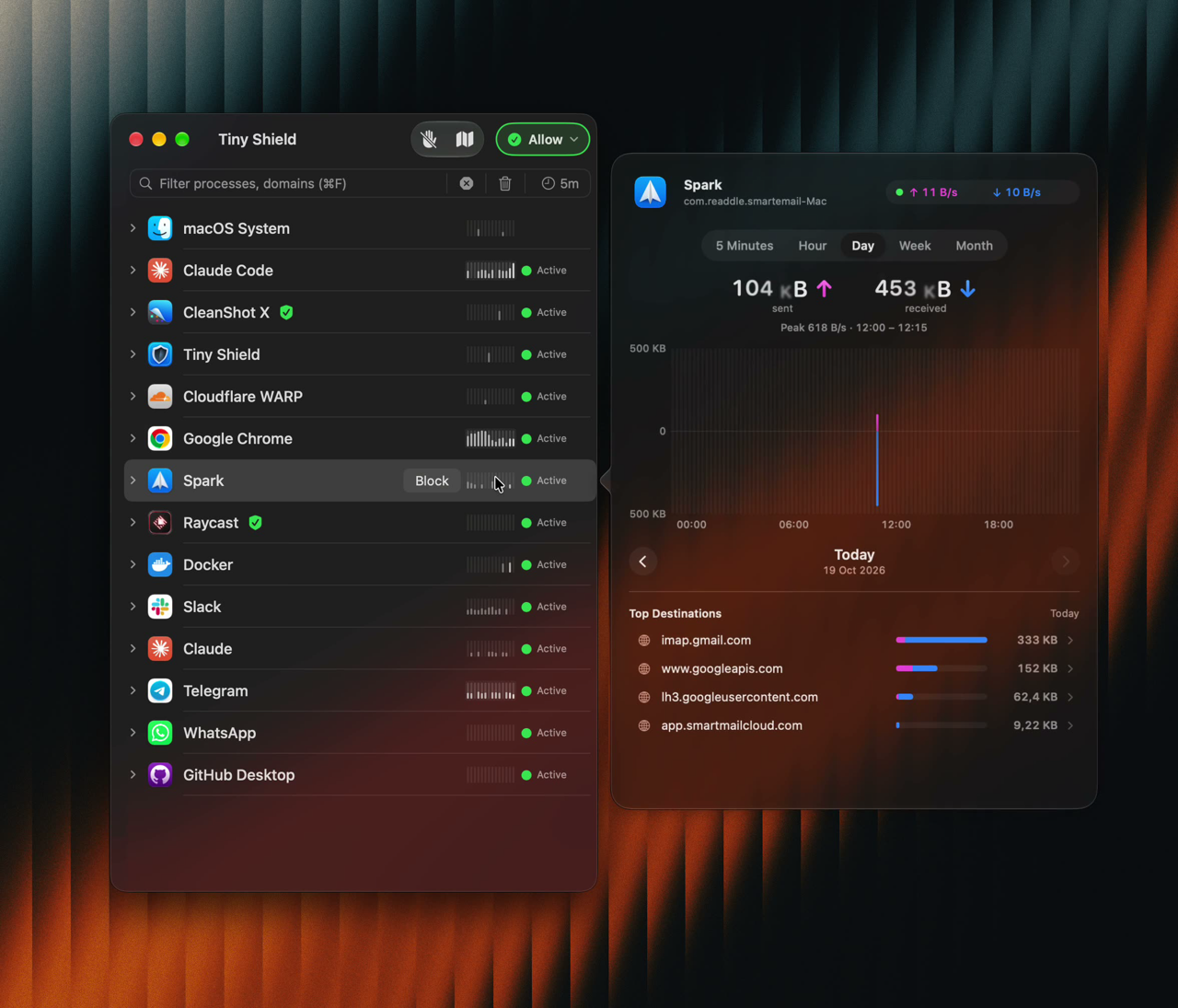
Tiny Shield is a macOS network-monitoring and connection-control app. It presents connections made by your Mac and offers controls for managing network access. The supplied product information describes it as a native app for macOS 15 or later.

  • View network activity with domain names rather than only IP addresses; the official site also describes hostname visibility with DNS over HTTPS in Chrome and Firefox.
  • See connection destinations on a map, including destination countries, alongside app and destination details.
  • Choose among Block Mode, Allow All, Block All, and Require Approval. In Require Approval mode, review connections from new apps and allow or block them; the app remembers the choice.
  • Block specific domains or websites, or block an entire app from accessing the internet. The product also presents sent and received traffic in a chart.

Install with brew install --cask tiny-shield. The cask installs Tiny Shield.app in /Applications. macOS 15 or later is required. Tiny Shield is a graphical Mac app, not a command-line network tool.

Official Tiny Shield site · Homebrew cask

At a glance

Price
Free with in-app purchases
System
macOS 15 or later
Chip
Apple silicon · Intel
Auto-updates
Yes
Developer
Proxyman team
Homebrew
Available; the app updates itself
Also known as
tiny-shield
Homepage
tinyshield.proxyman.com
Token
tiny-shield

Checked

How to install Tiny Shield on Mac

Homebrew installs the app in your Applications folder.

Install without Homebrew

Download the same file Homebrew uses: Install Details

Uninstall Tiny Shield and optional data cleanup

Uninstall command
brew uninstall --cask tiny-shield

A regular uninstall removes the app and keeps its settings and caches.

Deep clean (optional)
Uninstall command
brew uninstall --zap --cask tiny-shield

--zap also deletes the settings, caches and other files listed in the Homebrew definition. They can include data shared with other apps and cannot be restored, and it does not guarantee that nothing is left. Back up any data you need first. To keep settings and caches, leave out --zap.

Questions about Tiny Shield

Is Tiny Shield safe?

Tiny Shield is in Homebrew’s official catalog and has not been disabled. Since September 2026, Homebrew disables apps that fail macOS Gatekeeper checks. When installing, Homebrew checks the download from download.proxyman.io against its SHA-256 checksum. It was installed 29 times through Homebrew in the last 30 days.

Is Tiny Shield free?

Tiny Shield is free to download and offers in-app purchases. Source: tinyshield.proxyman.com/pricing, checked Oct 17, 2026.

How do I completely uninstall Tiny Shield on a Mac?

Run brew uninstall --cask tiny-shield. To delete its settings and caches as well, run brew uninstall --zap --cask tiny-shield. --zap also deletes the settings, caches and other files listed in the Homebrew definition. They can include data shared with other apps and cannot be restored, and it does not guarantee that nothing is left. Back up any data you need first. To keep settings and caches, leave out --zap. That also deletes 5 files and folders, including ~/Library/Application Support/com.proxyman.ProxymanGuard.

Does Tiny Shield run on Apple silicon (M1 and later) Macs?

Homebrew installs it on both Apple silicon and Intel Macs, from the same download. It needs macOS 15 or later.

Where does Tiny Shield store its settings and data?

Its settings are in ~/Library/Preferences/com.proxyman.ProxymanGuard.plist. Its data is in ~/Library/Application Support/com.proxyman.ProxymanGuard. These locations come from Homebrew’s clean-up list.

What is the latest version of Tiny Shield?

The latest version is 1.21.0. Tiny Shield updates itself; to update it with Homebrew, run brew upgrade --cask --greedy tiny-shield.

Related articles

Similar Apps

  • ShareMouseShare one mouse and keyboard across Mac and Windows computers, with clipboard and file-transfer features depending on edition.
  • INCYA macOS proxy client with configurable routing, subscription imports, and support for multiple proxy protocols.
  • AirtoolA macOS utility for capturing Wi-Fi packets; requires macOS 13 or later.
  • IPFS DesktopA macOS menu bar app for managing an IPFS node, importing and organizing content, and viewing connected peers.
Browse all apps