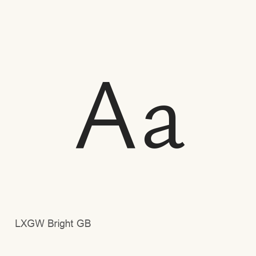
LXGW Bright GB
LXGW / Christian Thalmann (Catharsis Fonts) / Fontworks Inc. · A Chinese and Latin typeface combining Ysabeau Office with GB-standard forms from LXGW WenKai GB.
- 30-day installs
- 5
- 1-year installs
- 60
- Last 365 days
- Latest version
- 26.10.22
- Download size
- —
- arm64 / x86_64 · 7z
- Release cadence
- Irregular
- 0 releases in 30 days
LXGW Bright GB is a font you can install on a Mac. It is made by LXGW / Christian Thalmann (Catharsis Fonts) / Fontworks Inc..
Quick facts
- Font files
- 6 · TTF
- Installs to
~/Library/Fonts- Developer
- LXGW / Christian Thalmann (Catharsis Fonts) / Fontworks Inc.
- Install
brew install --cask font-lxgw-bright-gb- Homebrew
- Available; updated by Homebrew
- Also known as
- font-lxgw-bright-gb
About
LXGW Bright GB is the GB-form variant of LXGW Bright, a typeface combining Ysabeau Office for Latin text with forms based on LXGW WenKai GB. Its GB forms follow mainland Chinese standards, with missing glyphs supplemented from LXGW WenKai Lite.
The Homebrew cask installs six TrueType font files:
- Regular and Italic
- Light and Light Italic
- Medium and Medium Italic
These files provide the listed weights and styles; the cask does not install the other LXGW Bright variants. This font is not intended for vertical typesetting. It is a proportional font, not the monospaced LXGW Bright Code variant.
Install with brew install --cask font-lxgw-bright-gb. After installation, select LXGW Bright GB or one of its installed styles in the font menu of a compatible application. Installing this cask adds fonts; it does not install a writing or editing application. The project describes the font as licensed under SIL Open Font License 1.1.
Sources: LXGW Bright project · Project README
System requirements
| macOS | Version | Chips | Download | Source |
|---|---|---|---|---|
| Build for macOS 27, 26, 15, 14, 13, 12, 11 | 26.10.22 | Intel | github.com/lxgw/LxgwBright/releases/download/26.10.22/LXGWBrightGB.7zSHA-256 3775defd86a0bbc832dc68e9fee2a0e2ebb010ea83721db96ab0fdcfd03359f0 | HomebrewChecked |
| Build for macOS 27, 26, 15, 14, 13, 12, 11 | 26.10.22 | Apple silicon | github.com/lxgw/LxgwBright/releases/download/26.10.22/LXGWBrightGB.7zSHA-256 3775defd86a0bbc832dc68e9fee2a0e2ebb010ea83721db96ab0fdcfd03359f0 | HomebrewChecked |
How to install LXGW Bright GB on Mac
- In Terminal, run:
brew install --cask font-lxgw-bright-gb - Homebrew installs the font in ~/Library/Fonts, where Font Book can use it.
Install without Homebrew
Download the same file Homebrew uses: github.com/lxgw/LxgwBright/releases/download/26.10.22/LXGWBrightGB.7z
SHA-256 only checks that the download is complete; it is not a security certification. See the SHA-256 and download address
Uninstall LXGW Bright GB and optional data cleanup
brew uninstall --cask font-lxgw-bright-gbA regular uninstall removes the app and keeps its settings and caches.
What’s new in 26.10.22
New From Homebrew commits
This release has no separate notes.
Install Details
- Tap
- homebrew/cask
- Download URL
- https://github.com/lxgw/LxgwBright/releases/download/26.10.22/LXGWBrightGB.7z
- SHA-256
- 3775defd86a0bbc832dc68e9fee2a0e2ebb010ea83721db96ab0fdcfd03359f0
- Homebrew definition
- github.com/homebrew/homebrew-cask/blob/HEAD/Casks/font/font-l/font-lxgw-bright-gb.rb
- formulae.brew.sh
- formulae.brew.sh/cask/font-lxgw-bright-gb
- Source code
- github.com/lxgw/LxgwBright
Installation and removal contents
Install
fontSource file: LXGWBrightGB/
LXGWBrightGB-Italic. ttf Declared destination: /
$HOME/ Library/ Fonts/ LXGWBrightGB-Italic. ttf View full declaration
{ "font": [ "LXGWBrightGB/
LXGWBrightGB-Italic. ], "target": "/ttf" $HOME/ }Library/ Fonts/ LXGWBrightGB-Italic. ttf" Install
fontSource file: LXGWBrightGB/
LXGWBrightGB-Light. ttf Declared destination: /
$HOME/ Library/ Fonts/ LXGWBrightGB-Light. ttf View full declaration
{ "font": [ "LXGWBrightGB/
LXGWBrightGB-Light. ], "target": "/ttf" $HOME/ }Library/ Fonts/ LXGWBrightGB-Light. ttf" Install
fontSource file: LXGWBrightGB/
LXGWBrightGB-LightItalic. ttf Declared destination: /
$HOME/ Library/ Fonts/ LXGWBrightGB-LightItalic. ttf View full declaration
{ "font": [ "LXGWBrightGB/
LXGWBrightGB-LightItalic. ], "target": "/ttf" $HOME/ }Library/ Fonts/ LXGWBrightGB-LightItalic. ttf" Install
fontSource file: LXGWBrightGB/
LXGWBrightGB-Medium. ttf Declared destination: /
$HOME/ Library/ Fonts/ LXGWBrightGB-Medium. ttf View full declaration
{ "font": [ "LXGWBrightGB/
LXGWBrightGB-Medium. ], "target": "/ttf" $HOME/ }Library/ Fonts/ LXGWBrightGB-Medium. ttf" Install
fontSource file: LXGWBrightGB/
LXGWBrightGB-MediumItalic. ttf Declared destination: /
$HOME/ Library/ Fonts/ LXGWBrightGB-MediumItalic. ttf View full declaration
{ "font": [ "LXGWBrightGB/
LXGWBrightGB-MediumItalic. ], "target": "/ttf" $HOME/ }Library/ Fonts/ LXGWBrightGB-MediumItalic. ttf" Install
fontSource file: LXGWBrightGB/
LXGWBrightGB-Regular. ttf Declared destination: /
$HOME/ Library/ Fonts/ LXGWBrightGB-Regular. ttf View full declaration
{ "font": [ "LXGWBrightGB/
LXGWBrightGB-Regular. ], "target": "/ttf" $HOME/ }Library/ Fonts/ LXGWBrightGB-Regular. ttf"
Questions about LXGW Bright GB
How do I completely uninstall LXGW Bright GB on a Mac?
Run brew uninstall --cask font-lxgw-bright-gb.
What is the latest version of LXGW Bright GB?
The latest version is 26.10.22. Run brew upgrade --cask font-lxgw-bright-gb to update it.
Sources
Every fact on this page names its source and check date. Facts past their validity read “as of” their date and are no longer stated as current.
- Homebrew definition: github.com/homebrew/homebrew-cask/blob/HEAD/Casks/font/font-l/font-lxgw-bright-gb.rb · Checked
- formulae.brew.sh: formulae.brew.sh/cask/font-lxgw-bright-gb