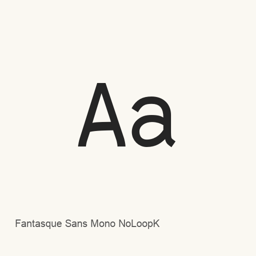
Fantasque Sans Mono NoLoopK
Jany Belluz · A monospaced programming font variant with a straight lowercase k, installed as four OTF styles.
SHA-256 recorded by Homebrew · Not disabled by Homebrew · Checked
- 30-day installs
- 0
- 1-year installs
- 62
- Last 365 days
- Latest version
- 1.8.0
- Download size
- 1.7MB
- arm64 / x86_64 · zip
- Release cadence
- Irregular
- 0 releases in 30 days
Fantasque Sans Mono NoLoopK is a font you can install on a Mac. It is made by Jany Belluz.
Quick facts
- Font files
- 4 · OTF
- Installs to
~/Library/Fonts- Developer
- Jany Belluz
- Install
brew install --cask font-fantasque-sans-mono-noloopk- Homebrew
- Available; updated by Homebrew
- Also known as
- font-fantasque-sans-mono-noloopk
About
Fantasque Sans Mono NoLoopK is a monospaced font variant intended for programming. It has a handwriting-like character, and this NoLoopK edition replaces the looped lowercase “k” with a straight form. This Homebrew cask installs four OTF files: regular, bold, italic, and bold italic.
- The regular and bold styles share the same metrics.
- Italic styles use redesigned glyphs rather than simply slanting the upright forms.
- The described character ranges include Latin letters, some accented characters, some Greek letters, and some arrows; this does not establish complete Unicode coverage.
- This is a font package, not an application.
Install with brew install --cask font-fantasque-sans-mono-noloopk. After installation, select the installed Fantasque Sans Mono style in a compatible application’s font settings. For coding, choose it in a code editor or terminal that supports monospaced fonts; installing the files alone does not select the font for you.
The installed files are FantasqueSansMono-Regular., FantasqueSansMono-Bold., FantasqueSansMono-Italic., and FantasqueSansMono-BoldItalic..
Sources: Official project · Project README
System requirements
| macOS | Version | Chips | Download | Source |
|---|---|---|---|---|
| Build for macOS 27, 26, 15, 14, 13, 12, 11 | 1.8.0 | Intel | github.com/belluzj/fantasque-sans/releases/download/v1.8.0/FantasqueSansMono-NoLoopK.zipSHA-256 f7bddc6f1e5a6e0830e332394b1ade52980c784dc4a383cdbee8c568ed0bf3c1 | HomebrewChecked |
| Build for macOS 27, 26, 15, 14, 13, 12, 11 | 1.8.0 | Apple silicon | github.com/belluzj/fantasque-sans/releases/download/v1.8.0/FantasqueSansMono-NoLoopK.zipSHA-256 f7bddc6f1e5a6e0830e332394b1ade52980c784dc4a383cdbee8c568ed0bf3c1 | HomebrewChecked |
How to install Fantasque Sans Mono NoLoopK on Mac
- In Terminal, run:
brew install --cask font-fantasque-sans-mono-noloopk - Homebrew installs the font in ~/Library/Fonts, where Font Book can use it.
Install without Homebrew
Download the same file Homebrew uses: github.com/belluzj/fantasque-sans/releases/download/v1.8.0/FantasqueSansMono-NoLoopK.zip
SHA-256 only checks that the download is complete; it is not a security certification. See the SHA-256 and download address
Uninstall Fantasque Sans Mono NoLoopK and optional data cleanup
brew uninstall --cask font-fantasque-sans-mono-noloopkA regular uninstall removes the app and keeps its settings and caches.
What’s new in 1.8.0
New · OpenNavo editorial
- ChangesAdded coding ligatures to all weights.
Install Details
- Tap
- homebrew/cask
- Download URL
- https://github.com/belluzj/fantasque-sans/releases/download/v1.8.0/FantasqueSansMono-NoLoopK.zip
- SHA-256
- f7bddc6f1e5a6e0830e332394b1ade52980c784dc4a383cdbee8c568ed0bf3c1
- Homebrew definition
- github.com/homebrew/homebrew-cask/blob/HEAD/Casks/font/font-f/font-fantasque-sans-mono-noloopk.rb
- formulae.brew.sh
- formulae.brew.sh/cask/font-fantasque-sans-mono-noloopk
- Source code
- github.com/belluzj/fantasque-sans
Installation and removal contents
Install
fontSource file: OTF/
FantasqueSansMono-Bold. otf Declared destination: /
$HOME/ Library/ Fonts/ FantasqueSansMono-Bold. otf View full declaration
{ "font": [ "OTF/
FantasqueSansMono-Bold. ], "target": "/otf" $HOME/ }Library/ Fonts/ FantasqueSansMono-Bold. otf" Install
fontSource file: OTF/
FantasqueSansMono-BoldItalic. otf Declared destination: /
$HOME/ Library/ Fonts/ FantasqueSansMono-BoldItalic. otf View full declaration
{ "font": [ "OTF/
FantasqueSansMono-BoldItalic. ], "target": "/otf" $HOME/ }Library/ Fonts/ FantasqueSansMono-BoldItalic. otf" Install
fontSource file: OTF/
FantasqueSansMono-Italic. otf Declared destination: /
$HOME/ Library/ Fonts/ FantasqueSansMono-Italic. otf View full declaration
{ "font": [ "OTF/
FantasqueSansMono-Italic. ], "target": "/otf" $HOME/ }Library/ Fonts/ FantasqueSansMono-Italic. otf" Install
fontSource file: OTF/
FantasqueSansMono-Regular. otf Declared destination: /
$HOME/ Library/ Fonts/ FantasqueSansMono-Regular. otf View full declaration
{ "font": [ "OTF/
FantasqueSansMono-Regular. ], "target": "/otf" $HOME/ }Library/ Fonts/ FantasqueSansMono-Regular. otf" Remove user data
zapView full declaration
{
  "zap": []
}
Questions about Fantasque Sans Mono NoLoopK
How do I completely uninstall Fantasque Sans Mono NoLoopK on a Mac?
Run brew uninstall --cask font-fantasque-sans-mono-noloopk.
What is the latest version of Fantasque Sans Mono NoLoopK?
The latest version is 1.8.0. Run brew upgrade --cask font-fantasque-sans-mono-noloopk to update it.
Sources
Every fact on this page names its source and check date. Facts past their validity read “as of” their date and are no longer stated as current.
- Homebrew definition: github.com/homebrew/homebrew-cask/blob/HEAD/Casks/font/font-f/font-fantasque-sans-mono-noloopk.rb · Checked
- formulae.brew.sh: formulae.brew.sh/cask/font-fantasque-sans-mono-noloopk