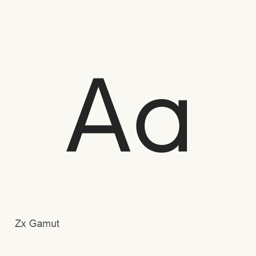
Zx Gamut
0xType (Masaaki Morishita) · 一款几何无衬线字体,兼具圆润字形与锐利边缘;此 cask 安装九个静态 OTF 字重文件。
Homebrew 已记录 SHA-256 · 未被 Homebrew 禁用 · 核查日期
- 近 30 天安装
- 1
- 近一年安装
- 46
- 365 天累计
- 最新版本
- 1.002
- 下载大小
- 424KB
- arm64 / x86_64 · zip
- 更新节奏
- 不定期
- 近 30 天 0 个版本
Zx Gamut 是可以安装在 Mac 上的字体。开发者是 0xType (Masaaki Morishita)。
基本信息
- 字体文件
- 9 · OTF
- 安装位置
~/Library/Fonts- 开发者
- 0xType (Masaaki Morishita)
- 安装命令
brew install --cask font-zxgamut- Homebrew
- 可以安装,由 Homebrew 更新
- 其他名称
- font-zxgamut
介绍
AI 翻译查看原文Zx Gamut 是一款几何无衬线字体,在圆润字形与更锐利的边缘之间取得平衡。此 Homebrew cask 安装九个静态 OTF 文件,涵盖 Thin、ExtraLight、Light、Regular、Medium、SemiBold、Bold、ExtraBold 和 Black。尽管官方项目将该字体描述为可变字体,此 cask 安装的文件是静态字重文件。
- 可从安装的九种字重中选择,用于排版和版面设计。
- 项目将其设计描述为几何风格,具有流畅圆润的形状和经过斟酌的边缘。
- 项目注明其许可证为 SIL Open Font License, Version 1.1。
使用 brew install --cask font-zxgamut 安装。安装后,在支持已安装字体的应用程序中选择所需的 Zx Gamut 字体。本软件包安装的是字体,并非独立应用程序。所列文件说明了包含的字重,但不能据此推断完整的 Unicode 覆盖范围或连字等排印功能的支持。
来源:Zx Gamut 项目 · 项目 README
系统要求
| macOS | 应用版本 | 芯片 | 下载 | 来源 |
|---|---|---|---|---|
| 适用于 macOS 27, 26, 15, 14, 13, 12, 11 的版本 | 1.002 | Intel | github.com/0xType/Gamut/releases/download/1.002/ZxGamut_1_002.zipSHA-256 3ef5ed2a8b651a6b780353a90832270fd305316c15a922cc57c8c9f8c20d6800 | Homebrew核查于 |
| 适用于 macOS 27, 26, 15, 14, 13, 12, 11 的版本 | 1.002 | Apple 芯片 | github.com/0xType/Gamut/releases/download/1.002/ZxGamut_1_002.zipSHA-256 3ef5ed2a8b651a6b780353a90832270fd305316c15a922cc57c8c9f8c20d6800 | Homebrew核查于 |
如何在 Mac 上安装 Zx Gamut
- 在“终端”中运行:
brew install --cask font-zxgamut - Homebrew 会把字体安装到 ~/Library/Fonts,之后可以在“字体册”中使用。
不用 Homebrew 安装
直接下载 Homebrew 使用的同一个文件: github.com/0xType/Gamut/releases/download/1.002/ZxGamut_1_002.zip
SHA-256 只用来核对下载的文件是否完整,不代表安全认证。 查看 SHA-256 和下载地址
卸载 Zx Gamut 与可选的数据清理
brew uninstall --cask font-zxgamut普通卸载会删除应用本身,设置和缓存会保留。
1.002 更新内容
新版本 · OpenNavo 编辑 · AI 翻译
- 修复修复了部分 FontBakery FAIL。
安装细节
- 来源仓库
- homebrew/cask
- 下载地址
- https://github.com/0xType/Gamut/releases/download/1.002/ZxGamut_1_002.zip
- SHA-256
- 3ef5ed2a8b651a6b780353a90832270fd305316c15a922cc57c8c9f8c20d6800
- Homebrew 定义文件
- github.com/homebrew/homebrew-cask/blob/HEAD/Casks/font/font-z/font-zxgamut.rb
- formulae.brew.sh
- formulae.brew.sh/cask/font-zxgamut
- 源代码
- github.com/0xType/Gamut
安装与卸载内容
安装
font来源文件: static/
ZxGamut-Thin. otf 声明的目标位置: /
$HOME/ Library/ Fonts/ ZxGamut-Thin. otf 查看完整声明
{ "font": [ "static/
ZxGamut-Thin. ], "target": "/otf" $HOME/ }Library/ Fonts/ ZxGamut-Thin. otf" 安装
font来源文件: static/
ZxGamut-Bold. otf 声明的目标位置: /
$HOME/ Library/ Fonts/ ZxGamut-Bold. otf 查看完整声明
{ "font": [ "static/
ZxGamut-Bold. ], "target": "/otf" $HOME/ }Library/ Fonts/ ZxGamut-Bold. otf" 安装
font来源文件: static/
ZxGamut-ExtraBold. otf 声明的目标位置: /
$HOME/ Library/ Fonts/ ZxGamut-ExtraBold. otf 查看完整声明
{ "font": [ "static/
ZxGamut-ExtraBold. ], "target": "/otf" $HOME/ }Library/ Fonts/ ZxGamut-ExtraBold. otf" 安装
font来源文件: static/
ZxGamut-ExtraLight. otf 声明的目标位置: /
$HOME/ Library/ Fonts/ ZxGamut-ExtraLight. otf 查看完整声明
{ "font": [ "static/
ZxGamut-ExtraLight. ], "target": "/otf" $HOME/ }Library/ Fonts/ ZxGamut-ExtraLight. otf" 安装
font来源文件: static/
ZxGamut-Light. otf 声明的目标位置: /
$HOME/ Library/ Fonts/ ZxGamut-Light. otf 查看完整声明
{ "font": [ "static/
ZxGamut-Light. ], "target": "/otf" $HOME/ }Library/ Fonts/ ZxGamut-Light. otf" 安装
font来源文件: static/
ZxGamut-Medium. otf 声明的目标位置: /
$HOME/ Library/ Fonts/ ZxGamut-Medium. otf 查看完整声明
{ "font": [ "static/
ZxGamut-Medium. ], "target": "/otf" $HOME/ }Library/ Fonts/ ZxGamut-Medium. otf" 安装
font来源文件: static/
ZxGamut-Regular. otf 声明的目标位置: /
$HOME/ Library/ Fonts/ ZxGamut-Regular. otf 查看完整声明
{ "font": [ "static/
ZxGamut-Regular. ], "target": "/otf" $HOME/ }Library/ Fonts/ ZxGamut-Regular. otf" 安装
font来源文件: static/
ZxGamut-SemiBold. otf 声明的目标位置: /
$HOME/ Library/ Fonts/ ZxGamut-SemiBold. otf 查看完整声明
{ "font": [ "static/
ZxGamut-SemiBold. ], "target": "/otf" $HOME/ }Library/ Fonts/ ZxGamut-SemiBold. otf" 安装
font来源文件: static/
ZxGamut-Black. otf 声明的目标位置: /
$HOME/ Library/ Fonts/ ZxGamut-Black. otf 查看完整声明
{ "font": [ "static/
ZxGamut-Black. ], "target": "/otf" $HOME/ }Library/ Fonts/ ZxGamut-Black. otf"
关于 Zx Gamut 的常见问题
怎样在 Mac 上彻底卸载 Zx Gamut?
运行 brew uninstall --cask font-zxgamut。
Zx Gamut 的最新版本是多少?
最新版本是 1.002,Homebrew 收录于 2026年1月16日。运行 brew upgrade --cask font-zxgamut 即可更新。
来源
页面上的每项资料都注明来源和核查日期;过期的资料只写“截至”某日,不再当作当前事实。
- Homebrew 定义:github.com/homebrew/homebrew-cask/blob/HEAD/Casks/font/font-z/font-zxgamut.rb · 核查于
- formulae.brew.sh:formulae.brew.sh/cask/font-zxgamut