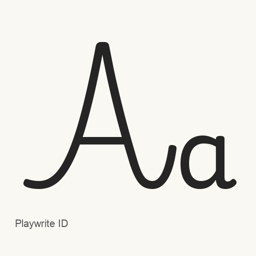
Playwrite ID
TypeTogether · 使用 Homebrew Cask 安装 Playwrite Indonesia 字体,安装内容为一个 TTF 字体文件。
Cask字体Apple 芯片 · Intel
来自 homebrew/cask
近 30 天安装0
近一年安装4365 天累计
最新版本latest
下载大小338KBarm64 / x86_64 · ttf
更新节奏不定期近 30 天 0 个版本
Playwrite ID 是可以安装在 Mac 上的字体。
介绍
Playwrite ID 是 Google Fonts 收录的 Playwrite Indonesia 字体。此 Homebrew Cask 会将一个 TrueType 字体文件 PlaywriteID[wght]. 安装到用户的 ~/ 目录。这是字体包,不是应用程序。
运行 brew install --cask font-playwrite-id 安装。安装后,在支持自定义字体的应用程序中选择已安装的 Playwrite Indonesia 字体。此 cask 安装的单个字体文件就是完整安装内容;现有信息无法确认其他样式、完整的 Unicode 覆盖范围或连字支持。
新版本 latest 更新内容 OpenNavo 编辑 · AI 翻译
- 字体文件更新现有文件 PlaywriteID[wght].ttf
安装与卸载
Homebrew 会把字体安装到 ~/Library/Fonts,之后可以在“字体册”中使用。
不用 Homebrew 安装
直接下载 Homebrew 使用的同一个文件: github.com/google/fonts/raw/main/ofl/playwriteid/PlaywriteID%5Bwght%5D.ttf
卸载命令
$ brew uninstall --cask \font-playwrite-id普通卸载会删除应用本身,设置和缓存会保留。
常见问题
Playwrite ID 安全吗?
Playwrite ID 收录在 Homebrew 官方软件库中,没有被停用。自 2026 年 9 月起,Homebrew 会停用没有通过 macOS Gatekeeper 检查的应用。安装包来自 github.com,Homebrew 安装时不核对校验值。
怎样在 Mac 上彻底卸载 Playwrite ID?
运行 brew uninstall --cask font-playwrite-id。