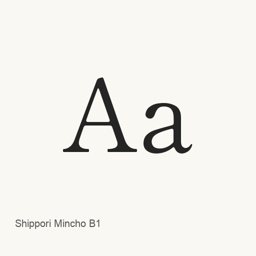
Shippori Mincho B1
FONTDASU / Google Inc. / but / Adobe · A Mincho typeface available through this cask in five static weights, from Regular to ExtraBold.
- 近 30 天安裝
- 7
- 近一年安裝
- 56
- 365 天累計
- 最新版本
- latest
- 下載大小
- —
- arm64 / x86_64 · git
- 更新節奏
- 不定期
- 近 30 天 0 個版本
Shippori Mincho B1 是可以安裝在 Mac 上的字型。開發者是 FONTDASU / Google Inc. / but / Adobe。
基本資訊
- 字型檔案
- 5 · TTF
- 安裝位置
~/Library/Fonts- 開發者
- FONTDASU / Google Inc. / but / Adobe
- 安裝命令
brew install --cask font-shippori-mincho-b1- Homebrew
- 可以安裝,由 Homebrew 更新
- 其他名稱
- font-shippori-mincho-b1
介紹
Shippori Mincho B1 is a typeface listed on Google Fonts. This Homebrew cask installs five individual TrueType font files, covering Regular, Medium, SemiBold, Bold, and ExtraBold weights. It provides font files rather than a separate application.
The installed files are ShipporiMinchoB1-Regular., ShipporiMinchoB1-Medium., ShipporiMinchoB1-SemiBold., ShipporiMinchoB1-Bold., and ShipporiMinchoB1-ExtraBold..
Install with Homebrew using brew install --cask font-shippori-mincho-b1. After installation, select the desired Shippori Mincho B1 weight from the font menu in an application that supports installed fonts. The cask installs these five specific files; it does not install a font-management or editing app. The listed files establish which weights are included, but do not by themselves establish full Unicode coverage or ligature support.
Sources: Google Fonts
Download size: Unknown.
Version changes: Unknown.
系統要求
| macOS | 應用版本 | 晶片 | 下載 | 來源 |
|---|---|---|---|---|
| 適用於 macOS 27, 26, 15, 14, 13, 12, 11 的版本 | latest | Intel | github.com/google/fonts.git | Homebrew核查於 |
| 適用於 macOS 27, 26, 15, 14, 13, 12, 11 的版本 | latest | Apple 晶片 | github.com/google/fonts.git | Homebrew核查於 |
如何在 Mac 上安裝 Shippori Mincho B1
- 在「終端機」中執行:
brew install --cask font-shippori-mincho-b1 - Homebrew 會把字型安裝到 ~/Library/Fonts,之後可以在「字型冊」中使用。
不用 Homebrew 安裝
直接下載 Homebrew 使用的同一個檔案: github.com/google/fonts.git
解除安裝 Shippori Mincho B1 與可選的資料清理
brew uninstall --cask font-shippori-mincho-b1普通解除安裝會刪除應用本身,設定和快取會保留。
latest 更新內容
新版本 來自 Homebrew 提交記錄
這個版本沒有單獨的更新說明。
安裝細節
- 來源倉庫
- homebrew/cask
- 下載網址
- https://github.com/google/fonts.git
- Homebrew 定義檔案
- github.com/homebrew/homebrew-cask/blob/HEAD/Casks/font/font-s/font-shippori-mincho-b1.rb
- formulae.brew.sh
- formulae.brew.sh/cask/font-shippori-mincho-b1
- 原始碼
- github.com/google/fonts
安裝與解除安裝內容
安裝
font來源檔案: ShipporiMinchoB1-Bold.
ttf 宣告的目標位置: /
$HOME/ Library/ Fonts/ ShipporiMinchoB1-Bold. ttf 檢視完整宣告
{ "font": [ "ShipporiMinchoB1-Bold.
ttf" ], "target": "/$HOME/ }Library/ Fonts/ ShipporiMinchoB1-Bold. ttf" 安裝
font來源檔案: ShipporiMinchoB1-ExtraBold.
ttf 宣告的目標位置: /
$HOME/ Library/ Fonts/ ShipporiMinchoB1-ExtraBold. ttf 檢視完整宣告
{ "font": [ "ShipporiMinchoB1-ExtraBold.
ttf" ], "target": "/$HOME/ }Library/ Fonts/ ShipporiMinchoB1-ExtraBold. ttf" 安裝
font來源檔案: ShipporiMinchoB1-Medium.
ttf 宣告的目標位置: /
$HOME/ Library/ Fonts/ ShipporiMinchoB1-Medium. ttf 檢視完整宣告
{ "font": [ "ShipporiMinchoB1-Medium.
ttf" ], "target": "/$HOME/ }Library/ Fonts/ ShipporiMinchoB1-Medium. ttf" 安裝
font來源檔案: ShipporiMinchoB1-Regular.
ttf 宣告的目標位置: /
$HOME/ Library/ Fonts/ ShipporiMinchoB1-Regular. ttf 檢視完整宣告
{ "font": [ "ShipporiMinchoB1-Regular.
ttf" ], "target": "/$HOME/ }Library/ Fonts/ ShipporiMinchoB1-Regular. ttf" 安裝
font來源檔案: ShipporiMinchoB1-SemiBold.
ttf 宣告的目標位置: /
$HOME/ Library/ Fonts/ ShipporiMinchoB1-SemiBold. ttf 檢視完整宣告
{ "font": [ "ShipporiMinchoB1-SemiBold.
ttf" ], "target": "/$HOME/ }Library/ Fonts/ ShipporiMinchoB1-SemiBold. ttf"
關於 Shippori Mincho B1 的常見問題
如何在 Mac 上徹底解除安裝 Shippori Mincho B1?
執行 brew uninstall --cask font-shippori-mincho-b1。
來源
頁面上的每項資料都註明來源和核查日期;過期的資料只寫「截至」某日,不再當作當前事實。
- Homebrew 定義:github.com/homebrew/homebrew-cask/blob/HEAD/Casks/font/font-s/font-shippori-mincho-b1.rb · 核查於
- formulae.brew.sh:formulae.brew.sh/cask/font-shippori-mincho-b1