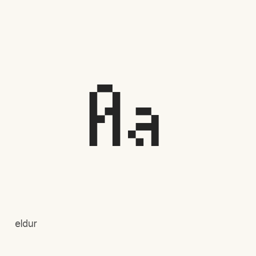
eldur
molarmanful · eldur is a compact monospace bitmap font with a 5×13-pixel design, installed by Homebrew as a single TTF file.
- 近 30 天安裝
- 0
- 近一年安裝
- 15
- 365 天累計
- 最新版本
- 0.0.5
- 2024年4月11日 · 2024年4月11日
- 下載大小
- 312kB
- arm64 / x86_64 · ttf
- 更新節奏
- 不定期
- 近 30 天 0 個版本
eldur 是可以安裝在 Mac 上的字型。開發者是 molarmanful。
基本資訊
- 字型檔案
- 1 · TTF
- 安裝位置
~/Library/Fonts- 開發者
- molarmanful
- 安裝命令
brew install --cask font-eldur- Homebrew
- 可以安裝,由 Homebrew 更新
- 其他名稱
- font-eldur
介紹
eldur is a monospace bitmap font designed for very small text. Its stated 5×13-pixel bounding box has an average glyph width of 4 pixels, with a 10-pixel ascent and 3-pixel descent. The design takes inspiration from upright-italic type and aims to balance compactness, readability, and appearance at small sizes. Some glyphs are adapted from scientifica and creep.
The Homebrew cask installs one file, eldur., in the user’s Fonts folder. This cask does not install the other font formats mentioned on the project page.
- To install, run
brew install --cask font-eldur. - After installation, select eldur as the font in an application that supports user-installed fonts. For coding, choose it in a compatible editor or terminal.
- The project recommends using TTF at font sizes that are multiples of 13 pixels when bitmap fonts are unsupported.
The project notes that Unicode support is a work in progress and lists ligatures as a future consideration. The cask provides a font file, not a separate application.
Sources: Project overview and installation notes · Project README
系統要求
| macOS | 應用版本 | 晶片 | 下載 | 來源 |
|---|---|---|---|---|
| 適用於 macOS 27, 26, 15, 14, 13, 12, 11 的版本 | 0.0.5 | Intel | github.com/molarmanful/eldur/releases/download/v0.0.5/eldur.ttfSHA-256 9ed5867dc7481a98bcf97ed68b1c3ca5886d8175431d2e38ba3a7a7f90f78392 | Homebrew核查於 |
| 適用於 macOS 27, 26, 15, 14, 13, 12, 11 的版本 | 0.0.5 | Apple 晶片 | github.com/molarmanful/eldur/releases/download/v0.0.5/eldur.ttfSHA-256 9ed5867dc7481a98bcf97ed68b1c3ca5886d8175431d2e38ba3a7a7f90f78392 | Homebrew核查於 |
如何在 Mac 上安裝 eldur
- 在「終端機」中執行:
brew install --cask font-eldur - Homebrew 會把字型安裝到 ~/Library/Fonts,之後可以在「字型冊」中使用。
不用 Homebrew 安裝
直接下載 Homebrew 使用的同一個檔案: github.com/molarmanful/eldur/releases/download/v0.0.5/eldur.ttf
SHA-256 只用來核對下載的檔案是否完整,不代表安全認證。 檢視 SHA-256 和下載網址
解除安裝 eldur 與可選的資料清理
brew uninstall --cask font-eldur普通解除安裝會刪除應用本身,設定和快取會保留。
0.0.5 更新內容
新版本 · OpenNavo 編輯
這個版本沒有單獨的更新說明。
安裝細節
- 來源倉庫
- homebrew/cask
- 下載網址
- https://github.com/molarmanful/eldur/releases/download/v0.0.5/eldur.ttf
- SHA-256
- 9ed5867dc7481a98bcf97ed68b1c3ca5886d8175431d2e38ba3a7a7f90f78392
- Homebrew 定義檔案
- github.com/homebrew/homebrew-cask/blob/HEAD/Casks/font/font-e/font-eldur.rb
- formulae.brew.sh
- formulae.brew.sh/cask/font-eldur
- 原始碼
- github.com/molarmanful/eldur
安裝與解除安裝內容
安裝
font來源檔案: eldur.
ttf 宣告的目標位置: /
$HOME/ Library/ Fonts/ eldur. ttf 檢視完整宣告
{ "font": [ "eldur.
ttf" ], "target": "/$HOME/ }Library/ Fonts/ eldur. ttf"
關於 eldur 的常見問題
如何在 Mac 上徹底解除安裝 eldur?
執行 brew uninstall --cask font-eldur。
eldur 的最新版本是多少?
最新版本是 0.0.5,Homebrew 收錄於 2024年11月4日。執行 brew upgrade --cask font-eldur 即可更新。
來源
頁面上的每項資料都註明來源和核查日期;過期的資料只寫「截至」某日,不再當作當前事實。
- Homebrew 定義:github.com/homebrew/homebrew-cask/blob/HEAD/Casks/font/font-e/font-eldur.rb · 核查於
- formulae.brew.sh:formulae.brew.sh/cask/font-eldur