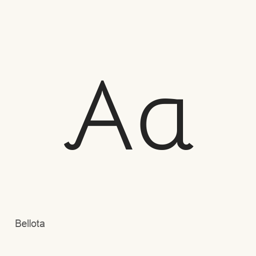
Bellota
Kemie Guaida · Bellotaは、レギュラー、ライト、ボールド、イタリック、およびウェイトとイタリックを組み合わせたスタイルを含む6ファイルのフォントファミリーです。
CaskフォントApple シリコン · Intel
提供元 homebrew/cask
過去 30 日間のインストール数3
過去1年間のインストール数24過去365日間の合計
最新バージョンlatest
ダウンロードサイズ—arm64 / x86_64 · git
更新頻度不定期過去30日間に0回リリース
- ソースリポジトリ
- homebrew/cask
- その他の名前
- Bellota · font-bellota
- ダウンロードURL
- github.com/google/fonts.git
- formulae.brew.sh
- formulae.brew.sh/cask/font-bellota
- ソースコード
- github.com/google/fonts
インストールとアンインストールの内容
インストール
fontソースファイル: Bellota-Bold.
ttf 宣言された保存先: /
$HOME/ Library/ Fonts/ Bellota-Bold. ttf 宣言全体を表示
{ "font": [ "Bellota-Bold.
ttf" ], "target": "/$HOME/ }Library/ Fonts/ Bellota-Bold. ttf" インストール
fontソースファイル: Bellota-BoldItalic.
ttf 宣言された保存先: /
$HOME/ Library/ Fonts/ Bellota-BoldItalic. ttf 宣言全体を表示
{ "font": [ "Bellota-BoldItalic.
ttf" ], "target": "/$HOME/ }Library/ Fonts/ Bellota-BoldItalic. ttf" インストール
fontソースファイル: Bellota-Italic.
ttf 宣言された保存先: /
$HOME/ Library/ Fonts/ Bellota-Italic. ttf 宣言全体を表示
{ "font": [ "Bellota-Italic.
ttf" ], "target": "/$HOME/ }Library/ Fonts/ Bellota-Italic. ttf" インストール
fontソースファイル: Bellota-Light.
ttf 宣言された保存先: /
$HOME/ Library/ Fonts/ Bellota-Light. ttf 宣言全体を表示
{ "font": [ "Bellota-Light.
ttf" ], "target": "/$HOME/ }Library/ Fonts/ Bellota-Light. ttf" インストール
fontソースファイル: Bellota-LightItalic.
ttf 宣言された保存先: /
$HOME/ Library/ Fonts/ Bellota-LightItalic. ttf 宣言全体を表示
{ "font": [ "Bellota-LightItalic.
ttf" ], "target": "/$HOME/ }Library/ Fonts/ Bellota-LightItalic. ttf" インストール
fontソースファイル: Bellota-Regular.
ttf 宣言された保存先: /
$HOME/ Library/ Fonts/ Bellota-Regular. ttf 宣言全体を表示
{ "font": [ "Bellota-Regular.
ttf" ], "target": "/$HOME/ }Library/ Fonts/ Bellota-Regular. ttf"