
Anleitung
TablePro 0.82:准备 UUID 测试数据,先看 SQL 再保存
用 TablePro 的新 UUID 操作准备少量测试行:分清主键与外键、已加载行与整张表,再检查待执行 SQL、写入权限和免费功能边界。
19. Okt. · 5 Min. Lesezeit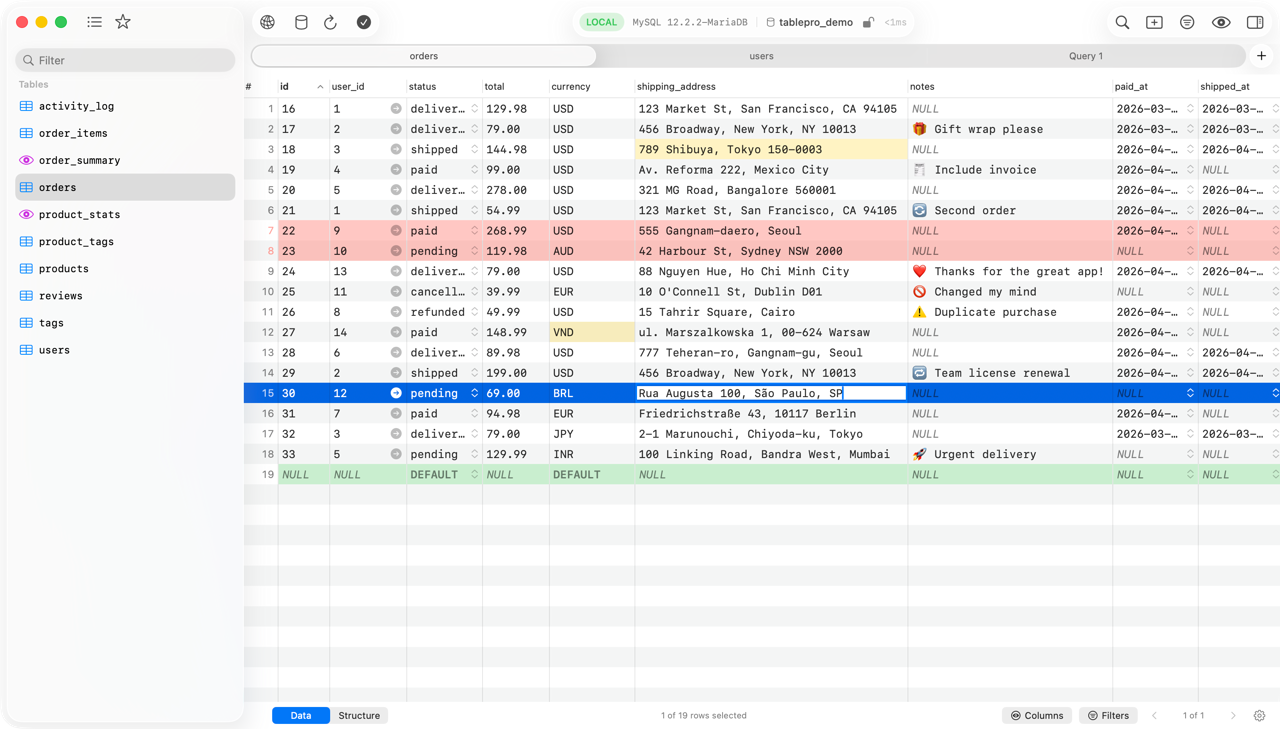
TablePro contributors · A native database client with SQL editing, an editable data grid, native drivers, SSH/TLS connections and optional AI and MCP tools.
TablePro ist eine Mac-App aus der Kategorie Datenbanken. Der Entwickler ist TablePro contributors.
brew install --cask tableproDiese Angaben wurden am oder später geprüft. Quellen der einzelnen Angaben ansehen
TablePro is a native database client for developers and database operators who want to query, inspect and edit multiple database engines from a Mac. It uses native drivers rather than Electron or JDBC and combines a SQL editor, editable data grid and database-management views.
Built-in drivers cover MySQL, MariaDB, PostgreSQL, SQLite, ClickHouse, Redis and other listed engines. Additional database drivers, including SQL Server, MongoDB, Oracle, Snowflake and DuckDB, install on demand through the plugin registry; do not assume all plugins are already included. The editor offers autocomplete, multiple cursors, Vim mode and syntax themes. The grid supports inline editing, sorting, filtering and undo/redo. Use SSH tunnels and SSL/TLS where supported, query history, native tabs, split panes and multiple windows.
Optional AI includes chat, inline suggestions and query explanation/optimization with your own provider key or a local Ollama service. An MCP server allows configured external clients to interact with databases. These integrations can extend access beyond the visible editor and must be configured with appropriate permissions.
Download the official DMG matching your Mac or use brew install --cask tablepro. The stable Mac application requires macOS 13 or later. The current catalog artifact is the 0.78.0 arm64 DMG, 23,725,860 bytes confirmed by the official download server. iPhone/iPad builds are separate and require iOS/iPadOS 18 or later; the README lists Linux as a prototype with nothing to install yet and no Windows application. Xcode 26 and XcodeGen are source-build requirements, not prerequisites for using the downloaded Mac app. A database server, credentials and network route—or a supported local database file—are external requirements.
The README states the core database/editor/AI features are free without a trial limit. Paid Mac licenses add functions such as iCloud Sync, encrypted export, environment variables, linked folders, query insights, charts, compare/sync and Data Rewind; the Team tier adds team catalog/library features. Check the current plan terms rather than treating the open-source client as an entitlement to every paid integration. The repository uses AGPL version 3. Cloud databases, SSH services, plugins and AI providers can require separate accounts or charges. Local database browsing does not inherently require a hosted AI account.
Database edits, imports, Copy To and query execution can alter or destroy data according to the connected account's privileges. Prefer a restricted or read-only database account for inspection and keep verified backups before applying changes. Review transaction state and confirmations; release 0.78.0 fixes issues involving database switching, transactions and edits against incorrect rows. Grant access only to the local database files, folders and credentials your workflow needs. The inspected sources do not establish a blanket Accessibility or Full Disk Access requirement. Queries, schemas and supplied data can be sent to an enabled AI provider; review its privacy policy and MCP tool permissions before using sensitive production databases.
Sources: Official project, supported engines and plans, Documentation, Pricing, 0.78.0 release, License.
OpenNavo erfasst geprüfte Preise nach Region, Edition und Abrechnungszeitraum, jeweils mit Quelle und Datum. Einen Preisverlauf gibt es nicht, und OpenNavo bewertet nicht, ob ein Preis der niedrigste ist.
| Edition | Preis | Region | Bezugsquelle | Geprüft am |
|---|---|---|---|---|
| — | Kostenlos mit In-App-Käufen | — | Offizielle Websitetablepro.app |
| macOS | App-Version | Chips | Download | Quelle |
|---|---|---|---|---|
| macOS 13 oder neuer | 0.82.0 | Intel | github.com/TableProApp/TablePro/releases/download/v0.82.0/TablePro-0.82.0.dmgSHA-256 11bda0a920ffc5dc3974813400d2077de971355467d8977fc4a5c800ef2ce1c4 | HomebrewGeprüft am |
| macOS 13 oder neuer | 0.82.0 | Apple silicon | github.com/TableProApp/TablePro/releases/download/v0.82.0/TablePro-0.82.0.dmgSHA-256 11bda0a920ffc5dc3974813400d2077de971355467d8977fc4a5c800ef2ce1c4 | HomebrewGeprüft am |
brew install --cask tableproLaden Sie dieselbe Datei herunter, die Homebrew verwendet: github.com/TableProApp/TablePro/releases/download/v0.82.0/TablePro-0.82.0.dmg
SHA-256 prüft nur, ob der Download vollständig ist; es ist keine Sicherheitszertifizierung. SHA-256 und Downloadadresse ansehen
brew uninstall --cask tableproEine normale Deinstallation entfernt die App, behält aber ihre Einstellungen und Caches.
brew uninstall --zap --cask tablepro--zap löscht zusätzlich die Einstellungen, Caches und weiteren Dateien, die in der Homebrew-Definition aufgeführt sind. Darunter können Daten sein, die andere Apps mitnutzen und die nach dem Löschen nicht wiederhergestellt werden können. Zudem ist nicht garantiert, dass keine Reste zurückbleiben. Sichern Sie zuerst alle Daten, die Sie behalten möchten. Wenn Sie Einstellungen und Caches behalten möchten, lassen Sie --zap weg.
~/Library/Application Support/com.apple.sharedfilelist/com.apple.LSSharedFileList.ApplicationRecentDocuments/com.tablepro.sfl*~/Library/Application Support/TablePro~/Library/Caches/com.TablePro~/Library/HTTPStorages/com.TablePro~/Library/Preferences/com.TablePro.plistDiese Einträge stammen aus der Homebrew-Definition, geprüft am . Sie zeigen nur, was die Definition zum Löschen vorsieht, nicht, was sich tatsächlich auf Ihrem Mac befindet.
Neu OpenNavo-Redaktion
Für diese Version gibt es keine eigenen Versionshinweise.
Hier stehen nur überprüfbare Fakten, jeweils mit Quelle und Datum. Das ist keine Sicherheitszertifizierung. Um Ihre heruntergeladenen Dateien zu prüfen, scannen Sie sie mit OpenNavo auf Ihrem Mac.
Deinstallation uninstall
{
  "uninstall": [
    {
      "quit": "com.TablePro"
    }
  ]
}
Installation app
Quelldatei: TablePro.
Angegebenes Ziel: /
{ "app": [ "TablePro.app" ], "target": "/Applications/ }TablePro. app"
Benutzerdaten entfernen zap
{ "zap": [ { "trash": [ "~/Library/ Support/Application com. "~/apple. sharedfilelist/ com. apple. LSSharedFileList. ApplicationRecentDocuments/ com. tablepro. sfl*", Library/ Support/Application TablePro", "~/Library/ "~/Caches/ com. TablePro", Library/ "~/HTTPStorages/ com. TablePro", Library/ ] } ] }Preferences/ com. TablePro. plist"
TablePro ist im offiziellen Katalog von Homebrew enthalten und wurde nicht deaktiviert. Seit September 2026 deaktiviert Homebrew Apps, die die Gatekeeper-Prüfung von macOS nicht bestehen. Bei der Installation prüft Homebrew den Download von github.com anhand seiner SHA-256-Prüfsumme. In den letzten 30 Tagen gab es 491 Installationen über Homebrew.
TablePro ist kostenlos erhältlich, bietet aber In-App-Käufe. Quelle: tablepro.app, geprüft am 16. Okt.
Der Quellcode von TablePro ist auf GitHub öffentlich (TableProApp/TablePro) und steht unter der Lizenz AGPL-3.0.
Führen Sie brew uninstall --cask tablepro aus. Der Befehl beendet die App. Um auch Einstellungen und Caches zu löschen, führen Sie brew uninstall --zap --cask tablepro aus. --zap löscht zusätzlich die Einstellungen, Caches und weiteren Dateien, die in der Homebrew-Definition aufgeführt sind. Darunter können Daten sein, die andere Apps mitnutzen und die nach dem Löschen nicht wiederhergestellt werden können. Zudem ist nicht garantiert, dass keine Reste zurückbleiben. Sichern Sie zuerst alle Daten, die Sie behalten möchten. Wenn Sie Einstellungen und Caches behalten möchten, lassen Sie --zap weg. Dabei werden zusätzlich 5 Dateien und Ordner gelöscht, darunter ~/.
Homebrew installiert die Software auf Macs mit Apple silicon und auf Intel-Macs aus demselben Download. Erforderlich ist macOS 13 oder neuer.
Die Einstellungen liegen in ~/. Die Daten liegen in ~/. Diese Speicherorte stammen aus der Bereinigungsliste von Homebrew.
Die aktuelle Version ist 0.82.0; Homebrew hat sie am 19. Okt. aufgenommen. TablePro aktualisiert sich selbst; für ein Update über Homebrew führen Sie brew upgrade --cask --greedy tablepro aus.
用 TablePro 的新 UUID 操作准备少量测试行:分清主键与外键、已加载行与整张表,再检查待执行 SQL、写入权限和免费功能边界。
19. Okt. · 5 Min. LesezeitJede Angabe auf dieser Seite nennt ihre Quelle und ihr Prüfdatum. Abgelaufene Angaben werden nur mit „Stand“ und Datum angezeigt und nicht mehr als aktuell dargestellt.