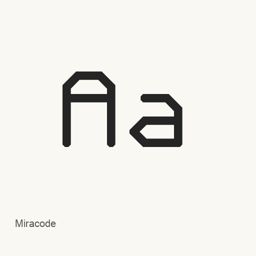
Miracode
Idrees Hassan · A monospaced programming font with angular, redesigned glyphs and programming ligatures, inspired by Monocraft.
- Installationen (30 Tage)
- 4
- Installationen (1 Jahr)
- 95
- Letzte 365 Tage
- Neueste Version
- 1.0
- 9. Feb. 2024 · 9. Feb. 2024
- Downloadgröße
- 299kB
- arm64 / x86_64 · ttf
- Update-Rhythmus
- Unregelmäßig
- 0 Versionen in 30 Tagen
Miracode ist eine Schriftart, die Sie auf einem Mac installieren können. Der Entwickler ist Idrees Hassan.
Eckdaten
- Schriftdateien
- 1 · TTF
- Installationsort
~/Library/Fonts- Entwickler
- Idrees Hassan
- Installationsbefehl
brew install --cask font-miracode- Homebrew
- Installierbar; Updates über Homebrew
- Auch bekannt als
- font-miracode
Beschreibung
Miracode is a monospaced programming font inspired by Monocraft, whose design draws on the typeface used in the Minecraft interface. Its glyphs have been redesigned for readability in a monospaced setting, including thin characters such as “i” and “l,” which use added tails and serifs.
- Uses angular letterforms created from pixel shapes converted into lines and curves.
- Includes programming ligatures; arrows and comparison operators are designed to be easier to distinguish at a glance.
- Offers ligatures for strings such as
TODO:andNOTE:. - The Homebrew cask installs the single font file
Miracode..ttf
Install it with brew install --cask font-miracode. This installs a font, not an application. After installation, select “Miracode” in an application that supports custom fonts. The font may not appear until you restart that application or your computer. Ligature display depends on support in the application where you use the font.
Systemvoraussetzungen
| macOS | App-Version | Chips | Download | Quelle |
|---|---|---|---|---|
| Build für macOS 27, 26, 15, 14, 13, 12, 11 | 1.0 | Intel | github.com/IdreesInc/Miracode/releases/download/v1.0/Miracode.ttfSHA-256 43efc3fd33e5a8eb7befda984bf745eda844777326e1ae06fb074707e1aeb66a | HomebrewGeprüft am |
| Build für macOS 27, 26, 15, 14, 13, 12, 11 | 1.0 | Apple silicon | github.com/IdreesInc/Miracode/releases/download/v1.0/Miracode.ttfSHA-256 43efc3fd33e5a8eb7befda984bf745eda844777326e1ae06fb074707e1aeb66a | HomebrewGeprüft am |
So installieren Sie Miracode auf dem Mac
- Führen Sie im Terminal Folgendes aus:
brew install --cask font-miracode - Homebrew installiert die Schrift in ~/Library/Fonts, wo die App „Schriftsammlung“ sie verwenden kann.
Ohne Homebrew installieren
Laden Sie dieselbe Datei herunter, die Homebrew verwendet: github.com/IdreesInc/Miracode/releases/download/v1.0/Miracode.ttf
SHA-256 prüft nur, ob der Download vollständig ist; es ist keine Sicherheitszertifizierung. SHA-256 und Downloadadresse ansehen
Miracode deinstallieren und Daten optional bereinigen
brew uninstall --cask font-miracodeEine normale Deinstallation entfernt die App, behält aber ihre Einstellungen und Caches.
Neu in 1.0
Neu · OpenNavo-Redaktion
Für diese Version gibt es keine eigenen Versionshinweise.
Installationsdetails
- Tap
- homebrew/cask
- Download-URL
- https://github.com/IdreesInc/Miracode/releases/download/v1.0/Miracode.ttf
- SHA-256
- 43efc3fd33e5a8eb7befda984bf745eda844777326e1ae06fb074707e1aeb66a
- Homebrew-Definition
- github.com/homebrew/homebrew-cask/blob/HEAD/Casks/font/font-m/font-miracode.rb
- formulae.brew.sh
- formulae.brew.sh/cask/font-miracode
- Quellcode
- github.com/IdreesInc/Miracode
Inhalte bei Installation und Deinstallation
Installation
fontQuelldatei: Miracode.
ttf Angegebenes Ziel: /
$HOME/ Library/ Fonts/ Miracode. ttf Vollständige Deklaration ansehen
{ "font": [ "Miracode.
ttf" ], "target": "/$HOME/ }Library/ Fonts/ Miracode. ttf"
Häufige Fragen zu Miracode
Wie deinstalliere ich Miracode vollständig auf dem Mac?
Führen Sie brew uninstall --cask font-miracode aus.
Was ist die aktuelle Version von Miracode?
Die aktuelle Version ist 1.0; Homebrew hat sie am 18. Sept. 2024 aufgenommen. Zum Aktualisieren führen Sie brew upgrade --cask font-miracode aus.
Quellen
Jede Angabe auf dieser Seite nennt ihre Quelle und ihr Prüfdatum. Abgelaufene Angaben werden nur mit „Stand“ und Datum angezeigt und nicht mehr als aktuell dargestellt.
- Homebrew-Definition: github.com/homebrew/homebrew-cask/blob/HEAD/Casks/font/font-m/font-miracode.rb · Geprüft am
- formulae.brew.sh: formulae.brew.sh/cask/font-miracode