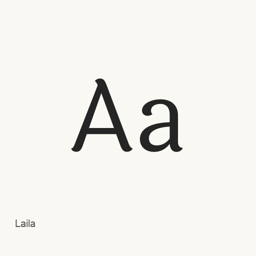
Laila
Indian Type Foundry · A Devanagari and Latin display typeface with five styles, from Light to Bold, for headlines and shorter passages.
- Installationen (30 Tage)
- 0
- Installationen (1 Jahr)
- 13
- Letzte 365 Tage
- Neueste Version
- 2.000
- 21. Nov. 2014 · 21. Nov. 2014
- Downloadgröße
- 395kB
- arm64 / x86_64 · zip
- Update-Rhythmus
- Unregelmäßig
- 0 Versionen in 30 Tagen
Laila ist eine Schriftart, die Sie auf einem Mac installieren können. Der Entwickler ist Indian Type Foundry.
Eckdaten
- Schriftdateien
- 5 · OTF
- Installationsort
~/Library/Fonts- Entwickler
- Indian Type Foundry
- Installationsbefehl
brew install --cask font-laila- Homebrew
- Installierbar; Updates über Homebrew
- Auch bekannt als
- font-laila
Beschreibung
Laila is a sans serif display typeface family for Devanagari and Latin text. Its informal design uses brush-like terminals; the Latin forms have a high x-height and open counters, while the Devanagari forms are described as fluid and graceful. The family is suited to headlines and can also be used for shorter passages.
The package installs these five font files: Light, Regular, Medium, SemiBold, and Bold. The project describes its typeface as supporting most Indian languages that use Devanagari, with conjuncts and ligatures; this does not establish complete Unicode coverage.
Install the font files with brew install --cask font-laila. After installation, select the desired Laila style from the font menu in an application that supports custom fonts. This package installs fonts, not an application.
Systemvoraussetzungen
| macOS | App-Version | Chips | Download | Quelle |
|---|---|---|---|---|
| Build für macOS 27, 26, 15, 14, 13, 12, 11 | 2.000 | Intel | github.com/itfoundry/laila/releases/download/v2.000/laila-2_000.zipSHA-256 caa87cae373702288a7510c74881077aa15e3b5c94a4746b61f3f977d8499f73 | HomebrewGeprüft am |
| Build für macOS 27, 26, 15, 14, 13, 12, 11 | 2.000 | Apple silicon | github.com/itfoundry/laila/releases/download/v2.000/laila-2_000.zipSHA-256 caa87cae373702288a7510c74881077aa15e3b5c94a4746b61f3f977d8499f73 | HomebrewGeprüft am |
So installieren Sie Laila auf dem Mac
- Führen Sie im Terminal Folgendes aus:
brew install --cask font-laila - Homebrew installiert die Schrift in ~/Library/Fonts, wo die App „Schriftsammlung“ sie verwenden kann.
Ohne Homebrew installieren
Laden Sie dieselbe Datei herunter, die Homebrew verwendet: github.com/itfoundry/laila/releases/download/v2.000/laila-2_000.zip
SHA-256 prüft nur, ob der Download vollständig ist; es ist keine Sicherheitszertifizierung. SHA-256 und Downloadadresse ansehen
Laila deinstallieren und Daten optional bereinigen
brew uninstall --cask font-lailaEine normale Deinstallation entfernt die App, behält aber ihre Einstellungen und Caches.
Neu in 2.000
Neu · OpenNavo-Redaktion
Für diese Version gibt es keine eigenen Versionshinweise.
Installationsdetails
- Tap
- homebrew/cask
- Download-URL
- https://github.com/itfoundry/laila/releases/download/v2.000/laila-2_000.zip
- SHA-256
- caa87cae373702288a7510c74881077aa15e3b5c94a4746b61f3f977d8499f73
- Homebrew-Definition
- github.com/homebrew/homebrew-cask/blob/HEAD/Casks/font/font-l/font-laila.rb
- formulae.brew.sh
- formulae.brew.sh/cask/font-laila
- Quellcode
- github.com/itfoundry/laila
Inhalte bei Installation und Deinstallation
Installation
fontQuelldatei: Laila-Bold.
otf Angegebenes Ziel: /
$HOME/ Library/ Fonts/ Laila-Bold. otf Vollständige Deklaration ansehen
{ "font": [ "Laila-Bold.
otf" ], "target": "/$HOME/ }Library/ Fonts/ Laila-Bold. otf" Installation
fontQuelldatei: Laila-Light.
otf Angegebenes Ziel: /
$HOME/ Library/ Fonts/ Laila-Light. otf Vollständige Deklaration ansehen
{ "font": [ "Laila-Light.
otf" ], "target": "/$HOME/ }Library/ Fonts/ Laila-Light. otf" Installation
fontQuelldatei: Laila-Medium.
otf Angegebenes Ziel: /
$HOME/ Library/ Fonts/ Laila-Medium. otf Vollständige Deklaration ansehen
{ "font": [ "Laila-Medium.
otf" ], "target": "/$HOME/ }Library/ Fonts/ Laila-Medium. otf" Installation
fontQuelldatei: Laila-Regular.
otf Angegebenes Ziel: /
$HOME/ Library/ Fonts/ Laila-Regular. otf Vollständige Deklaration ansehen
{ "font": [ "Laila-Regular.
otf" ], "target": "/$HOME/ }Library/ Fonts/ Laila-Regular. otf" Installation
fontQuelldatei: Laila-SemiBold.
otf Angegebenes Ziel: /
$HOME/ Library/ Fonts/ Laila-SemiBold. otf Vollständige Deklaration ansehen
{ "font": [ "Laila-SemiBold.
otf" ], "target": "/$HOME/ }Library/ Fonts/ Laila-SemiBold. otf"
Häufige Fragen zu Laila
Wie deinstalliere ich Laila vollständig auf dem Mac?
Führen Sie brew uninstall --cask font-laila aus.
Was ist die aktuelle Version von Laila?
Die aktuelle Version ist 2.000. Zum Aktualisieren führen Sie brew upgrade --cask font-laila aus.
Quellen
Jede Angabe auf dieser Seite nennt ihre Quelle und ihr Prüfdatum. Abgelaufene Angaben werden nur mit „Stand“ und Datum angezeigt und nicht mehr als aktuell dargestellt.
- Homebrew-Definition: github.com/homebrew/homebrew-cask/blob/HEAD/Casks/font/font-l/font-laila.rb · Geprüft am
- formulae.brew.sh: formulae.brew.sh/cask/font-laila