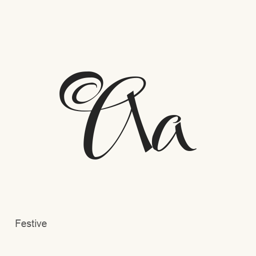
Festive
Robert E. Leuschke · A Google Fonts typeface installed as the `Festive-Regular.ttf` font file.
- Installationen (30 Tage)
- 0
- Installationen (1 Jahr)
- 17
- Letzte 365 Tage
- Neueste Version
- latest
- Downloadgröße
- 1,3MB
- arm64 / x86_64 · ttf
- Update-Rhythmus
- Unregelmäßig
- 0 Versionen in 30 Tagen
Festive ist eine Schriftart, die Sie auf einem Mac installieren können. Der Entwickler ist Robert E. Leuschke.
Eckdaten
- Schriftdateien
- 1 · TTF
- Installationsort
~/Library/Fonts- Entwickler
- Robert E. Leuschke
- Installationsbefehl
brew install --cask font-festive- Homebrew
- Installierbar; Updates über Homebrew
- Auch bekannt als
- font-festive
Beschreibung
Festive is a typeface available from Google Fonts. This Homebrew cask installs one font file, Festive-Regular., in the current user’s ~/ folder. It installs the font itself, not a separate application.
To install it, run brew install --cask font-festive. After installation, select Festive in the font menu of an application that supports custom fonts, such as a document editor or design tool. The installed file is the regular style; the cask does not install additional font files.
The available evidence identifies the font family but does not establish its character coverage or support for particular languages, symbols, or typographic features. Those details may depend on the font and the application displaying it.
Systemvoraussetzungen
| macOS | App-Version | Chips | Download | Quelle |
|---|---|---|---|---|
| Build für macOS 27, 26, 15, 14, 13, 12, 11 | latest | Intel | github.com/google/fonts/raw/main/ofl/festive/Festive-Regular.ttf | HomebrewGeprüft am |
| Build für macOS 27, 26, 15, 14, 13, 12, 11 | latest | Apple silicon | github.com/google/fonts/raw/main/ofl/festive/Festive-Regular.ttf | HomebrewGeprüft am |
So installieren Sie Festive auf dem Mac
- Führen Sie im Terminal Folgendes aus:
brew install --cask font-festive - Homebrew installiert die Schrift in ~/Library/Fonts, wo die App „Schriftsammlung“ sie verwenden kann.
Ohne Homebrew installieren
Laden Sie dieselbe Datei herunter, die Homebrew verwendet: github.com/google/fonts/raw/main/ofl/festive/Festive-Regular.ttf
Festive deinstallieren und Daten optional bereinigen
brew uninstall --cask font-festiveEine normale Deinstallation entfernt die App, behält aber ihre Einstellungen und Caches.
Neu in latest
Neu OpenNavo-Redaktion
Für diese Version gibt es keine eigenen Versionshinweise.
Installationsdetails
- Tap
- homebrew/cask
- Download-URL
- https://github.com/google/fonts/raw/main/ofl/festive/Festive-Regular.ttf
- Homebrew-Definition
- github.com/homebrew/homebrew-cask/blob/HEAD/Casks/font/font-f/font-festive.rb
- formulae.brew.sh
- formulae.brew.sh/cask/font-festive
- Quellcode
- github.com/google/fonts
Inhalte bei Installation und Deinstallation
Installation
fontQuelldatei: Festive-Regular.
ttf Angegebenes Ziel: /
$HOME/ Library/ Fonts/ Festive-Regular. ttf Vollständige Deklaration ansehen
{ "font": [ "Festive-Regular.
ttf" ], "target": "/$HOME/ }Library/ Fonts/ Festive-Regular. ttf"
Häufige Fragen zu Festive
Wie deinstalliere ich Festive vollständig auf dem Mac?
Führen Sie brew uninstall --cask font-festive aus.
Quellen
Jede Angabe auf dieser Seite nennt ihre Quelle und ihr Prüfdatum. Abgelaufene Angaben werden nur mit „Stand“ und Datum angezeigt und nicht mehr als aktuell dargestellt.
- Homebrew-Definition: github.com/homebrew/homebrew-cask/blob/HEAD/Casks/font/font-f/font-festive.rb · Geprüft am
- formulae.brew.sh: formulae.brew.sh/cask/font-festive