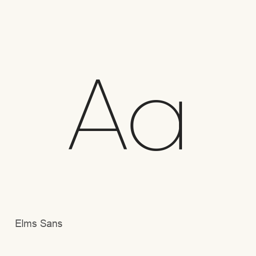
Elms Sans
Amarachi Nwauwa, Gida Type Studio · A font family installed as variable upright and italic TrueType files.
- Installationen (30 Tage)
- 5
- Installationen (1 Jahr)
- 66
- Letzte 365 Tage
- Neueste Version
- latest
- Downloadgröße
- —
- arm64 / x86_64 · git
- Update-Rhythmus
- Unregelmäßig
- 0 Versionen in 30 Tagen
Elms Sans ist eine Schriftart, die Sie auf einem Mac installieren können. Der Entwickler ist Amarachi Nwauwa, Gida Type Studio.
Eckdaten
- Schriftdateien
- 2 · TTF
- Installationsort
~/Library/Fonts- Entwickler
- Amarachi Nwauwa, Gida Type Studio
- Installationsbefehl
brew install --cask font-elms-sans- Homebrew
- Installierbar; Updates über Homebrew
- Auch bekannt als
- font-elms-sans
Beschreibung
Elms Sans is a font family available through this Homebrew cask. Installing it adds two TrueType font files: an upright variable font and a variable italic font.
ElmsSans[wght].provides the upright font file.ttf ElmsSans-Italic[wght].provides the italic font file.ttf - Both files are installed in
~/.Library/ Fonts/
Install with brew install --cask font-elms-sans. After installation, select the Elms Sans font in an application that lets you choose installed fonts. This cask installs fonts; it does not install a separate application. Its two files establish the included upright and italic styles, but do not establish full Unicode coverage or ligature support.
Download size: Unknown.
Version changes: Unknown.
Systemvoraussetzungen
| macOS | App-Version | Chips | Download | Quelle |
|---|---|---|---|---|
| Build für macOS 27, 26, 15, 14, 13, 12, 11 | latest | Intel | github.com/google/fonts.git | HomebrewGeprüft am |
| Build für macOS 27, 26, 15, 14, 13, 12, 11 | latest | Apple silicon | github.com/google/fonts.git | HomebrewGeprüft am |
So installieren Sie Elms Sans auf dem Mac
- Führen Sie im Terminal Folgendes aus:
brew install --cask font-elms-sans - Homebrew installiert die Schrift in ~/Library/Fonts, wo die App „Schriftsammlung“ sie verwenden kann.
Ohne Homebrew installieren
Laden Sie dieselbe Datei herunter, die Homebrew verwendet: github.com/google/fonts.git
Elms Sans deinstallieren und Daten optional bereinigen
brew uninstall --cask font-elms-sansEine normale Deinstallation entfernt die App, behält aber ihre Einstellungen und Caches.
Neu in latest
Neu Aus Homebrew-Commits
Für diese Version gibt es keine eigenen Versionshinweise.
Installationsdetails
- Tap
- homebrew/cask
- Download-URL
- https://github.com/google/fonts.git
- Homebrew-Definition
- github.com/homebrew/homebrew-cask/blob/HEAD/Casks/font/font-e/font-elms-sans.rb
- formulae.brew.sh
- formulae.brew.sh/cask/font-elms-sans
- Quellcode
- github.com/google/fonts
Inhalte bei Installation und Deinstallation
Installation
fontQuelldatei: ElmsSans-Italic[wght].
ttf Angegebenes Ziel: /
$HOME/ Library/ Fonts/ ElmsSans-Italic[wght]. ttf Vollständige Deklaration ansehen
{ "font": [ "ElmsSans-Italic[wght].
ttf" ], "target": "/$HOME/ }Library/ Fonts/ ElmsSans-Italic[wght]. ttf" Installation
fontQuelldatei: ElmsSans[wght].
ttf Angegebenes Ziel: /
$HOME/ Library/ Fonts/ ElmsSans[wght]. ttf Vollständige Deklaration ansehen
{ "font": [ "ElmsSans[wght].
ttf" ], "target": "/$HOME/ }Library/ Fonts/ ElmsSans[wght]. ttf"
Häufige Fragen zu Elms Sans
Wie deinstalliere ich Elms Sans vollständig auf dem Mac?
Führen Sie brew uninstall --cask font-elms-sans aus.
Quellen
Jede Angabe auf dieser Seite nennt ihre Quelle und ihr Prüfdatum. Abgelaufene Angaben werden nur mit „Stand“ und Datum angezeigt und nicht mehr als aktuell dargestellt.
- Homebrew-Definition: github.com/homebrew/homebrew-cask/blob/HEAD/Casks/font/font-e/font-elms-sans.rb · Geprüft am
- formulae.brew.sh: formulae.brew.sh/cask/font-elms-sans