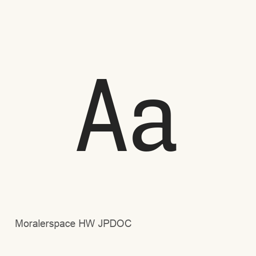
Moralerspace HW JPDOC
yuru7 · A programming font variant with half-width 1:2 proportions and Japanese-document symbols set to full width.
Moralerspace HW JPDOC is a font you can install on a Mac.
About
Moralerspace HW JPDOC is a programming font variant that combines Latin and Japanese characters. The HWJPDOC variant pairs half-width 1:2 spacing with full-width treatment for symbols often used in Japanese documents, such as arrows and square shapes. This is a font package, not an application.
The installed files include styles from the Argon, Krypton, Neon, Radon, and Xenon families. The package includes regular, italic, bold, and bold-italic files for several families, while Xenon and Argon have fewer styles in this installation. These are the specific font files installed by this cask; it does not install every possible family style.
The project describes Moralerspace as combining Monaspace-derived Latin characters with Japanese characters based on IBM Plex Sans JP and other sources. It also describes visible full-width spaces. The HWJPDOC variant is distinct from the regular-width, JPDOC-only, and Nerd Fonts variants.
Install with brew install --cask font-moralerspace-hw-jpdoc. After installation, select the actual installed Moralerspace font name and style in a compatible application; choose a monospaced font in an editor or terminal when using it for coding. The package installs font files in the user's Fonts folder.
Sources: Moralerspace project · Project README
New What’s new in 2.0.0 Jul 28, 2025 · OpenNavo editorial
- Font updatesMonaspace updated to v1.200
- PackagingNerd Fonts included by default in all variants
- WindowsFor a fresh install, delete existing font files to avoid install issues
Install and uninstall
Homebrew installs the font in ~/Library/Fonts, where Font Book can use it.
Install without Homebrew
Download the same file Homebrew uses: github.com/yuru7/moralerspace/releases/download/v2.0.0/MoralerspaceHWJPDOC_v2.0.0.zip
SHA-256 only checks that the download is complete; it is not a security certification. See the SHA-256 and download address
$ brew uninstall --cask \ font-moralerspace-hw-jpdocA regular uninstall removes the app and keeps its settings and caches.
Facts and sources
- Version 2.0.0
- Recorded by Homebrew on Jul 28, 2025Released by the vendor on Jul 28, 2025
Questions
How do I update Moralerspace HW JPDOC?
Run brew upgrade --cask font-moralerspace-hw-jpdoc to get the latest version Homebrew records.
Can I install Moralerspace HW JPDOC without Homebrew?
Yes, download it from the official website, github.com/yuru7/moralerspace.