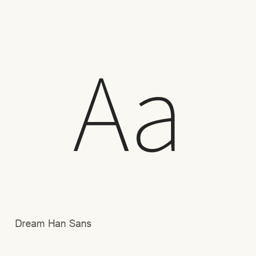
Dream Han Sans
Adobe · A CJK sans-serif font family supplied as 27 separate weight files, from W1 to W27.
Dream Han Sans is a font you can install on a Mac.
About
Dream Han Sans is the sans-serif member of the Dream Han font family. This Homebrew cask installs a specific set of TTC font files; it does not install a font-management or editing application.
- The family offers 27 distinct weights, from W1 through W27, as separate font files rather than a variable font.
- The project describes support for Simplified Chinese, Traditional Chinese (Taiwan and Hong Kong), Japanese, and Korean variants, along with OpenType features such as vertical typesetting.
- The project says it adjusts line spacing associated with the Source Han series. Its documentation also describes the full family character set, but the installed-file list alone does not establish glyph coverage for a particular file.
- The installed files are
DreamHanSans-W1.throughttc DreamHanSans-W27..ttc
Install with brew install --cask font-dream-han-sans. After installation, select the actual Dream Han Sans font and desired weight in a compatible application, such as a word processor or design program. Installing the font does not install an application, and availability in a particular program depends on that program recognizing the installed font.
Sources: Project overview · Project documentation
New What’s new in 3.03 Mar 3 · OpenNavo editorial
- UpdateSynced with Adobe Source Han Sans
2..005 - EmbeddingOffice may not subset-embed the full
TTCbuild.
Install and uninstall
Homebrew installs the font in ~/Library/Fonts, where Font Book can use it.
Install without Homebrew
Download the same file Homebrew uses: github.com/Pal3love/dream-han-cjk/releases/download/dream-3.03-sans-2.005-serif-2.003/DreamHanSans.zip
SHA-256 only checks that the download is complete; it is not a security certification. See the SHA-256 and download address
$ brew uninstall --cask \font-dream-han-sansA regular uninstall removes the app and keeps its settings and caches.
Facts and sources
- Version 3.03
- Released by the vendor on Mar 3
Questions
Is Dream Han Sans safe?
Dream Han Sans is in Homebrew’s official catalog and has not been disabled. Since September 2026, Homebrew disables apps that fail macOS Gatekeeper checks. When installing, Homebrew checks the download from github.com against its SHA-256 checksum. It was installed 1 time through Homebrew in the last 30 days.
How do I completely uninstall Dream Han Sans on a Mac?
Run brew uninstall --cask font-dream-han-sans.
What is the latest version of Dream Han Sans?
The latest version is 3.03. Run brew upgrade --cask font-dream-han-sans to update it.